 Retro Replay Retro Replay gaming reviews, news, emulation, geek stuff and more!

Retro Replay Review
Gameplay
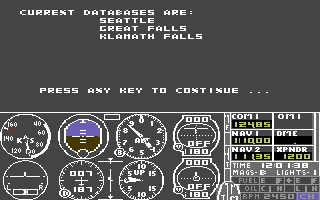
Scenery Disk 4 integrates seamlessly with subLOGIC’s Flight Simulator II and its compatible titles, offering pilots an effortless installation process. Upon loading the add-on, you’re prompted to select one of the three covered regions—Klamath Falls, Seattle or Great Falls—each complete with its own network of airfields and navigational aids. The setup utility walks you through the disk-based installation, making the process intuitive even for newcomers to flight simulation add-ons.
(HEY YOU!! We hope you enjoy! We try not to run ads. So basically, this is a very expensive hobby running this site. Please consider joining us for updates, forums, and more. Network w/ us to make some cash or friends while retro gaming, and you can win some free retro games for posting. Okay, carry on 👍)
Once in the cockpit, Flight Simulator II, Flight Assignment: Airline Transport Pilot, UFO, Jet, Thunderchopper, or Stealth Mission will automatically pick up the new scenery files. You’ll find that air traffic patterns, radio beacons, and VOR stations align exactly as expected, allowing for realistic IFR and VFR training flights. The inclusion of local airports like Redding, Tacoma, Helena, and Renton enhances route planning, giving you genuine challenges in runway approaches, crosswind landings, and regional traffic control.
Flight planning becomes a richer experience with Scenery Disk 4. The navigational aids correspond precisely to the NOAA Sectional Aeronautical Charts upon which they’re based, meaning you can dial in your frequencies and cross-check them against real-world charts or Flight Simulator’s internal map. Whether you’re practicing an inbound approach to Portland’s busy airspace or charting a scenic VFR hop over the mountainous terrain near Klamath Falls, the add-on elevates gameplay from generic to authentic.
For those who enjoy mission-based scenarios or structured airline operations, Scenery Disk 4 offers a perfect backdrop. The additional airports fill gaps in default coverage and present new departure and arrival points for packaged scenarios. You’ll notice that IFR clearances, holding patterns, and missed approach procedures behave exactly as they would in real life, enhancing both training value and immersion for virtual pilots.
Graphics
Visually, Scenery Disk 4 shines by introducing a wealth of aerial detail that the base simulator simply can’t provide. The disk leverages the capabilities of early 1980s hardware by layering updated landmark sprites, improved runway textures, and denser coastlines. Flying over the Puget Sound en route to Seattle, you’ll see the distinct silhouette of the Space Needle, the bridges spanning Lake Washington, and the patchwork farmland patterns west of Tacoma.
The airports themselves benefit from carefully crafted outlines and clearly marked taxiways, which show up crisply against the default grass or desert textures. Runway thresholds and overrun strips are accurately positioned, and secondary airfields like Eureka and Cody are no longer abstract points on a flat map—they’re recognizable layouts you can compare directly to printed Airport/Facility Directories.
Landmark enhancements extend beyond simple airport improvements. In the Great Falls region, you’ll pass by the Missouri River’s snaking curves, small reservoirs, and distinct mountain ridgelines. These textures, while primitive by today’s standards, were cutting-edge for their era and lend an unexpected sense of place and depth to every flight. Even pilots using monochrome displays will appreciate the sharper contrast between land and water or urban and rural areas.
Additionally, Scenery Disk 4’s visual updates smoothly blend into the default simulator environment without jarring transitions. The disk’s sectional chart data, converted into line art boundaries and altitude shadings, helps you judge elevation changes and terrain hazards. Whether flying under VOR guidance or eyeballing features for a VFR route, the graphical fidelity keeps you oriented and engaged.
Story
While Scenery Disk 4 doesn’t tell a traditional narrative, it crafts its own emergent stories through exploration and discovery. As you taxi at Redding and lift off into clear California skies, you’re instantly transported into a real-world setting rich with geographic context. The disk’s accuracy encourages you to plot multi-leg adventures—perhaps a sunrise departure over Mount Shasta followed by an evening arrival into Portland’s bustling airspace.
Every flight becomes a personal journey, shaped by weather observations, traffic delays, and the challenge of navigating unfamiliar airports. In the Seattle region, you might weave through rain clouds above the Cascades before lining up at Renton’s short runway. Those procedural hurdles—checking runway wind components, tuning into the local CTAF, and managing fuel stops in Helena—form a narrative arc that evolves with each takeoff and landing.
Because the scenery is derived from authentic NOAA charts and Facility Directories, there’s a sense that you’re flying a living, breathing piece of the world. Each hop from Tacoma to Portland or from Cody to Eureka feels like a chapter in your pilot logbook. Over time, you’ll develop favorite VFR corridors, IFR alternates, and weather patterns to track, turning routine simulator sessions into memorable storytelling experiences.
Moreover, group flights and shared scenarios take on extra depth when all participants are exploring the same patched-in airspace. You can plan multi-aircraft photo runs over the San Francisco Bay or coordinate tanker operations in the Pacific Northwest. The realism of Scenery Disk 4 enriches these cooperative endeavors, giving every participant a shared “world” to inhabit and narrate together.
Overall Experience
Scenery Disk 4 represents a significant step up from the base Flight Simulator II product, transforming generic flying fields into distinct, recognizable regions. For pilots seeking deeper immersion, accurate navigation, and a more engaging visual environment, this add-on is a must-have. Installation is straightforward, compatibility spans multiple subLOGIC titles and early Microsoft Flight Simulator 2.x, and the performance impact on 8-bit and early 16-bit platforms is minimal.
The coverage of Klamath Falls, Seattle, and Great Falls strikes a perfect balance between rural charm and urban complexity. The selection of airports—Redding, Eureka, Tacoma, Portland, Helena, Cody and more—ensures that both VFR “scenic” flights and structured IFR procedures are fully supported. No matter which region you choose, you’ll find that the additional visual and navigational data elevate long-haul hops and short training sorties alike.
Even by today’s standards, Scenery Disk 4 stands as a testament to subLOGIC’s attention to cartographic detail and simulation authenticity. While modern flight simulators boast photoreal textures and dynamic weather, there’s something undeniably nostalgic and rewarding about plotting your course on a sectional-inspired display and executing real-world procedures on vintage hardware.
For collectors, nostalgia seekers, or simulation purists, Scenery Disk 4 offers enduring value. It bridges the gap between arcade-style flying and serious pilot training, all within the modest constraints of 1980s computing. If you’re building a classic flight simulation rig or simply want to experience the roots of add-on scenery innovation, Scenery Disk 4 remains a standout choice.


Reviews
There are no reviews yet.