 Retro Replay Retro Replay gaming reviews, news, emulation, geek stuff and more!
Retro Replay Review
Gameplay
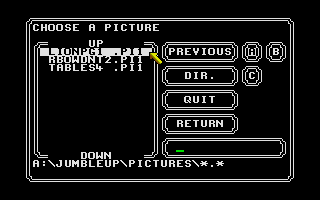
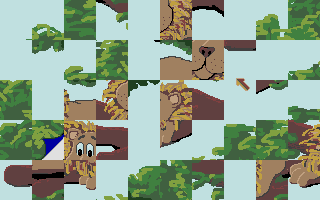
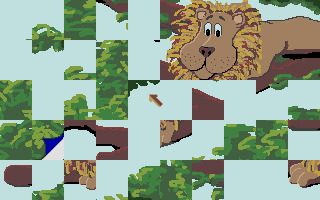
Jumble Up offers a straightforward yet satisfying puzzle experience built around classic jigsaw mechanics. From the moment you load your chosen image—be it one of the three included pictures or a user-supplied Degas or Neochrom file—you’re presented with fifty shuffled pieces to drag into place. The controls are intuitive: left-click and hold to grab a piece, move it freely, and release to see if it snaps into the correct spot. If it doesn’t fit, it snaps back to its origin, encouraging you to keep experimenting until each fragment finds its home.
(HEY YOU!! We hope you enjoy! We try not to run ads. So basically, this is a very expensive hobby running this site. Please consider joining us for updates, forums, and more. Network w/ us to make some cash or friends while retro gaming, and you can win some free retro games for posting. Okay, carry on 👍)
The inclusion of a right-click hint system is a thoughtful touch, providing a quick glimpse of the completed image without handing you the solution on a silver platter. This feature is especially helpful if you’re tackling a high-resolution Degas file with intricate detail, or if you’re stretching your puzzle skills by using a personal photograph. The snap-and-return mechanic ensures you’re engaging in careful placement rather than random shuffling, making each successful fit all the more rewarding.
While there are only fifty pieces in each puzzle, the challenge can vary widely based on the complexity of the source image. A bold, colorful Degas scene may feel like child’s play, whereas a subtler, grayscale Neochrom picture can test your patience and eye for detail. The ability to choose low or high resolution adds another layer of challenge, letting beginners and veteran puzzlers alike dial in the exact level of difficulty they desire.
Graphics
As a STOS-written title on the Atari ST, Jumble Up doesn’t aim to dazzle with cutting-edge effects or 3D spectacles. Instead, it focuses on faithfully reproducing whatever image you supply. When you load a high-resolution Degas file, you’ll appreciate the crisp outlines and faithful color representation that STOS can manage. The puzzle interface remains clean and uncluttered, placing the spotlight firmly on your chosen picture.
Low-resolution modes and Neochrom support can look blocky by modern standards, but that retro aesthetic may delight fans of classic computing. The graphics engine handles both file types smoothly, with no noticeable slowdown as you drag multiple pieces around the screen. Backgrounds remain static and noise-free, ensuring that your eyes aren’t distracted by flickering or off-colours.
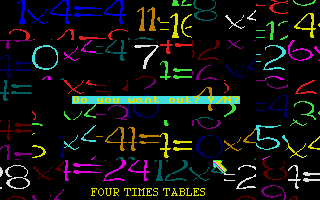
Even the three included images—selected to showcase varied color palettes and subject matter—are well rendered. Whether you’re piecing together a vibrant landscape or a more subdued portrait, Jumble Up’s display routines keep the focus on the puzzle itself. For enthusiasts of old-school pixel art or those who appreciate clean, functional visuals, the graphics deliver exactly what’s needed.
Story
Jumble Up doesn’t follow a traditional narrative arc; it’s a pure puzzle title with no characters, plot, or cutscenes. Instead, the “story” emerges from the images you choose to assemble. Each puzzle becomes a personal journey as you gradually reveal a hidden scene—whether a scenic photograph, a piece of artwork, or one of the three pre-loaded pictures.
That said, even without an overarching storyline, there’s a satisfying sense of progression. You begin with a blank canvas of disordered fragments and, piece by piece, reconstruct a coherent whole. This visual unfolding provides its own kind of narrative tension, climaxing in the moment the final piece clicks into place and the image stands complete.
If you wish to inject more narrative into your sessions, you can load themed pictures—family photos, vacation shots, or hand-drawn art—and build your own backstory around them. Jumble Up’s flexible image support effectively hands you the pen to author your own story through the puzzles you solve.
Overall Experience
Jumble Up shines as a no-frills, customizable jigsaw puzzle that leverages the power of user-supplied images to keep gameplay fresh. It’s ideal for both casual players seeking a moment of calm and retro enthusiasts who appreciate STOS-based titles on the Atari ST. The straightforward controls and hint system ensure accessibility, while the choice of resolutions and file formats caters to different skill levels and hardware capabilities.
The lack of bells and whistles means the game’s enjoyment hinges on the images you select. If you’re looking for a long campaign or branching storylines, you won’t find them here. But if your goal is to sit back with a favorite photo, challenge your pattern-recognition skills, and enjoy the simple pleasure of reassembling a scrambled image, Jumble Up delivers admirably.
In an age of flashy puzzle titles with built-in timers, leaderboards, and social features, Jumble Up stands out by focusing on the core jigsaw experience and letting players decide how to use it. Whether you stick to the three included pictures or dive into your own digital photo album, you’ll discover a satisfying, mindful pastime that’s as relaxing or challenging as you make it. For buyers seeking straightforward, customizable puzzling on classic hardware, Jumble Up is well worth exploring.


Reviews
There are no reviews yet.