 Retro Replay Retro Replay gaming reviews, news, emulation, geek stuff and more!
Retro Replay Review
Gameplay
CeeBot3 places students directly in control of a virtual robot, tasking them with writing code that produces still images and dynamic animations complete with soundtracks. From the very first exercise, learners experiment with simple “repeat” loops and basic functions, seeing the immediate impact of their code on the robot’s behavior. This hands-on approach transforms abstract programming concepts into concrete visual results, which helps maintain motivation and engagement.
(HEY YOU!! We hope you enjoy! We try not to run ads. So basically, this is a very expensive hobby running this site. Please consider joining us for updates, forums, and more. Network w/ us to make some cash or friends while retro gaming, and you can win some free retro games for posting. Okay, carry on 👍)
As they progress through the lessons, students unlock additional programming constructs such as “for” loops and functions with float parameters. Each new concept is introduced through clear, self-contained exercises that reinforce the mechanics before moving on. Although the full language supports object-oriented features, arrays, file management and class definitions, the core lessons focus tightly on a few building blocks to avoid overwhelming beginners.
The integrated interactive debugger is a standout feature of CeeBot3’s gameplay loop. Learners can step through their code line by line, inspect variable values, and visualize the robot’s movements in real time. This immediate feedback loop encourages experimentation and helps students build confidence by quickly identifying and correcting mistakes.
For classroom instructors, the unlimited-time demo version of CeeBot3 offers six of the full 25 chapters, allowing full lesson plans without any expiration. Teachers can tailor assignments to their students’ existing skill levels—using the demo alone for those with some prior coding background, or upgrading to the full edition for a complete pedagogical progression.
Graphics
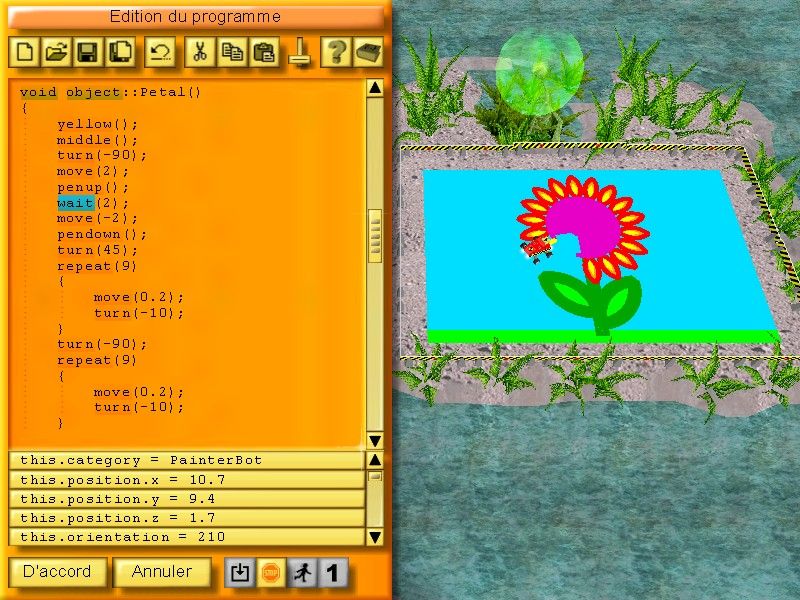
CeeBot3’s visual presentation is crisp, colorful, and inviting. The 3D environment is carefully designed to be both aesthetically pleasing and functionally clear, with the robot and drawing canvas rendered in vibrant hues against a neutral backdrop. This contrast ensures that student-generated drawings and animations stand out, reinforcing the cause-and-effect relationship between code and visual output.
The user interface balances simplicity with power. Buttons and menus for common functions (run, debug, stop) are prominently displayed, while the code editor features syntax highlighting for Java-compatible keywords. This visual clarity reduces cognitive load, allowing students to focus on logic and creativity rather than wrestling with complicated menus.
Animations flow smoothly, and the addition of simple soundtracks brings projects to life. When the robot traces a shape or loops through an animation sequence, the motion is fluid and easy to follow. These graphical flourishes help sustain student interest and make each programming milestone feel like a real accomplishment.
Even on modest classroom hardware, CeeBot3 performs reliably. The demo version requires no special graphics card, and load times between chapters remain swift. For schools with older computers, this low barrier to entry ensures that every student can participate fully without frustrating delays.
Story
Although CeeBot3 is primarily an educational tool, it frames each exercise as a mini-mission in a broader narrative of robot exploration and creative expression. Students are encouraged to imagine their robot traversing colorful worlds, drawing landmarks, patterns or animations that tell their own story. This thematic backdrop transforms routine drills into purposeful quests.
The curriculum weaves in interdisciplinary contexts—drawing geometric figures connects to math lessons, creating soundtracks touches on music theory, and visual design invites artistic experimentation. This story-driven approach fosters cross-subject connections, making programming feel relevant to a variety of academic interests.
As learners advance through the staged chapters, the narrative implicitly evolves. Early missions focus on simple shapes and loops, while later exercises challenge students to design more complex animations or even simulate simple games. This progression gives a sense of accomplishment, as each completed chapter unlocks new “levels” of creative freedom and technical complexity.
Even within the six-chapter demo, the story arc is clear: from introductory tasks that establish basic commands to multi-step projects that require planning, debugging and artistic flair. For teachers, this narrative scaffolding provides a natural roadmap for lesson planning, with each assignment building neatly on the last.
Overall Experience
CeeBot3 Educational Programming Software strikes an excellent balance between accessibility and depth. Beginners appreciate the focus on core structures like loops and simple functions, while more advanced students can dive into the full Java-compatible language, exploring classes, file I/O and arrays when they’re ready. This dual appeal makes CeeBot3 a versatile choice for mixed-ability classrooms.
The demo version’s lack of a time limit is particularly noteworthy, as it removes pressure from both students and instructors. With six foundational chapters at their disposal, teachers can introduce the software without committing to a purchase immediately. When the time comes to expand into the full suite of 25 chapters and over 100 exercises, schools can smoothly transition to the complete version.
Across gameplay, graphics and narrative structure, CeeBot3 delivers a cohesive educational journey. The colorful 3D environment and real-time debugger keep learners engaged, while the staged progression and interdisciplinary themes ensure that programming lessons resonate beyond the computer lab. Whether used for self-paced discovery or structured classroom instruction, CeeBot3 is a compelling choice for anyone seeking a modern, creative approach to teaching and learning programming.
In summary, CeeBot3’s combination of user-friendly design, robust feature set and pedagogical depth offers an overall experience that meets the needs of novices and advanced students alike. From the first loop to the final animation project, learners are supported every step of the way, making CeeBot3 an educational tool worth exploring.



Reviews
There are no reviews yet.