 Retro Replay Retro Replay gaming reviews, news, emulation, geek stuff and more!



Retro Replay Review
Gameplay
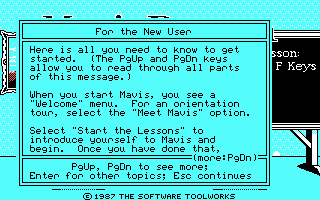
Mavis Beacon Teaches Typing! delivers a structured, lesson-based approach to mastering touch typing. You begin each session with clear instructions displayed on a virtual chalkboard, introducing key groups of letters—starting with the familiar ASDF row on a standard QWERTY layout. Each lesson walks you through finger placement using on-screen hand diagrams keyed to the physical keyboard, ensuring you know exactly which finger to use for every stroke.
(HEY YOU!! We hope you enjoy! We try not to run ads. So basically, this is a very expensive hobby running this site. Please consider joining us for updates, forums, and more. Network w/ us to make some cash or friends while retro gaming, and you can win some free retro games for posting. Okay, carry on 👍)
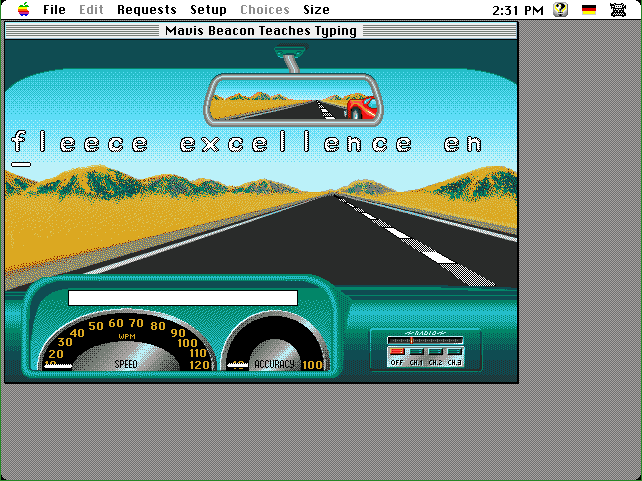
Beyond static drills, the game spices up practice with an arcade-style typing race. As colored text scrolls across the top of the screen, you compete against computer-controlled drivers whose skill levels scale with each new stage. Fast, accurate typing translates directly into speed on the racetrack, adding a layer of adrenaline to otherwise routine exercises.
For learners who love data, progress graphing provides over twenty different charts tracking metrics such as words per minute, error rate, and individual finger performance. These visual stats don’t just pat you on the back; they empower you to identify your weakest keys and create custom lessons tailored to your needs.
Adjustable settings allow you to tweak the experience to your preferences. Whether you’re a complete beginner or a seasoned typist, you can choose lesson difficulty, switch between QWERTY and Dvorak layouts, enable or disable helpful hints from Mavis herself, and save your progress at any time—so each session picks up right where you left off.
Graphics
Graphically, Mavis Beacon Teaches Typing! opts for clarity and simplicity over flashy visuals. The chalkboard interface, pastel-colored keyboard overlay, and minimalist racing backdrop ensure that nothing distracts you from the keys. While not cutting-edge by today’s standards, the art style remains functional and unambiguous—perfect for learners who need to focus.
The on-screen hands light up the exact finger and key you’re about to use, offering a real-time visual cue that reinforces proper technique. This guided approach removes much of the guesswork, especially in early lessons, and the contrast between active and inactive keys helps you build muscle memory quickly.
During the arcade races, the pastel racetrack and stylized competitor icons keep things fun without overwhelming your senses. The text you type scrolls in a bold, legible font with color-coded segments to highlight your current word, next key, and any mistakes as they happen—ensuring instant feedback on every keystroke.
Progress charts use clean bar and line graphs, each color-coded for easy reading. Whether you’re comparing your daily WPM improvements or tracking error rates finger by finger, the visual dashboards are intuitive. You can even print or export these graphs if you want to share your progress with a teacher or study partner.
Story
Though not narrative-driven in the traditional sense, Mavis Beacon Teaches Typing! weaves a thematic storyline around your personal typing journey. Mavis Beacon herself serves as your virtual instructor—a composed, encouraging guide who offers explanations and congratulatory remarks as you advance through lessons.
The “story” unfolds lesson by lesson: what starts as a simple exercise in finger placement evolves into high-stakes typing races and complex composition drills. This progression gives a sense of accomplishment akin to chapters in a book, motivating you to stick with the program until you reach (and surpass) your goals.
Occasional voiceovers and onscreen tips from Mavis add a human touch, breaking the monotony of block text. Her friendly tone and practical advice make you feel like you’re in a one-on-one tutoring session rather than a computer program—helping maintain engagement over longer practice periods.
While there’s no overarching plot or character arcs beyond the lessons themselves, the carefully paced “curriculum arc” offers enough variety to keep you invested. Each new mode or challenge feels like unlocking a new chapter in your typing education.
Overall Experience
Mavis Beacon Teaches Typing! excels as both an educational tool and an engaging pastime. Its blend of structured lessons, competitive racing, and detailed progress tracking ensures that learners of all ages remain motivated and can see tangible improvements in their typing speed and accuracy.
The user interface, though dated by modern gaming standards, excels at clarity and ease of use. You’ll spend your time focusing on keystrokes rather than navigating convoluted menus or deciphering flashy animations. Adjustability across keyboard layouts, difficulty levels, and lesson types means the software adapts to your goals—whether you’re a student, a professional, or simply someone who wants to type more efficiently.
Feedback mechanisms—visual cues, progress graphs, and Mavis’s own commentary—create a supportive environment for steady growth. Typing races inject a fun, game-like element that breaks up tedious drills, while customizable lessons allow you to target specific weaknesses.
Overall, Mavis Beacon Teaches Typing! remains a gold standard for typing instruction. It balances educational rigor with playful features in a way that keeps you coming back. For anyone looking to improve their keyboard skills—whether for work, study, or personal satisfaction—this title offers a comprehensive, engaging, and thoroughly rewarding experience.


Reviews
There are no reviews yet.