 Retro Replay Retro Replay gaming reviews, news, emulation, geek stuff and more!
Retro Replay Review
Gameplay
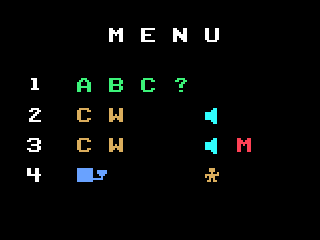
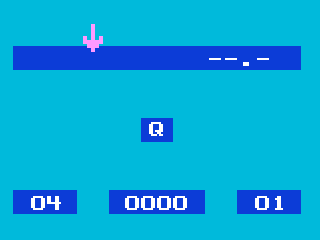
Morse’s core appeal lies in its hands-on approach to teaching Morse code through four distinct game modes. The primary mode lets you tailor both speed (from a leisurely 4 words per minute up to a challenging 30 WPM) and difficulty level (unlocking anywhere from 1 character to all 36 symbols). After a brief tutorial on the first two signals, you’re plunged into an arcade-style scenario: a row of trees stretches across the top of the screen, an arrow marks the fourth tree, and a little man stands ready to chop.
(HEY YOU!! We hope you enjoy! We try not to run ads. So basically, this is a very expensive hobby running this site. Please consider joining us for updates, forums, and more. Network w/ us to make some cash or friends while retro gaming, and you can win some free retro games for posting. Okay, carry on 👍)
Each time you correctly identify ten characters, the man takes down one tree. When he reaches the arrow, the game introduces a new symbol, adding to your repertoire. The 36-symbol sequence runs from Q, 7, Z, G and on through the full alphanumeric set, culminating in E—an elegant progression that keeps learners motivated while steadily expanding their knowledge.
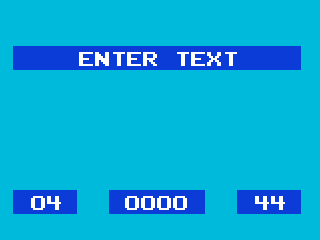
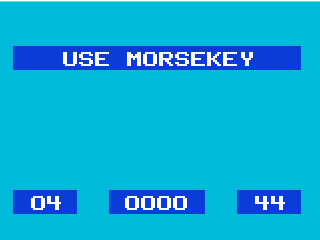
The remaining three modes focus on repetition and self-testing. Mode two lets you type any single symbol and immediately hear its Morse equivalent. Mode three enhances that by allowing you to enter whole sequences before hitting “enter” to play the full code back to you. Finally, mode four requires you to use your joystick’s action button to input dots and dashes directly, reinforcing muscle memory alongside aural recognition.
Together, these modes offer a rich learning loop: initial exposure, auditory practice, pattern recall, and kinesthetic input. By switching among them, players can build confidence at their own pace, target weak spots, and enjoy a structured yet flexible training regimen that feels more like a game than a dry drill.
Graphics
Morse opts for clean, functional visuals rather than flashy effects. The background is a simple gradient or single-color field that ensures focus remains on the trees, the arrow, and the little lumberjack character. These sprites are basic but crisp, with just enough animation to convey progress—each fallen tree and the shifting arrow feel satisfying without distracting you from the audio cues you’re learning to interpret.
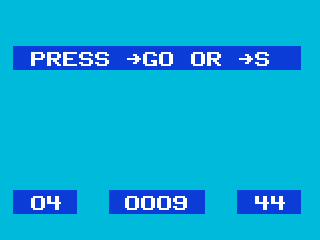
The menu screens are straightforward: clear text labels, intuitive selection arrows, and an organized layout that displays speed and level settings at a glance. There’s no clutter or unnecessary ornamentation, which means you can instantly dial in your preferred training session and get going in seconds. For an educational title, this kind of minimalism is a feature, not a drawback.
During playback and input, on-screen feedback is immediate and unambiguous. Correct entries are confirmed with a brief flash or tone, while mistakes trigger a subtle warning beep. The simplicity of the interface extends to all four modes, ensuring that whether you’re entering single characters or full sequences with the joystick, the visual elements always support—not compete with—your learning objectives.
Story
Morse does not present a traditional narrative, and that’s by design. The closest thing to a plot is the implicit storyline of skill mastery: you start by learning Q, make your way through letters and numbers, and eventually become fluent in interpreting and sending every dot and dash. In this sense, your personal progress is the story, with each new symbol you conquer serving as a self-driven milestone.
The recurring motif of the tree-chopping lumberjack offers a light thematic thread, giving a sense of accomplishment beyond mere correct answers. Watching the trees fall one by one as you improve provides a tangible reward loop and gives context to what could otherwise feel like endless drills. There’s no rich back-story or characters beyond this simple setup, but the mechanic itself injects a playful, almost storybook quality into the learning process.
For players seeking intricate world-building or plot twists, Morse’s narrative economy may feel sparse. However, for those who relish educational challenge over scripted drama, the “story” of personal growth and the visual metaphor of clearing the forest prove more than sufficient. Your satisfaction comes from mastery rather than narrative surprises, making the experience uniquely focused and purpose-driven.
Overall Experience
Morse stands out as one of the most focused edutainment titles for learning Morse code. Its adjustable speed and level system caters to absolute beginners and seasoned hobbyists alike, while its four gameplay modes ensure that you’re always switching up your practice style. You won’t find side quests or collectible items here—just pure, progressively challenging code training wrapped in a simple, arcade-like presentation.
While the graphics are intentionally minimal, they serve the game’s educational goals perfectly. Audio quality remains clear across all speeds, and the instant visual feedback helps anchor your interpretations. The absence of a complex narrative keeps the spotlight where it belongs: on skill acquisition and incremental progress, preventing any distractions that might slow your learning curve.
If your priority is to develop real-world Morse proficiency, this title offers excellent value. Its design strikes a balance between repetition and reward, making practice sessions feel engaging rather than burdensome. In short, Morse delivers a streamlined, effective training regimen that doubles as an enjoyable retro gaming experience—highly recommended for radio enthusiasts, hobbyists, and anyone eager to master the language of dots and dashes.


Reviews
There are no reviews yet.