 Retro Replay Retro Gaming History, Reviews & Emulation
EMULATOR DATABASE
nulldce-psp
nulldce-psp is a PlayStation Portable port of a nullDC-era Dreamcast emulator. The project is a restored archive of an experimental PSP build; it boots some Dreamcast games from .gdi images but remains incomplete and limited in compatibility and features.
Download Tutorials & guidesSign in to download. Files are hosted by the emulator project.
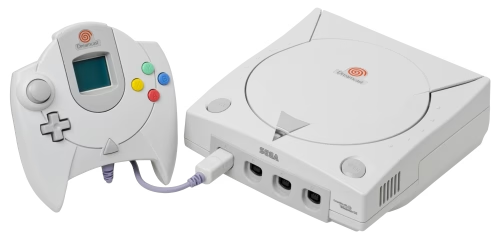
About nulldce-psp
nulldce-psp represents an effort to bring Dreamcast emulation to original PSP hardware. The project preserves a rare homebrew port and documents practical constraints of running Dreamcast software on a low-powered handheld.
Running and testing a handful of Dreamcast games on original PSP slim hardware for preservation, experimentation, and demonstration purposes.
Supported systems and capabilities
- Sega Dreamcast
- PlayStation Portable (host)
- Games in .gdi disc image format
- Requires Dreamcast BIOS files (dc_boot.bin, dc_flash.bin)
The people behind nulldce-psp / history
nulldce-psp originated from a nullDC PSP port developed around 2008 (authorship attributed to drk||Raziel, later known as skmp). The source was lost for years. PSP-Archive published the code, and contributors compiled and restored a working, experimental release in 2021 (compilation and restoration credited to xiro and hlide in the repository README). The project remains experimental: the README and documentation emphasize that many games are not yet playable, sound is not emulated, and the release targets PSP slim models only. The repository is a public archive rather than a fully featured, actively expanding emulator project.
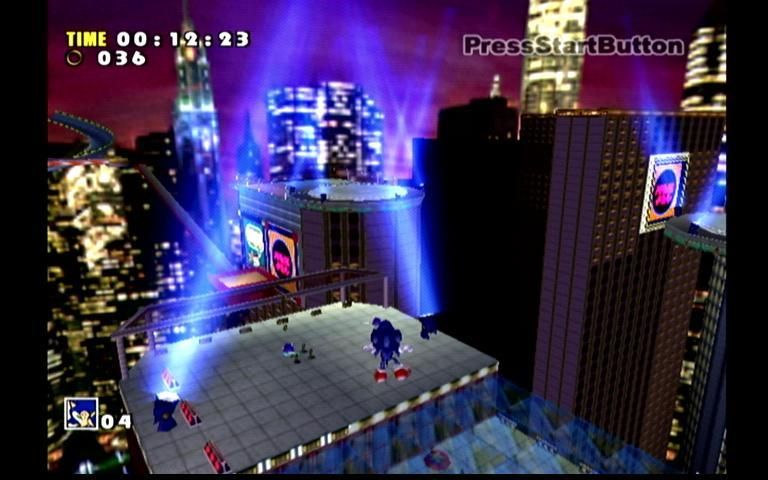
Screenshots
Tutorials & guides
nulldce-psp setup guide
This guide explains how to prepare and run the nulldce-psp experimental release on original PSP slim hardware. The instructions assume you will use the official GitHub releases/binaries from PSP-Archive and that you understand that Dreamcast BIOS and game images are not included and must be provided separately by the user.
- 1. Obtain the official build Download the official release package from the PSP-Archive nulldce-psp Releases page on GitHub. Use only the files published on that releases page to avoid unofficial or modified binaries.
- 2. Prepare a compatible PSP nulldce-psp targets PSP slim models (PSP-2000 and later). Ensure your PSP is able to run homebrew applications (custom firmware or a supported homebrew loader). The repository README explicitly notes the emulator will not boot on PSP-1000 devices.
- 3. Install emulator files to your PSP memory stick Copy the emulator folder from the release package into the PSP/GAME (or PSP/GAME150) directory on your memory stick, following the folder structure provided by the release. Keep the executable and all included data files together as delivered by the release.
- 4. Provide Dreamcast BIOS files (required) Create a data folder inside the emulator folder (as described in the repository README). Place two required Dreamcast BIOS files named exactly dc_boot.bin and dc_flash.bin into that data folder. The README states these files are needed in the data folder. The emulator release does not include these BIOS files.
- 5. Prepare game images in .gdi format Only Dreamcast images in the .gdi format are supported by this build. For each game create a separate folder containing the .gdi and its associated tracks, then copy each game's folder into the emulator's discs folder. The emulator will scan that discs folder and list available games at boot.
- 6. Booting and controls Launch the emulator from the PSP Game menu. To start the Dreamcast BIOS during emulator boot, press the Triangle button as the emulator is booting (instruction documented in the README). Idle time can be adjusted with the L and R shoulder buttons. The on-screen frame rate is calculated via Vblank and may not reflect real throughput.
- 7. Compatibility and limitations Expect limited compatibility: the README and documentation state many games are not playable and sound is not emulated. Check the PSP-Archive compatibility list maintained by the project for per-game notes and community test results. Avoid assuming full Dreamcast compatibility; treat this build as experimental.
- 8. Troubleshooting and community If a build will not run, confirm you are on a PSP-2000 or later, that dc_boot.bin and dc_flash.bin are present and correctly named, and that your game image is a valid .gdi. For further information consult the repository README and the PSP-Archive documentation site; report issues on the repository's Issues page if you can provide reproducible details.
READMEs & documentation
nulldce-psp official project README
nullDC-PSP is a Sega Dreamcast emulator for PlayStation Portable. This is an experimental release, and many games are not yet playable. Sound is not yet emulated. # Authorship nullDC-PSP was originally developed by drk||Raziel (currently under the nickname skmp). It was compiled and restored by xiro and hlide in 2021. # Compatibility nullDC-PSP is only compatible with 'slim' models (PSP-2000 and above). It will not boot on the original PSP-1000. See the [compatibility list](https://psp-archive.github.io/nulldce-psp/compatibility/index.html) or [add a new entry](https://github.com/PSP-Archive/nulldce-psp/issues) to the list. # Instructions ## BIOS files The following files are needed in the `data` folder: - dc_boot.bin - dc_flash.bin ## Game files Only games in the .gdi format are supported for now. Place the files for each individual game within a separate folder, and move the folder to `nullDC-PSP\discs`. The list of available games will then appear when you boot the emulator.  ## Controls Idle time can be adjusted with the L / R buttons. To start the Dreamcast bios, press triangle as the emulator is booting. # Notes The on-screen frame rate is calculated through Vblank - which does not always correspond to the actual frame rate.Download original README
Release log
Selected releases and changes, with coverage from our weekly emulation roundup.
Sources & further reading
FROM THE COMMUNITY
Player reviews
Starting site scores are provisional editorial scores. Established mainstream projects receive a higher starting score; other imported entries begin at a neutral 6/10 pending individual review. Member scores change the average after approval.
Your take on nulldce-psp
Spam has been overwhelming. To help us approve your review, sign up and introduce yourself in the Introductions forum so we know you’re not a bot.
Sign in with your Retro Replay account to rate this project and share your experience.
Sign in to review