 Retro Replay Retro Replay gaming reviews, news, emulation, geek stuff and more!
Retro Replay Review
Gameplay
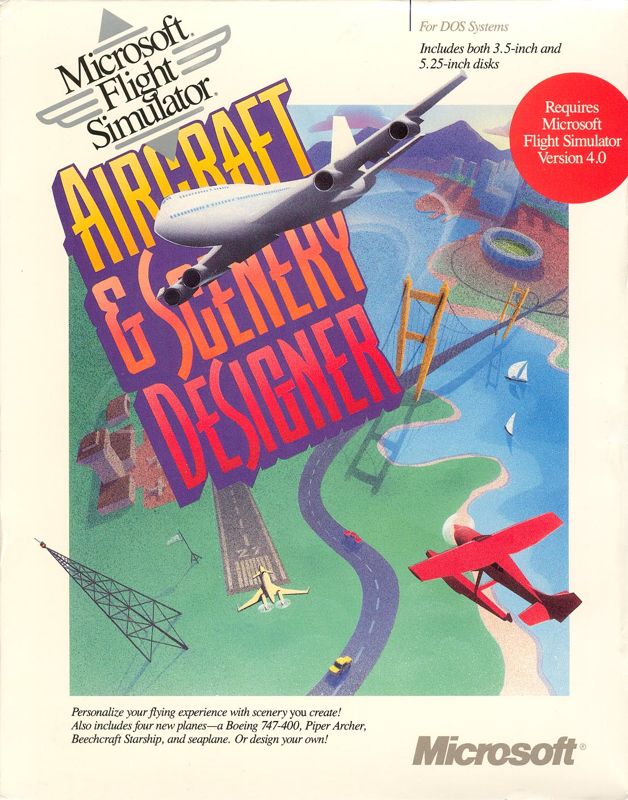
Microsoft Flight Simulator: Aircraft & Scenery Designer builds upon the solid foundation of Flight Simulator v4.0 by offering unprecedented creative freedom. Instead of merely flying pre-built planes, you can now design your own custom aircraft from scratch. The intuitive editing tools let you modify wing shapes, fuselage dimensions, and control surfaces, giving you full control over how your plane handles and responds in flight.
(HEY YOU!! We hope you enjoy! We try not to run ads. So basically, this is a very expensive hobby running this site. Please consider joining us for updates, forums, and more. Network w/ us to make some cash or friends while retro gaming, and you can win some free retro games for posting. Okay, carry on 👍)
Alongside the custom aircraft editor, the add-on introduces four fully modeled new planes: the Boeing 747-400, Piper Archer, Beechcraft Starship, and a versatile seaplane. Each model flies true to life, with realistic performance curves and cockpit layouts. Whether you’re cruising in the jumbo jet’s flight deck or taking off from a remote waterway in the seaplane, you’ll appreciate the nuanced flight dynamics and engaging control challenges.
Scenery design takes center stage, too. You can place buildings, roads, trees, and vehicles to recreate real-world landscapes or dream up entirely new environments. The drag-and-drop interface is surprisingly approachable, allowing you to populate entire cities or sculpt rural airstrips in minutes. This added layer of creation turns every flight into a personal showcase of both your piloting skill and aesthetic vision.
Beyond the creative editors, the gameplay loop encourages exploration and experimentation. Try flying your homemade craft through dense urban canyons you’ve built yourself, then swap to the Starship to test its speed records over the open ocean. The seamless integration of editing and flying ensures that every session offers something fresh—whether it’s refining a design, tweaking scenery elements, or simply enjoying the thrill of flight.
Beginners will find plenty of tutorials and reference data to get started, while veterans can dive deep into performance tweaking and advanced scenery scripting. The balance between accessibility and depth means you’re never bored: there’s always a new aerodynamic challenge to solve or a better-looking digital world to create.
Graphics
Although Microsoft Flight Simulator v4.0 was groundbreaking in its day, the Aircraft & Scenery Designer add-on takes visuals a step further by introducing a wealth of new textures and 3D models. The four new aircraft boast detailed surface finishes, from the polished metal of the Boeing 747-400 to the distinctive composite curves of the Beechcraft Starship. Cockpits come alive with sharper instrument gauges and more distinct panel layouts.
Scenery customization also benefits from an expanded palette of textures and models. You’ll find new building types ranging from suburban homes to industrial warehouses, all rendered in crisp, era-appropriate detail. Roads, rail lines, and vehicle sprites bring your landscapes to life, creating bustling cityscapes or sleepy rural scenes at the click of a mouse.
While the add-on doesn’t overhaul the core graphics engine, the quality of the assets more than compensates. Lighting effects, shadow casting, and ground textures blend seamlessly with the base game, making your custom creations look and feel like native content. When you position a hangar next to a runway or line up a stretch of highway below your flight path, the immersion rivals what some early ‘90s titles could only dream of.
Performance remains smooth on contemporary hardware (for its time), with frame rates holding steady even in densely populated areas. If you’re running on a high-end 486 or early Pentium system, you’ll appreciate the ability to toggle object detail levels to maintain optimal speed. This flexibility ensures that your carefully crafted world doesn’t come at the cost of stutter or slowdown.
Story
As a flight simulator add-on, Aircraft & Scenery Designer doesn’t follow a traditional narrative with protagonists or plot twists. Instead, its “story” unfolds through your personal journey as both pilot and designer. You set your own objectives—whether that’s creating the ultimate long-haul jetliner, crafting a bush plane to explore remote lakes, or building a virtual metropolis complete with custom landmarks.
Each creative project you embark on forms a chapter in your simulation logbook. You might document the maiden flight of your first hand-crafted aircraft, complete with test data on lift coefficients and cruising speeds. Then you move on to sculpting a coastal town where your seaplane will dock, later designing a dramatic mountain valley for high-altitude aerobatics. These self-directed milestones replace scripted missions, offering boundless replay value.
The sense of progression derives from the growing complexity of your designs. Beginners start by tweaking basic prop planes before advancing to multi-engine jets like the Boeing 747-400. As your confidence builds, you’ll incorporate custom scenery triggers—such as animated vehicles or day-night lighting cycles—that add dynamic storytelling elements to your flights.
In a way, the scenario editor becomes your storyboard, with every new airport or city acting as a setting for aerial adventures. Rather than following a linear campaign, you weave together a tapestry of personal achievements: the first successful transcontinental flight in your Piper Archer, the record-speed dash in your Starship, or the scenic low-altitude run along a coastline you’ve meticulously crafted.
Overall Experience
Microsoft Flight Simulator: Aircraft & Scenery Designer transforms the venerable v4.0 into a sandbox of aeronautical and geographical creativity. The seamless blend of design and flight ensures that you’re always engaged—there’s no separation between making something cool and then experiencing it firsthand at 30,000 feet. This dual role keeps the experience fresh, whether you’re a hardcore simmer or a curious newcomer.
The variety of aircraft, from the long-haul capabilities of the Boeing 747-400 to the nimble handling of the seaplane, ensures there’s a suitable challenge for every pilot personality. Coupled with the deep scenery editor, you can craft environments tailored to each plane’s strengths and weaknesses. Want to recreate a sprawling international airport for your jumbo jet? Go for it. Prefer to lay out winding mountain passes for your Starship’s high-speed runs? The tools are at your fingertips.
Installation and integration with the base Flight Simulator are straightforward, and the documentation is thorough, guiding you through both aircraft modeling and landscape creation. Community support was strong even in the early ‘90s, with user-generated libraries of aircraft templates and scenery packs extending the add-on’s lifespan well beyond its initial release.
In terms of longevity, Aircraft & Scenery Designer stands out as one of the most inspiring expansions of its era. It turns passive flight simulation into an active creative process, giving you the reins over both machine and environment. For anyone serious about virtual aviation or simply eager to try their hand at digital world-building, this add-on offers hours—if not years—of satisfying gameplay.
Whether you’re approaching this add-on as a designer, a pilot, or both, you’ll find that Microsoft Flight Simulator: Aircraft & Scenery Designer adds a compelling new dimension to the classic flight simulator formula. Its balance of user-friendly tools and deep customization options makes it a must-have for enthusiasts looking to elevate their virtual skies.



Reviews
There are no reviews yet.