 Retro Replay Retro Gaming History, Reviews & Emulation
NES EMULATOR
Cardputer-Game-Station-Emulators
Collection of highly optimized console emulator cores (NES, SNES, GameBoy, Master System, Genesis/Megadrive, Neo Geo Pocket, WonderSwan, Lynx, Atari, PC-Engine, Coleco, SG-1000, MSX and more) packaged to run on ESP32-based Cardputer hardware with a small memory footprint.
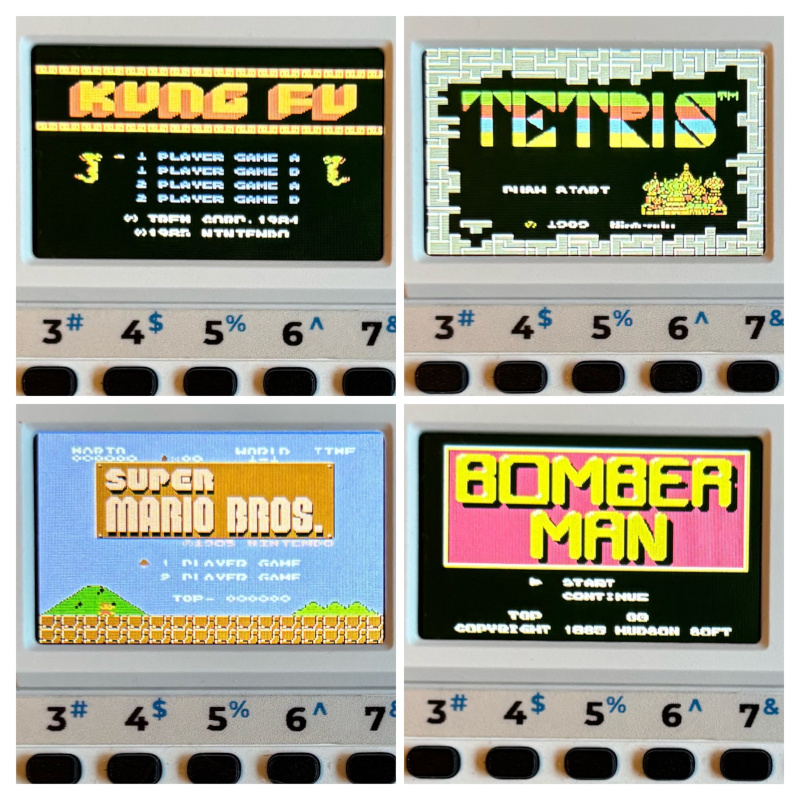
WHY IT MATTERS
Why this project exists
Designed to bring many classic console emulators to very constrained ESP32-based handheld hardware (Cardputer) by drastically reducing RAM and flash usage. It targets users of the Cardputer platform who want multiple retro systems available from a single firmware image and to run games directly from an SD card.
BEST FOR
Notable strengths
Small memory footprint (cores optimized to run within ~256 KB RAM and ~2.5 MB flash for 13 cores), broad system coverage on a single device, SD-based ROM loading, on-device save handling, and many device-specific controls and optimizations (zoom modes, alternative key mappings, M5Stack joystick support).

The people behind Cardputer-Game-Station-Emulators
Project history and scope
This repository collects, ports, and tunes multiple existing emulator cores (Nofrendo, Snes9x, Smsplus, Race, Gwenesis, Oswan, GnuBoy, Handy, PCE-GO, Stella, Pro-System, fMSX, Arnold and others) so they can run on Cardputer-class ESP32 hardware with limited RAM and flash. The README documents supported systems and per-system caveats (for example SNES is experimental due to RAM limits, some heavier systems show slowdowns or sound inaccuracies). The repository has an active commit history and release artifacts maintained on GitHub; it is intended as firmware for Cardputer devices rather than a general-purpose desktop emulator.
What Cardputer-Game-Station-Emulators supports
- NES (.nes)
- SNES (.sfc) — experimental / limited
- Game Boy / Game Boy Color (.gb, .gbc)
- Master System (.sms)
- Game Gear (.gg)
- SG-1000 (.sg / .rom?) — supported via SMS core family notes in README (SG-1000 listed separately in table) — note: video marked N/A for SG-1000 in README table when applicable to some features (see sources). — treat conservatively when using advanced features that may be missing for some systems on this hardware (per README). (User should consult README for per-system caveats.) (Entry retained because README explicitly lists SG-1000.) (File extension support enumerated in README.)
Download and availability
OFFICIAL DOWNLOADS
Get Cardputer-Game-Station-Emulators
Official builds and release artifacts are distributed through the project's GitHub releases. The repository README and Releases page are the primary official download sources.
Get Cardputer-Game-Station-Emulators ↗DOCUMENTATION
Official documentation
Read the official configuration, compatibility, and troubleshooting material before changing advanced options.
Read official documentation ↗Cardputer-Game-Station-Emulators setup guide
Setup note: This firmware is intended for Cardputer/ESP32 devices. The README documents how ROMs are loaded from an SD card, control mappings, save handling, and Launcher partition behavior for large ROMs. The device expects uncompressed ROM files on the SD card and supports on-device saves.
- Verify device and prerequisites: You need a Cardputer-compatible ESP32 device (Cardputer hardware/firmware environment) with an SD card slot and sufficient flash to accept the Game Station firmware. Confirm you have a Launcher environment if you plan to use partition switching for ROMs >1 MB.
- Download firmware or source: Get official release artifacts from the repository's Releases section on GitHub. If you prefer to build from source, the repo includes platformio.ini and source folders; follow the repository build instructions (platform-specific build tools such as PlatformIO would be required).
- Prepare SD card and ROMs: Copy uncompressed ROM files to the SD card. The README explicitly warns ROMs must be uncompressed (not .zip, .7z, .rar) and notes the firmware can run ROMs up to ~5.5 MB. To avoid slow directory listings, keep fewer than ~512 ROM files per folder.
- Launcher partition (large ROMs): If you use the Cardputer Launcher, select CFG → Partition Change → Game Station to enable a partition layout that supports ROMs larger than 1 MB. The firmware can also request the Launcher to flash the Game Station partition table and reboot automatically when a large ROM is launched (as described in the README).
- Controls and input options: The firmware maps Cardputer keys to joystick/buttons (README lists mappings). An M5Stack Joystick (v1.1 or Joystick2) is supported by plugging it in before launching a game. The README documents alternate key bindings (e.g., 'j' as Button A) and special keys for zoom, brightness, and volume.
- Run games and saves: Launch ROM files from the firmware menu. Saves are created automatically and stored on the SD card in per-console folders with filenames tied to the ROM name. The README warns that autosave writes happen in the background and recommends quitting properly (hold GO for 1s) to reduce the risk of save corruption.
- Performance and compatibility notes: Refer to the README's per-system table for known limitations (examples: SNES listed as experimental; heavy Genesis/Megadrive and Lynx titles can show slowdown or audio inaccuracies; some NES mappers not supported). If you encounter issues, check the project's issue tracker for updates and fixes.
Software reminder: The firmware does not include commercial game ROMs, system BIOS files, or proprietary firmware. Use only legally obtained ROMs and any required system files as allowed by law.
Sources and further reading
Detailed guides and tutorials
Explore step-by-step guides for Cardputer-Game-Station-Emulators as they are published.