 Retro Replay Retro Gaming History, Reviews & Emulation
EMULATOR DATABASE
LodjurDS
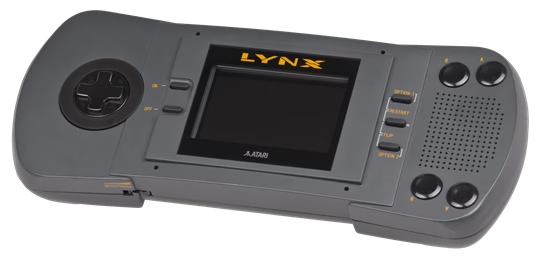
An Atari Lynx emulator that runs on Nintendo DS(i)/3DS hardware.
Download Tutorials & guidesSign in to download. Files are hosted by the emulator project.
About LodjurDS
LodjurDS brings Atari Lynx emulation to native Nintendo DS and 3DS hardware, providing a handheld-native way to run Lynx software on classic Nintendo portable devices. The project is focused on a practical, hardware-targeted implementation with save states, IPS patch support, and adjustable speed modes.
Native NDS/3DS build, save states, support for zipped roms, IPS patching, multiple speed modes (50%, 100%, 200%, Max), selectable Lynx BIOS support, and options to change display orientation and gamma/contrast.
Supported systems and capabilities
- Nintendo DS
- Nintendo DSi
- Nintendo 3DS (homebrew/backward-compatible mode via native DS support)
- Flashcart/homebrew environments on the above systems
The people behind LodjurDS / history
The repository includes an explicit release history and a series of tagged releases (v0.1.0 through v0.1.5). Release notes show ongoing fixes and feature additions such as smooth zoom, IPS patch functionality, and hardware revision differences for Lynx and Lynx II. The project is hosted and released from the author FluBBaOfWard's GitHub account.
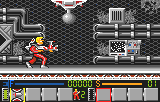
Screenshots
Tutorials & guides
LodjurDS setup guide
This guide explains how to prepare and run LodjurDS on a flashcart or other NDS homebrew environment using official project releases and repository instructions.
- 1) Obtain the official release Download the latest LodjurDS release package from the project's GitHub Releases page. Use the release assets provided by the repository rather than third-party builds.
- 2) Prepare an NDS/3DS homebrew environment Place the LodjurDS nds file into the root or data folder used by your flashcart or homebrew loader, following that flashcart's standard installation procedure.
- 3) Create the lodjurds folder Create a folder named lodjurds in the root of your flashcard storage or in the loader's data folder. LodjurDS uses this folder to store settings and save files.
- 4) Add Lynx ROMs and BIOS Put Lynx ROM files (.lnx) or zip archives (deflate-compressed) into a folder on your card. Filenames should be no longer than 127 characters and each folder may contain up to 768 games according to the project README. LodjurDS requires a Lynx BIOS file to run games; the emulator provides a menu option to select the BIOS. The BIOS is not included with the emulator and must be supplied by the user.
- 5) DLDI and flashcart compatibility Depending on the flashcart, you may need to DLDI patch the nds binary. Use the DLDI patcher recommended by your flashcart or homebrew loader and follow its instructions. If your loader supports automatic DLDI, use that facility.
- 6) Controls and menus Start the emulator and open the menu by pressing L+R or tapping the touchscreen. Navigate with the d-pad or touchscreen, use A or double tap to select, and B or tapping the top of the screen to go back. Options include controller mapping, display rotation/zoom, gamma/contrast, machine model selection, speed modes, sound toggle, and debug output.
- 7) Using save states and settings Use the menu options Save State and Load State to manage save states. Use Save Settings to persist emulator preferences to the lodjurds folder.
- 8) IPS patches and additional features As of the latest release, LodjurDS supports IPS patching for ROMs and includes options such as smooth zoom and power on/off handling. Refer to the release notes in the repository for details on what each release added or fixed.
READMEs & documentation
LodjurDS official project README
# LodjurDS V0.1.5

<img align="right" width="220" src="./logo.png" alt="The Lynx logo"/>

An Atari Lynx emulator for Nintendo DS(i)/3DS.

## How to use

1. Create a folder named "lodjurds" in either the root of your flash card or in
 the data folder. This is where settings and save files end up.
2. Now put game/bios files into a folder where you have (Lynx) roms, max
 768 games per folder, filenames must not be longer than 127 chars. You can use
 zip-files (as long as they use the deflate compression).
3. Depending on your flashcart you might have to DLDI patch the emulator.

Note! You need a bios to be able to run games.

When the emulator starts, you can either press L+R or tap on the screen to open
up the menu.
Now you can use the cross or touchscreen to navigate the menus, A or double tap
to select an option, B or the top of the screen to go back a step.

To select between the tabs use R & L or the touchscreen.

## Menu

### File

* Load Game: Select a game to load.
* Load State: Load a previously saved state of the currently running game.
* Save State: Save a state of the currently running game.
* Save Settings: Save the current settings.
* Reset Console: Reset the console.
* Quit Emulator: (If supported.)

### Options

* Controller:
  * B Autofire: Select if you want autofire on button B.
  * A Autofire: Select if you want autofire on button A.
  * Swap A-B: Swap which NDS button is mapped to which Lynx button.
* Display:
  * Screen: Select rotation & zoom.
  * Gamma: Lets you change the gamma ("brightness").
  * Contrast: Lets you change the contrast.
  * Border: Change between console image and black.
* Machine:
  * Machine: Select the emulated machine.
  * Cpu Speed Hacks: Allow speed hacks.
  * Select Bios: Load a Lynx Bios, needed.
  * Sound: Enable/disable sound.
* Settings:
  * Speed: Switch between speed modes.
    * Normal: Game runs at it's normal speed.
    * 200%: Game can run up to double speed.
    * Max: Game can run up to 4 times normal speed.
    * 50%: Game runs at half speed.
  * Allow Refresh Change: Allow the Lynx to change NDS refresh rate.
  * Autoload State: Toggle Savestate autoloading. Automagically load the savestate associated with the current game.
  * Autosave Settings: This will save settings when leaving menu if any changes are made.
  * Autopause Game: Toggle if the game should pause when opening the menu.
  * Powersave 2nd Screen: If graphics/light should be turned off for the GUI screen when menu is not active.
  * Emulator on Bottom: Select if top or bottom screen should be used for emulator, when menu is active emulator screen is allways on top.
* Debug:
  * Debug Output: Show FPS and logged text.
  * Step Frame: Emulate one frame.

### About

Some dumb info about the game and emulator...

## Controls

* NDS B & A buttons are mapped to Lynx B & A.
* NDS X is mapped to Lynx Option I.
* NDS Y is mapped to Lynx Option II.
* NDS Start is mapped to Lynx Pause.
* NDS d-pad is mapped to Lynx d-pad.

## Games

* Baseball Heroes. Doesn't start

## Accuracy

There are not a lot of test programs yet, the only one I've found so far is from Dr.Helius.

* [Atari Lynx Hardware Test ROMs](https://github.com/drhelius/lynx-tests) - Timer, sound & UART tests.
* [Suzy Timing](https://github.com/laoo/SuzyTiming) - Suzy Timing.

## Credits

```text
Thanks to:
Keith Wilkins for Handy source and info.
Dr.Helius for test programs.
42Bastian for bug reports, test files & bll.enc.
```

Fredrik Ahlström

<https://bsky.app/profile/therealflubba.bsky.social>

<https://www.github.com/FluBBaOfWard>

X/Twitter @TheRealFluBBa
Download original READMERelease log
Selected releases and changes, with coverage from our weekly emulation roundup.
Sources & further reading
FROM THE COMMUNITY
Player reviews
Starting site scores are provisional editorial scores. Established mainstream projects receive a higher starting score; other imported entries begin at a neutral 6/10 pending individual review. Member scores change the average after approval.
Your take on LodjurDS
Spam has been overwhelming. To help us approve your review, sign up and introduce yourself in the Introductions forum so we know you’re not a bot.
Sign in with your Retro Replay account to rate this project and share your experience.
Sign in to review