 Retro Replay Retro Gaming History, Reviews & Emulation
GAME BOY EMULATOR
gba
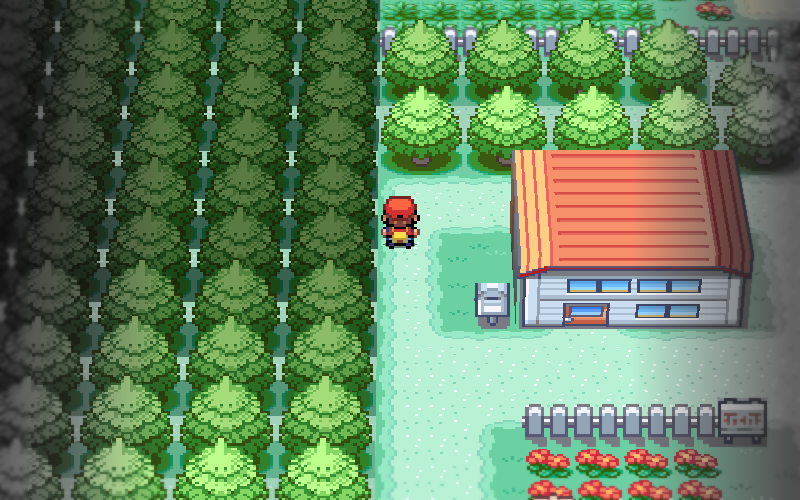
A Game Boy Advance emulator written in Rust that provides a native desktop binary, a WebAssembly (browser) build, and an iOS frontend. Includes an experimental alpha 3D renderer that reconstructs Pokémon FireRed towns from in-game map data and a 2D browser player.
WHY IT MATTERS
Why this project matters
gba is a small, from-scratch GBA implementation in Rust that focuses on a single accurate 2D core (ARM7TDMI, PPU, DMA, audio, saves) and an unusual experimental feature: a desktop-only 3D renderer that builds scenes from Pokémon FireRed map data. It also demonstrates a shared core compiled to WebAssembly for browser play and an iOS frontend.
BEST FOR
Notable strengths
A complete Rust implementation of the GBA hardware stack with a WebAssembly build, pixel-identical comparison tests against mGBA for FireRed, clear documentation of known gaps, and downloadable platform binaries. The 3D mode (alpha) is a unique research/visualization feature limited to FireRed.
The people behind gba
History & verification
The project repository (x0cero/gba) and the project's documentation site describe the code as a ground-up Rust implementation. The README documents feature claims (ARM core, PPU modes, audio, save handling), provides the 3D-mode explanation and limitations, and gives running/build instructions. The repository includes a docs folder with development notes and a differential-testing document describing pixel-for-pixel checks against mGBA for Pokémon FireRed. The project is released under the MIT license.
What gba supports
- Windows (native binary)
- macOS (native binary, including macOS ARM builds)
- Linux (native binary)
- Browser (WebAssembly build)
- iOS frontend (source folder present)
Download and availability
OFFICIAL DOWNLOADS
Get gba
Official releases (prebuilt platform archives) are provided on the project's GitHub releases page. Alternatively build from source using Rust's cargo.
Get gba ↗DOCUMENTATION
Official documentation
Read the official configuration, compatibility, and troubleshooting material before changing advanced options.
Read official documentation ↗gba setup guide
Setup note: This guide explains verified, emulator-specific steps to run the native binaries or build the project and how to use the browser build. It assumes you supply your own GBA ROM files and that you understand the legal restriction: commercial ROMs and BIOS images are not included and must not be distributed.
- Get a release or the source: Download a prebuilt archive for Windows, macOS, or Linux from the project's GitHub releases page and unpack it. If you prefer to compile yourself, clone the repository and build with cargo build –release.
- Run a native binary (desktop 2D mode): After unpacking, run the platform binary with the path to your .gba ROM as the single argument (example shown in repository): ./gba-macos-arm64 path/to/rom.gba. Battery saves are written next to the ROM as <rom>.gba.sav and save states as <rom>.gba.state.
- Run FireRed with 3D mode (desktop only): To enable the experimental 3D renderer for Pokémon FireRed, run the native desktop binary with the –3d flag: ./gba-macos-arm64 path/to/firered.gba –3d. The README documents that 3D mode is alpha, FireRed is the only supported game for the feature, and rendering beyond early towns may produce incorrect geometry.
- Use the browser (WebAssembly) build: Open the project's documentation site or the provided web build and load a local .gba ROM into the page. The browser player is 2D only, requires you to supply the ROM, and stores saves in the browser (persistent storage). Audio in the web build requires a user gesture to unlock playback in many browsers.
- Build from source (desktop and web): Install Rust and cargo. From a cloned repository run cargo build –release to produce native binaries. The README and docs/development.md explain build targets and how the same core compiles to WebAssembly for the browser frontend. For the web build you will need wasm32-unknown-unknown target and the toolchain described in the repository docs.
- Controls and save files: The README documents keyboard mappings (Z/X = A/B, arrow keys = D-pad, Enter/RightShift = Start/Select, Q/W = L/R). Battery saves are created alongside the ROM file; save states use .state files. Fast-forward, pause, and save/load hotkeys are also documented in the README.
- Practical caveats: This emulator is region-aware but not fully cycle-accurate; no link-cable or real-time clock emulation is provided. Some SWI calls are unimplemented and affine background usage is limited. The 3D renderer only understands FireRed and is alpha quality. If you need link cable, RTC, or cycle-exact timing, prefer more mature projects.
Software reminder: You must supply your own ROM files. The project implements BIOS calls in software so no BIOS image is required. Follow the repository README and docs for build prerequisites (Rust toolchain) and browser audio restrictions.
Sources and further reading
Detailed guides and tutorials
Explore step-by-step guides for gba as they are published.