 Retro Replay Retro Gaming History, Reviews & Emulation
GAME BOY COLOR EMULATOR
NoobBoy
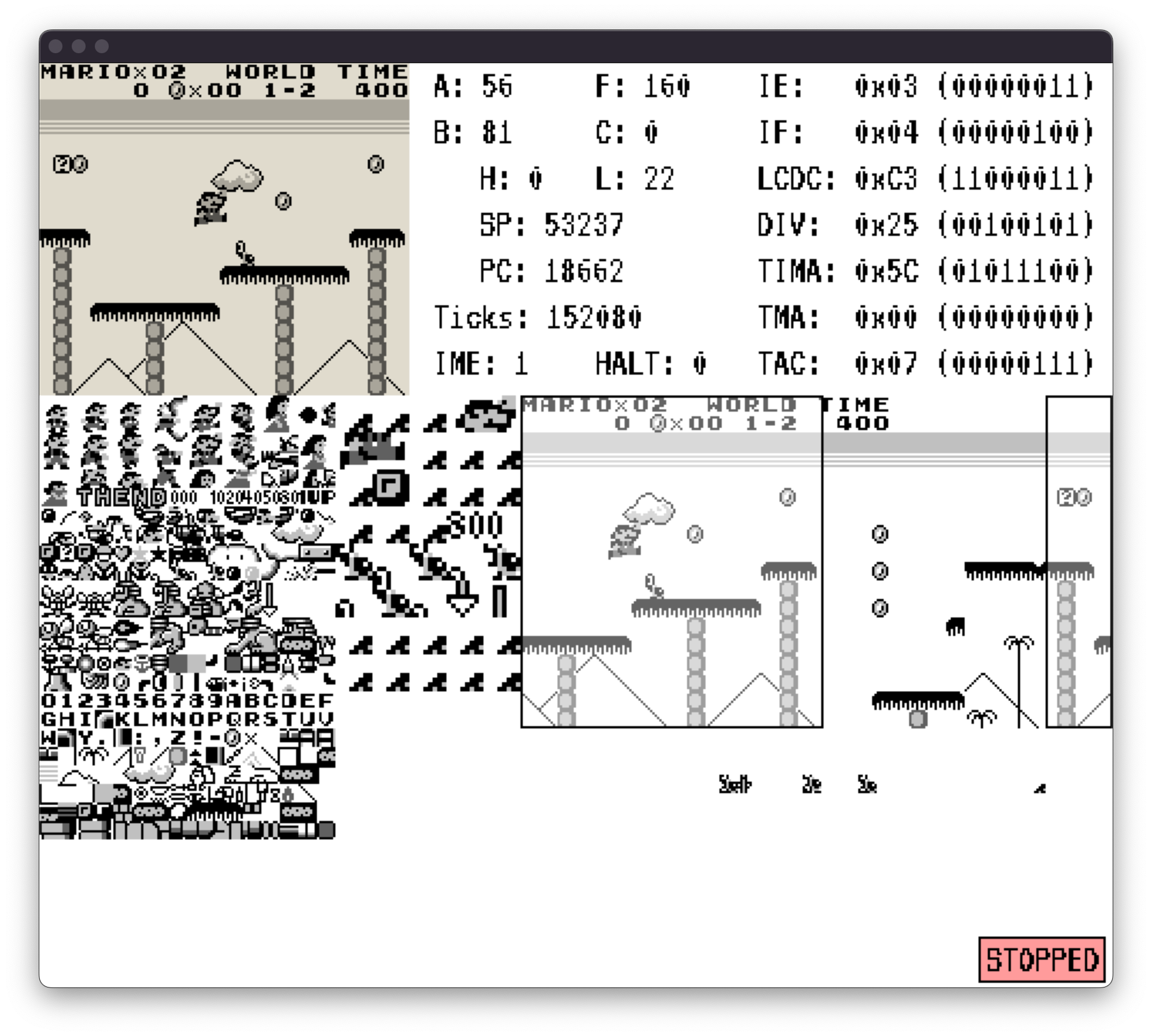
NoobBoy is an open-source, educational Game Boy emulator written in C++ that implements a DMG-compatible CPU, PPU, MBC support, basic save-state handling and an optional debugger. It is intended as a learning project rather than a polished end-user emulator.
WHY IT MATTERS
Why NoobBoy exists
NoobBoy is a learning-focused implementation: the author built it to understand Game Boy internals and emulation techniques rather than to compete with long-standing, highly compatible emulators. The README and tests emphasize correctness of CPU instructions, PPU pixel and sprite behavior, and the ability to run Blargg/mooneye test suites to validate implementation details.
BEST FOR
What NoobBoy does well
Implements correct Game Boy CPU instructions, sprite row limitations and pixel priority; it runs Blargg/mooneye test suites; includes a debugger and save-state dumping of external RAM banks. The project includes VRAM rendering overlays and MBC support for many cartridge types. Build system and test tooling (cmake, make targets, python test runner) are provided for developers.

The people behind NoobBoy
Project history & status
NoobBoy is a single-repository, actively developed hobby project hosted on GitHub. The repository contains source, a test suite, bootrom support, screenshots, and a Makefile/CMake build. The README documents goals, features and known missing behavior (the halt-bug emulation is not implemented due to interrupt timing differences). The project was published on GitHub and shows commit history and contributor activity; however there are no formal binary releases in the repository’s Releases section. The README states the emulator was tested on Linux and macOS and lists required build dependencies. The project is best treated as an educational emulator and development codebase rather than a drop-in end-user release.
What NoobBoy supports
- Nintendo Game Boy (DMG) – primary target; DMG bootrom supported
- Memory Bank Controllers (MBC) – various cartridge types (partial support; some MBC features missing may block certain games)
- Developer/test suites: Blargg and mooneye test compatibility suites (included integration)
- Desktop platforms: Linux and macOS (tested)
Download and availability
OFFICIAL DOWNLOADS
Get NoobBoy
NoobBoy does not publish packaged releases on the GitHub Releases page. Obtain the source from the project repository (clone or download the source archive) and build locally. The official project page and source are on GitHub; use the repo to get source, issues, and documentation.
Get NoobBoy ↗DOCUMENTATION
Official documentation
Read the official configuration, compatibility, and troubleshooting material before changing advanced options.
Read official documentation ↗NoobBoy setup guide
Setup note: These steps summarize how to get NoobBoy running from source (based on the project's README and build files). The guide focuses on a desktop build on Linux/macOS and covers dependencies, build, command-line usage, and practical notes about ROMs, boot ROMs and saves.
- 1) Get the source: Clone or download the repository from the official GitHub repository. Example: git clone https://github.com/Mika412/NoobBoy.git. Inspect the README.md and CMakeLists.txt in the project root for current build targets and options.
- 2) Install build dependencies: NoobBoy’s README states it requires CMake plus SDL3 and SDL3_ttf. On Linux use your distribution package manager to install cmake, development headers for SDL3 and SDL3_ttf (e.g., libsdl3-dev, libsdl3-ttf-dev or equivalent). On macOS install cmake and SDL3/SDL3_ttf via Homebrew (brew install cmake sdl3 sdl3_ttf). Also have a C++ toolchain (gcc/clang) and make available.
- 3) Build the desktop target: From the repository root the README indicates a provided Makefile. Build the desktop binary by running: make desktop. The repository also contains CMake files, so alternatively run a standard cmake build: mkdir build && cd build && cmake .. && cmake –build . –target desktop (adjust for your toolchain). The resulting desktop binary is produced at build/desktop/NoobBoy (per the README usage example).
- 4) Runtime command-line usage: The README documents the emulator’s CLI. Typical usage: ./build/desktop/NoobBoy –rom <rom_file> [–bootrom <bootrom_file>] [–load-save <save_file>] [–debug] [–sound] [–no-bootrom]. –rom is required and expects a standard Game Boy ROM file. –bootrom lets you provide a custom DMG boot ROM (not included). –no-bootrom starts execution immediately without running a boot ROM sequence. –debug enables the built-in debugger. –load-save points at a save file to preload external RAM state.
- 5) Save states, debugging and sound: The project implements save-state style dumps for external RAM banks (used by battery-backed cartridges). There is an experimental sound option (marked WIP in the README). Use the –debug flag to enable the debugger and the input controls and debug keys documented in README (step and CPU stepping available). Note that some features (like the halt-bug behavior) are noted as not fully implemented; you may encounter games that rely on those timing quirks.
- 6) Practical notes about ROMs, boot ROMs and legality: NoobBoy does not include commercial game ROMs, BIOS/boot ROMs or firmware. Acquire your own legally-owned ROMs and boot ROMs if you intend to test behavior that requires the DMG boot ROM. The emulator accepts standard Game Boy ROM files; if a cartridge requires a specific MBC feature that is not implemented your game may not boot or save correctly.
- 7) Platform notes and testing: The README notes the emulator was tested on Linux and macOS. If you encounter platform-specific build failures, verify installed SDL3 and SDL3_ttf dev packages and C++ compiler versions. The project includes automated test suites (make test and python3 tests/run_tests.py) — use those to validate builds and to see which features pass or fail.
Software reminder: NoobBoy is source-only (no official binaries in Releases). You must build from source and supply your own ROMs and boot ROMs. Sound is experimental and some MBC or timing quirks remain unimplemented.
Sources and further reading
Detailed guides and tutorials
Explore step-by-step guides for NoobBoy as they are published.