 Retro Replay Retro Gaming History, Reviews & Emulation
SATURN EMULATOR
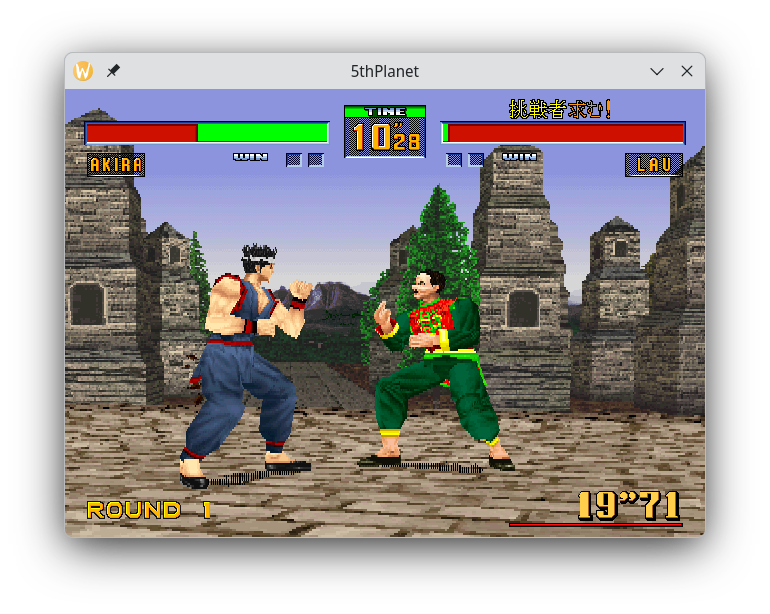
5thPlanet
An accuracy-first Sega Saturn emulator written in Rust. Provides a native executable named 'jupiter' and focuses on precise hardware timing and compatibility; primary published builds target Linux x86_64.
WHY IT MATTERS
Why use 5thPlanet?
Focused on accuracy and correct Saturn hardware behaviour; the project documents playable games and an explicit roadmap toward broader compatibility. The codebase is implemented in Rust and aims for careful emulation of Saturn subsystems rather than quick feature additions.
BEST FOR
Best for
Users who want an accuracy-oriented, actively developed open-source Saturn emulator (developers and advanced users on Linux who can supply a BIOS and game media).

The people behind 5thPlanet
History and status
5thPlanet is an open-source Sega Saturn emulator hosted on GitHub. The project describes itself as 'accuracy-first' and maintains a public roadmap and compatibility notes. The repository includes a runtime executable 'jupiter', a persisted config system, an in-window OSD menu, and CI workflows that produce packaged Linux x86_64 artifacts on published releases. The roadmap and compatibility notes list several commercial titles flagged as playable and outline phased development (Phase 1: Linux x86_64 packaging completed). The project remains under active development in the repository.
What 5thPlanet supports
- Sega Saturn (emulation of console hardware)
- Linux x86_64 (official packaged builds)
- Cross-platform build from source via Rust/Cargo (source requires building locally)
- Requires user-supplied Saturn BIOS and game images (not included)
Download and availability
OFFICIAL DOWNLOADS
Get 5thPlanet
Official packaged builds are published as GitHub release assets. Release archives contain the jupiter executable for Linux and empty directories/README placeholders for bios/ and roms/ — you must supply your own BIOS and disc images. For end-user packaged artifacts, look for the 5thplanet-vX.Y.Z-linux-x64.tar.bz2 assets on the repository's Releases page.
Get 5thPlanet ↗DOCUMENTATION
Official documentation
Read the official configuration, compatibility, and troubleshooting material before changing advanced options.
Read official documentation ↗5thPlanet setup guide
Setup note: Practical setup notes and a step-by-step guide to run 5thPlanet. This profile assumes you will use official release artifacts on Linux x86_64 or build from source on a system with Rust toolchain installed. You must legally obtain and supply Saturn BIOS files and game disc images (CUE/BIN or supported formats).
- 1) Get the official release or source: Download the latest packaged Linux release from the project's GitHub Releases page (look for 5thplanet-*-linux-x64.tar.bz2). If you prefer to build from source, clone the repository and install Rust (rustup, cargo). The repository's README shows that the primary runtime binary is built as the cargo package 'jupiter'.
- 2) Inspect the release package layout: Released archives contain an executable named jupiter-linux-x64 (or similar), a jupiter.toml.example, and placeholder bios/ and roms/ directories with README files. The release intentionally does not include BIOS or commercial game files — you must create a bios/ directory and provide required files there according to the emulator's expectations.
- 3) Provide BIOS and game media: Place your legally obtained Saturn BIOS (named as required by your local build or the jupiter invocation) into a bios/ folder beside the executable, or configure the emulator to point to the BIOS location. Supply a disc image (a .cue referencing .bin, or a single-track image) when launching. The README and example jupiter.toml describe BIOS lookup order (a jupiter.toml beside the executable takes precedence; otherwise use $XDG_CONFIG_HOME/5thplanet/jupiter.toml).
- 4) Run packaged binary: From the folder with the unpacked archive, make the jupiter binary executable (chmod +x) if needed. Run: cargo-run style invocation is shown in the repository docs for developers, but for the packaged binary run the executable directly with arguments: jupiter <bios.bin> [disc.cue]. On a release artifact the executable may be named jupiter-linux-x64 — confirm the filename in the archive and pass the BIOS path and optional disc cue file.
- 5) Build from source (optional, advanced): Install Rust toolchain (rustup) and any system dependencies required by SDL3 (the project lists SDL3). Clone the repository, then build the jupiter package with cargo: cargo run -p jupiter — <bios.bin> [disc.cue] or cargo build –release to produce a release binary in target/release/. Follow the project's README for more build-time configuration and features.
- 6) Configuration and OSD: The emulator provides an in-window OSD menu (Esc to open) and a persisted configuration file jupiter.toml. Use jupiter.toml.example as a starting point. Adjust input mappings, video options, and paths in the config file. A jupiter.toml placed beside the executable will override $XDG_CONFIG_HOME configuration.
- 7) Troubleshooting and compatibility: Because the project emphasises accuracy and is under development, expect some games to be unplayable or require per-title flags. Check the repository's compatible-game-titles document and roadmap to see which titles are currently playable and any required workarounds. If you hit issues, consult the GitHub Issues on the repository to check for known problems and report reproductions with logs if requested by developers.
Software reminder: 5thPlanet does not include BIOS files, commercial games, or firmware. You must supply those yourself and ensure you have legal rights to use them.
Sources and further reading
Detailed guides and tutorials
Explore step-by-step guides for 5thPlanet as they are published.