 Retro Replay Retro Gaming History, Reviews & Emulation
GAME BOY EMULATOR
knocknock
knocknock — a work-in-progress open-source Game Boy (DMG/CGB) emulator core with an optional SDL frontend and developer-facing debugging tools.
WHY IT MATTERS
Why knocknock matters
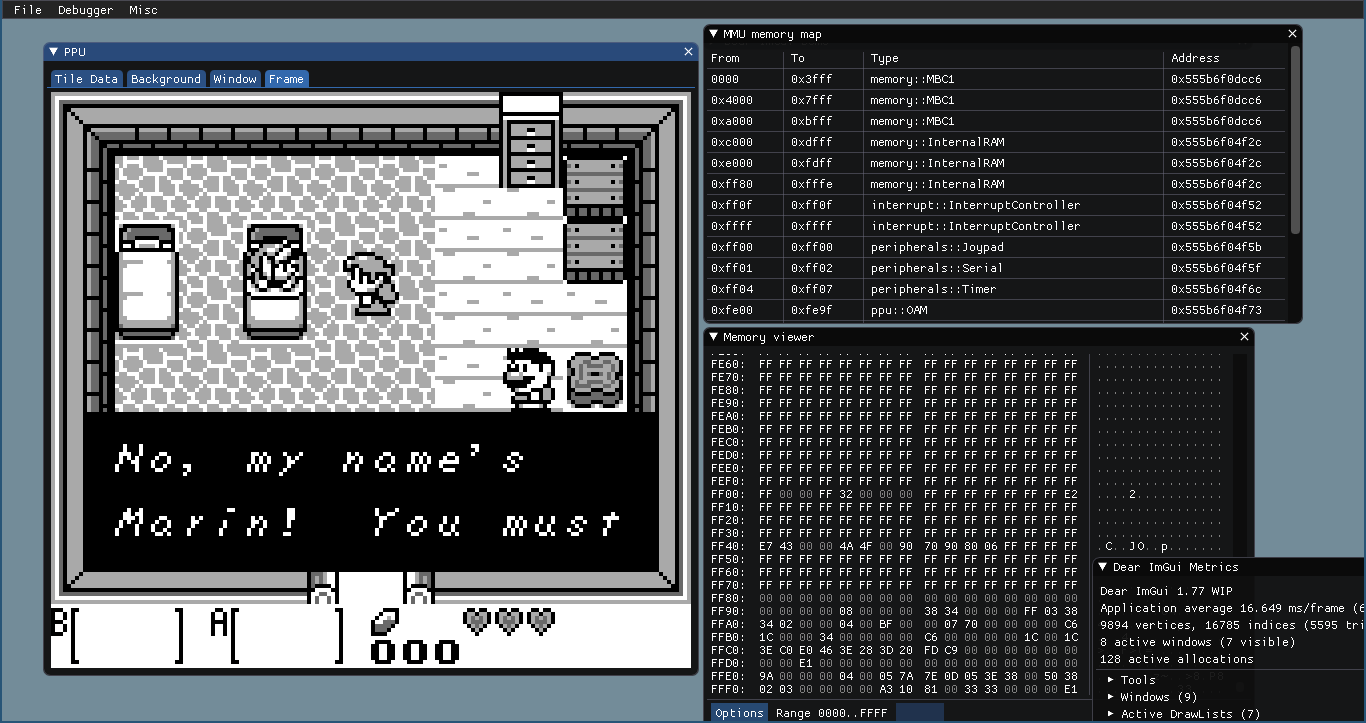
knocknock is a single-developer, C++17 Game Boy emulator project focused on correctness and developer tooling (blargg test passing, cycle-accurate CPU implementation and debuggers). It aims to be a readable, test-driven emulator and provides a desktop SDL frontend for interactive debugging and testing.
BEST FOR
Best for
Developers, emulator researchers, and hobbyists who want a modern, source-level Game Boy core with debugging views (memory, PPU, CPU) and the ability to build and run tests. Not a ready-made end-user emulator for polished game play.
The people behind knocknock
History and status
The repository is maintained publicly on GitHub and described by its author as a work-in-progress Game Boy emulator. The README documents that the project passes blargg's cpu_instrs tests and can run some games with minor graphics glitches. The source tree includes a core library and an SDL frontend (knocknock-sdl), and the repo shows active development history (many commits). The project explicitly lists which Game Boy hardware pieces are implemented or partially implemented (CPU, multiple MBCs, PPU elements, serial, timer partly implemented, audio listed but unspecified), and documents references used during implementation. There are no bundled BIOS or commercial ROMs and the README lists build dependencies and build-time options for which components to compile. Current public indicators show a small community footprint (single-digit stars and one fork at the time of profiling).
What knocknock supports
- Nintendo Game Boy (DMG) and Game Boy Color-targeted hardware behavior (core CPU/PPU/MMU implementations aimed at Game Boy class cartridges)
- MBC variants: Flat ROM, MBC1, MBC2, MBC3, MBC5 (as documented by the project; verification status varies)
- SDL frontend (knocknock-sdl) for interactive debugging and rendering
- CLI frontend for serial-output-only testing
Download and availability
OFFICIAL DOWNLOADS
Get knocknock
Official source, releases and source tarballs are distributed from the project's GitHub repository and its Releases page. Binary packages are not provided by the project; you must build from source or use any binaries attached to official releases if present.
Get knocknock ↗DOCUMENTATION
Official documentation
Read the official configuration, compatibility, and troubleshooting material before changing advanced options.
Read official documentation ↗knocknock setup guide
Setup note: This guide gives a practical, reproducible setup for building and running knocknock from source. It follows the project's own build instructions and points out practical steps and caveats for testing ROMs and using the SDL frontend.
- 1) Get the source: Clone the official repository from GitHub (official repo: tuankiet65/knocknock). Use git clone to get the full history if you want to inspect tests and commit messages.
- 2) Install build dependencies: You will need CMake and a C++17-capable compiler (the project lists GCC 10+, Clang 10+, or recent MSVC). For the SDL frontend install SDL2 and FFmpeg. Optional: Doxygen to generate docs. The project also uses third-party libraries (fmt, glog, Catch2) which are partially bundled but can be configured to use system packages via CMake flags.
- 3) Configure the build (Linux and cross-platform notes): Create a build directory and run CMake from that directory. Example: mkdir build && cd build && cmake -DCMAKE_BUILD_TYPE=Release [additional flags] .. The README documents optional flags: -DWITH_SDL_FRONTEND=On to build the SDL GUI, -DWITH_CLI_FRONTEND=On to build the CLI frontend, -DWITH_TESTS=On to build unit tests, and USE_SYSTEM_* flags to prefer system copies of bundled libraries.
- 4) Build: Run make -jN (or your generator's build command) where N is the number of parallel jobs/cores. A Release or MinSizeRel build is recommended for better performance; Debug builds are useful when using the debugger or contributing fixes.
- 5) Running knocknock-sdl (what to expect): If you built the SDL frontend, run the generated executable (name and path depend on your generator). The frontend provides memory viewers, PPU viewers (tile, background/window, OAM), CPU disassembly and step controls, breakpoints, and other developer-centric tools. The README emphasizes that the emulator can run some games but still has rendering/timer inaccuracies; expect development-level glitches.
- 6) ROMs, BIOS and legal note: knocknock does not include commercial ROMs, BIOS, or firmware. You must supply your own ROM files. Ensure you own the rights to any ROMs you load. The project documents supported cartridge types and MMCs; ensure you try cartridges compatible with implemented MBCs (Flat ROM, MBC1/2/3/5).
- 7) Tests and verification: The project states it passes blargg's cpu_instrs tests; the repository includes tests and a tests option in the CMake configuration. Run the test target (if built) to confirm core correctness on your platform.
- 8) Troubleshooting and contribution: If you encounter build errors: check that your system SDL2/FFmpeg headers and libraries are installed and that your compiler supports C++17. Use the project's GitHub issues to report reproducible problems. The README invites contributors and documents references used to implement CPU/PPU behavior.
Software reminder: Do not expect preinstalled commercial ROMs, BIOS, or firmware. Obtain ROMs only from your legal backups. The emulator is development-grade; expect incomplete/partly accurate subsystems.
Sources and further reading
Detailed guides and tutorials
Explore step-by-step guides for knocknock as they are published.