 Retro Replay Retro Gaming History, Reviews & Emulation
GAME BOY EMULATOR
sprite
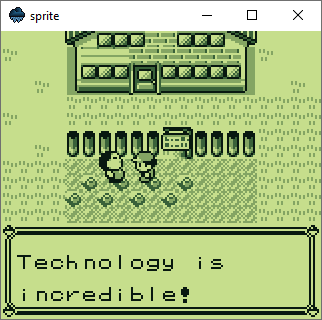
Sprite — a small open-source Game Boy (DMG/CGB) emulator implemented in the Drizzle language/runtime. Targets native speed, implements CPU, PPU (graphics) and basic cartridge types, but intentionally omits sound and battery-backed saves.
WHY IT MATTERS
Purpose
The repository exists primarily as a language/runtime stress test: to implement a real system (Game Boy) in Drizzle with reasonable accuracy and native performance. The author describes it as a test of the language rather than a fully-featured end-user emulator.
BEST FOR
What it can do
Runs Game Boy and Game Boy Color ROMs using DMG/CGB CPU and PPU emulation at native speed. Supports a limited set of cartridge mappers (MBC0, MBC1, MBC3). Provides prebuilt binaries (nightly and release) for Windows, Linux and macOS and can be built from source with a C++20 toolchain and Drizzle/Drizzle-SDL runtime.
The people behind sprite
History & status
The project is maintained in a public GitHub repository with active commits and a small community (stars and watchers). The README and BUILD.md indicate ongoing development: the emulator intentionally lacks sound and save support and is limited to certain cartridge types. Binaries are published as nightly and release builds. The repository serves more as a demonstration/stress-test of Drizzle than as a finished, polished emulator.
What sprite supports
- Windows (binaries provided)
- Linux (binaries provided)
- macOS (binaries provided)
- Source build (requires C++20 toolchain and Drizzle/Drizzle-SDL runtime)
Download and availability
OFFICIAL DOWNLOADS
Get sprite
Official releases and nightly builds are published from the repository releases page; binaries are available for Windows, Linux and macOS. If you prefer building from source, follow BUILD.md in the repository.
Get sprite ↗DOCUMENTATION
Official documentation
Read the official configuration, compatibility, and troubleshooting material before changing advanced options.
Read official documentation ↗sprite setup guide
Setup note: This guide summarizes verified, emulator-specific setup steps: obtain the Drizzle runtime (drizzle-sdl), download or build sprite, and run a ROM. It assumes you already own any ROMs you attempt to run and that you will not use commercial BIOSes supplied by the project (none are included). Follow the repository BUILD.md for platform-specific build details.
- 1) Get binaries (quick start): Visit the repository's Releases/Nightly builds and download the appropriate binary for your OS (Windows, Linux, macOS). The project README indicates binaries are published as nightly and release builds. After extracting, run using the Drizzle runtime: drizzle sprite.dz <path-to-rom>. If your system already has a drizzle-sdl distribution that includes the drizzle runner, you can run directly; otherwise install drizzle-sdl first.
- 2) Install Drizzle / drizzle-sdl (required runtime): The README instructs users to download drizzle-sdl for their system. Obtain a drizzle-sdl distribution compatible with your OS (the repository references drizzle-sdl as the runtime used to run sprite.dz). Ensure the drizzle binary (drizzle) is in your PATH or call it by absolute path when running sprite.
- 3) Build from source (overview): If you prefer to build: clone the repository (including submodules) and follow BUILD.md. A C++20 compiler is required. Platform-specific dependency notes in BUILD.md mention using vcpkg on Windows. The repository includes build scripts/solutions and a BUILD.md that documents dependencies and build steps—follow that file closely for platform-specific compiler, linker and library setup.
- 4) Cartridge and ROM compatibility: The README explicitly states cartridge support is limited to MBC0 (no bank), MBC1 and MBC3. There is no sound or battery-backed save support. Test ROMs that use those mappers are more likely to run; titles relying on other mappers, sound, or persistent saves may not work correctly.
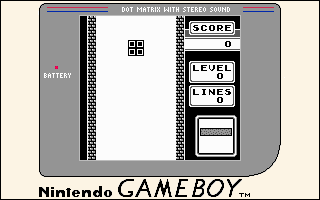
- 5) Running the emulator: Usage described in README: run drizzle sprite.dz <rom>. If you built sprite into an executable or used a packaged binary, adjust the command accordingly. The project provides example screenshots in the docs/screenshots folder in the repository.
- 6) Troubleshooting & development notes: Because the project is a language stress-test, some features are intentionally missing. If you plan to contribute or debug, consult BUILD.md, the source tree (including the sprite.dz and sprite project files) and the project's Git history. Open issues or pull requests on the GitHub repository for questions or bug reports.
Software reminder: The project does not include commercial ROMs, BIOS images or save files. Make sure you have legal rights to any ROMs used. The emulator purposely omits sound and battery-backed save support.
Sources and further reading
Detailed guides and tutorials
Explore step-by-step guides for sprite as they are published.