 Retro Replay Retro Gaming History, Reviews & Emulation
BANDAI SNK SPECIALTY HANDHELDS EMULATOR
StoicGoose
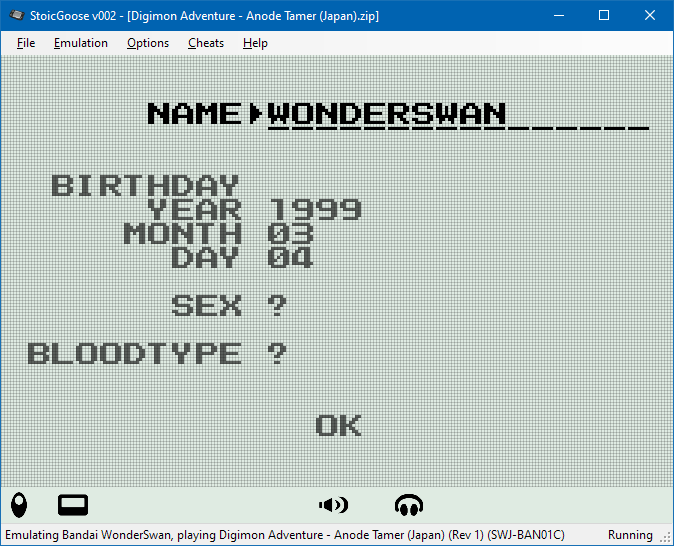
StoicGoose is an open-source, in-development emulator for Bandai WonderSwan, WonderSwan Color, and SwanCrystal written in C# using .NET 6.0. It provides a Windows Forms front-end for playing games and a Dear ImGui GLWindow build intended for debugging and disassembly.
WHY IT MATTERS
Why StoicGoose matters
StoicGoose targets the Bandai WonderSwan family (including WonderSwan Color and SwanCrystal), systems that have relatively few modern emulators with active development. Its codebase is written in managed C# and exposes debugging tools (disassembly, breakpoints, ImGui debugger) alongside a player-focused WinForms build, which can help developers and preservationists inspect hardware behavior in detail.
BEST FOR
Best for
Users who want a Windows-native (.NET) WonderSwan/WonderSwan Color emulator with an integrated debugger or developers who want a C# codebase to read, extend, or use as a reference implementation. It is not a finished, feature-complete, widely compatible emulator but is usable for testing and debugging games in many cases.
The people behind StoicGoose
History & status
StoicGoose is hosted on GitHub and described by its author as a work-in-progress WonderSwan and WonderSwan Color emulator. The repository documents build instructions, required NuGet packages, two main build flavors (StoicGoose WinForms for playing; StoicGoose.GLWindow for debugging), and optional support for WonderSwan bootstrap ROMs. The project lists .NET 6.0 and OpenGL 4.0 as runtime requirements and includes assets and No-Intro DAT data for game lists. The repository shows active development history on GitHub and includes a Releases page for downloadable builds. Because development is ongoing, compatibility and feature completeness vary; consult the repository for current issues and build details.
What StoicGoose supports
- Windows (WinForms player build)
- Linux (ImGui debugger via WSL/experimental)
- .NET 6.0 runtime required
- GPU with OpenGL 4.0 or later (for rendering)
- XInput controllers supported in the WinForms build
Download and availability
OFFICIAL DOWNLOADS
Get StoicGoose
Official builds and release assets (when available) are published on the project's GitHub Releases page. Source code is available in the main repository for users who prefer to build from source.
Get StoicGoose ↗DOCUMENTATION
Official documentation
Read the official configuration, compatibility, and troubleshooting material before changing advanced options.
Read official documentation ↗StoicGoose setup guide
Setup note: Concise, emulator-specific setup and usage steps for StoicGoose. This assumes you want the WinForms player build on Windows; building from source and running the ImGui debugger are covered after the quick start.
- 1) Requirements: Windows: Windows 10 or later, .NET 6.0 Desktop Runtime, Visual Studio (for building) if compiling. GPU drivers that support OpenGL 4.0 (NVIDIA GeForce 400 series or later, Radeon HD 5000 or later, or modern Intel GPUs). Optional: XInput-compatible controller and WonderSwan bootstrap ROMs (bootstrap ROMs are supported but not bundled; they must be obtained separately and are optional).
- 2) Download an official release (quick start): Open the StoicGoose GitHub Releases page and download the latest Windows build asset if present. Extract the archive to a folder. Ensure the .NET 6.0 Desktop Runtime is installed. Run the executable from the extracted folder; the WinForms front-end is the player-oriented build and supports shaders and XInput controllers.
- 3) Optional: Add WonderSwan bootstrap ROMs: StoicGoose supports optional WonderSwan/WonderSwan Color/SwanCrystal bootstrap ROMs (not required). If you provide them, confirm their MD5 hashes match the exact values documented in the repository to ensure correct files. Do not expect the emulator to include any commercial game ROMs or firmware; these must come from your own legally obtained backups.
- 4) Running games: From the WinForms UI, use the file > open (or equivalent) game loader to select a WonderSwan ROM file. The WinForms build supports shaders (dot-matrix and color shaders are included in repository assets). Configure controller input via the settings and use XInput controllers or keyboard mapping. If a game does not start, check the log output and ensure required runtime dependencies and GPU drivers are present.
- 5) Building from source (Windows): Install Visual Studio Community 2022 (or another .NET-capable IDE), clone the StoicGoose repository, and open StoicGoose.sln. Restore NuGet packages (.NET 6.0, OpenTK, ImGui.NET, OpenAL-Soft, Newtonsoft.Json, Serilog, etc.). Build the StoicGoose WinForms project for Release to produce the player executable. Follow any repository-specific build notes in README.md.
- 6) Using the ImGui GLWindow debugger (advanced / Linux/WSL): The StoicGoose.GLWindow build is meant for debugging and disassembly and is available as a separate project within the repository. On Linux this has only been tested under WSL; the WinForms UI does not work on Linux. Build the GLWindow project with dotnet build (net6.0) and run the resulting DLL with dotnet to launch the debugger UI. Consult the README for debugger-specific controls, breakpoint setup, and disassembly windows.
- 7) Troubleshooting & logs: If the emulator fails to run, check that .NET 6.0 Desktop Runtime is installed and that your GPU drivers provide OpenGL 4.0+. Inspect the Serilog-produced logs (console/file per configuration) and the GitHub Issues on the repository for known problems and workarounds. For build errors, ensure required NuGet packages are available and the solution is built targeting net6.0.
Software reminder: StoicGoose does not include commercial game ROMs, BIOS, or firmware. If you choose to use WonderSwan bootstrap ROMs they must be sourced separately and legally; verify hashes against those listed in the repository.
Sources and further reading
Detailed guides and tutorials
Explore step-by-step guides for StoicGoose as they are published.