 Retro Replay Retro Gaming History, Reviews & Emulation

Switch 2 emulation is already delivering playable commercial games and encouraging speeds. Mario Kart World appears in 60-fps captures, players report smooth sessions in Pokémon Pokopia, and Lichii is making rapid progress with the new Ocarina of Time. Compatibility still varies by build and hardware, but this is well beyond a collection of boot screens.
Research snapshot: November 13, 2026. We checked the repositories, release assets, developer documentation, and public reports linked below. Gameplay results belong to their named testers and creators. Builds mentioned here are a dated reference.
Jump to a project or setup guide (click to expand)
Which Switch 2 projects are actually out there?
A public repository, a downloadable application, and a game working well are three separate milestones. This table records what we could verify at each project’s own home.
| Project | Public snapshot | Platforms or current scope | Where it fits |
|---|---|---|---|
| Eglantine | November 12 daily build | Windows x64, Linux x64/ARM64, Apple silicon macOS assets | A main desktop starting point. Still very experimental. |
| Lichii | Build 177, November 13 | Windows, Linux, macOS packages | Busy compatibility work, especially visible around Ocarina of Time. |
| PokeDinner | 2.7.7 Windows experiment; 2.5.0 has broader assets | Platform availability changes by release | Pokémon-focused, with fixes for other games. Read the individual release notes. |
| Fritchii | v5.8.4 returned by GitHub during our check | Windows x64 | Lichii-derived. Public access was inconsistent across our checks. |
| SmileyTatsu’s Eglantine | November 8 experimental merge build | Windows and Linux assets | Texture decoding, memory, and game-specific experiments. |
| notsapinho’s Eglantine | Build 24, November 7 | Windows x64, Linux x64/ARM64 | PGO builds with explicit CPU and Linux requirements. |
| Chungus Emulation | 0.2.0 beta, November 2 | Linux AppImage | Linux-tested fork with two performance presets. |
| rdenno’s Eglantine | November 12 Hyrule dynamic-FPS test | Windows assets in that build | Branch-specific testing, not a general stable release. |
| Orchid | No README or releases available in the named repository | No current package verified | An older AMD-focused recommendation we cannot presently turn into a download guide. |
| Takoroka’s Eden-NX2 | October 29 release | Windows x64 tested by its author | An early starting point, separate from official Eden releases. |
| Eden SX2A | Final 0.3.2, November 2 | Unmaintained Android experiment | Historical downloadable work, not an active phone recommendation. |
| nxnative | Public source and per-game notes; no release packages | Apple silicon native execution/translation; Switch 2 testing documented on Mac | A porting pipeline, not another emulator ZIP. |
| oboromi | Active foundation; older 2025 prereleases still listed | Rust core and Qt debugging frontend | Cannot currently run commercial games or firmware. |
| NeXo2 | Public source; no release assets found | Homebrew-focused implementation | Commercial games are not supported. |
Why Switch 2 emulation progressed so quickly
Eglantine builds on Eden, yuzu, and Sudachi; Lichii builds on that work in turn. Existing CPU translation, graphics, loaders, controller support, and system-service implementations gave these forks a substantial starting point.
Switch 2 support still required new work. Eglantine’s early development notes document unsupported ARM instructions, executable-metadata changes, missing services, and graphics-initialization differences. Resolving those boot blockers opened the way for rendering and performance improvements. Reaching gameplay, rendering correctly, and sustaining a good frame rate remain separate compatibility milestones.
High-level emulation replaces the console services a game calls with host implementations, while the CPU translator handles guest instructions. Graphics work is another substantial component: the emulator must interpret the game’s GPU commands, translate shaders, and keep textures and buffers synchronized. Progress in one layer can expose a failure in another. A successful launch therefore does not tell you whether a later effect, loading transition, or synchronization operation is implemented correctly. The inherited code helps across these layers, but Switch 2 changes still need title-by-title testing.
Eglantine: a main desktop starting point
Eglantine is one of the main active desktop projects. Its current home is the Eglantine Community organization; older Djihads80 links redirect there.
The November 12 daily release includes Windows x64, Linux x64/ARM64, and Apple silicon macOS packages. Some platforms offer profile-guided optimization (PGO) variants. PGO changes compiler optimization, not the game’s compatibility rating. Match the package to your operating system and CPU architecture.
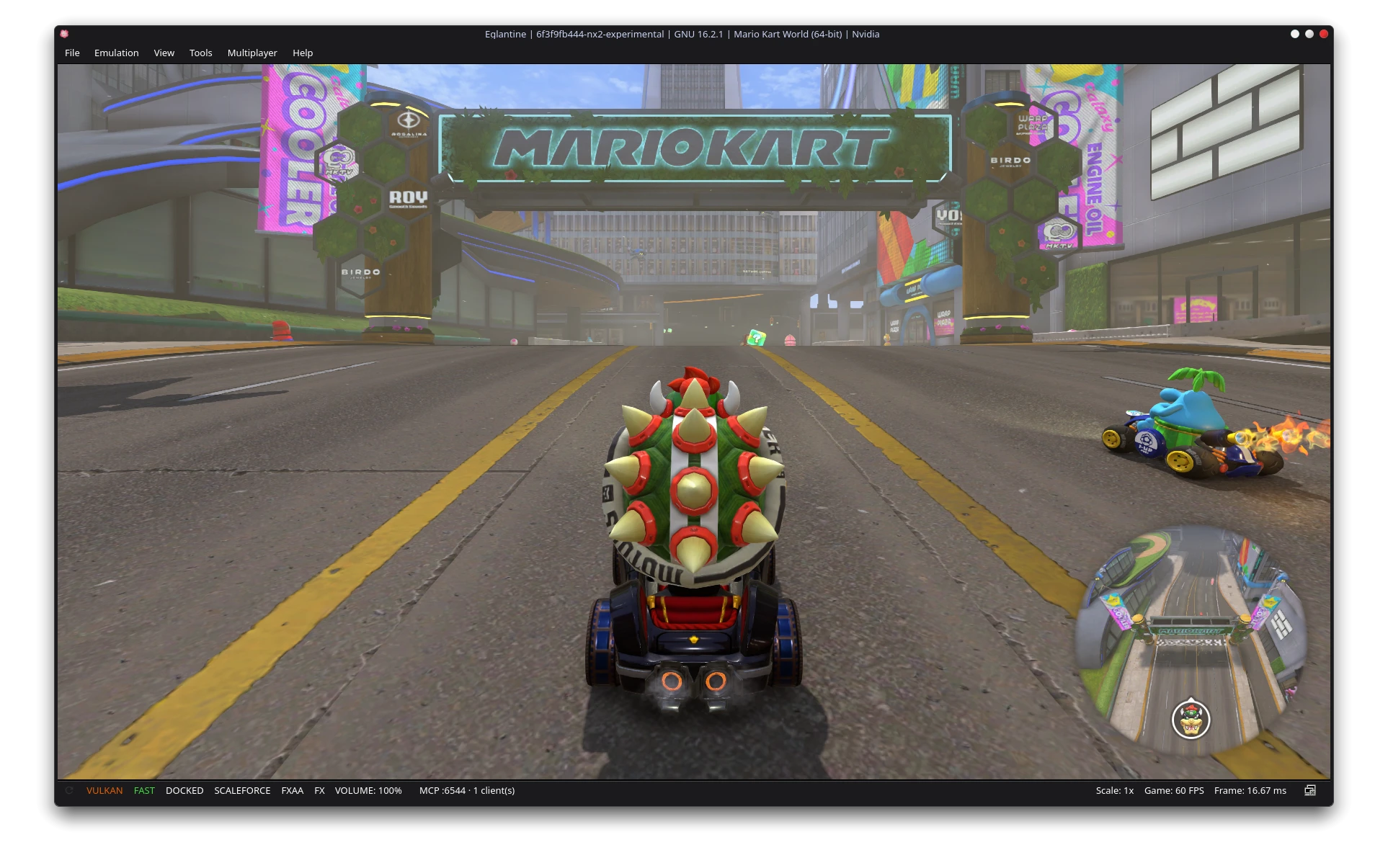
The developers report Mario Kart World reaching good speeds on suitable configurations, with more variable Splatoon Raiders results. Contributor kraibse’s texture-timestamp fix addresses minimap and image-tracking problems; its accompanying capture shows the 60-fps starting-grid scene above. Fixes circulate between Eglantine and its forks, so their differences often come down to specific patches and release timing.
The texture-timestamp problem is a useful example of work that affects both appearance and correctness. Games can update image data through CPU writes and GPU rendering. When the emulator selects a stale version, a minimap or depth effect can display incorrectly even while the frame-rate counter looks healthy. kraibse’s investigation tracks when images were updated so that a later GPU result is not displaced by older data. This kind of cache-coherency fix is different from lowering resolution or enabling an upscaler: it changes which image data the game actually receives.
Lichii: playable Zelda and active renderer development
Lichii’s progress with The Legend of Zelda: Ocarina of Time is one of the clearest demonstrations of playable Switch 2 emulation. Footage shows substantial gameplay, while changelogs track the shader, synchronization, and rendering fixes behind it.
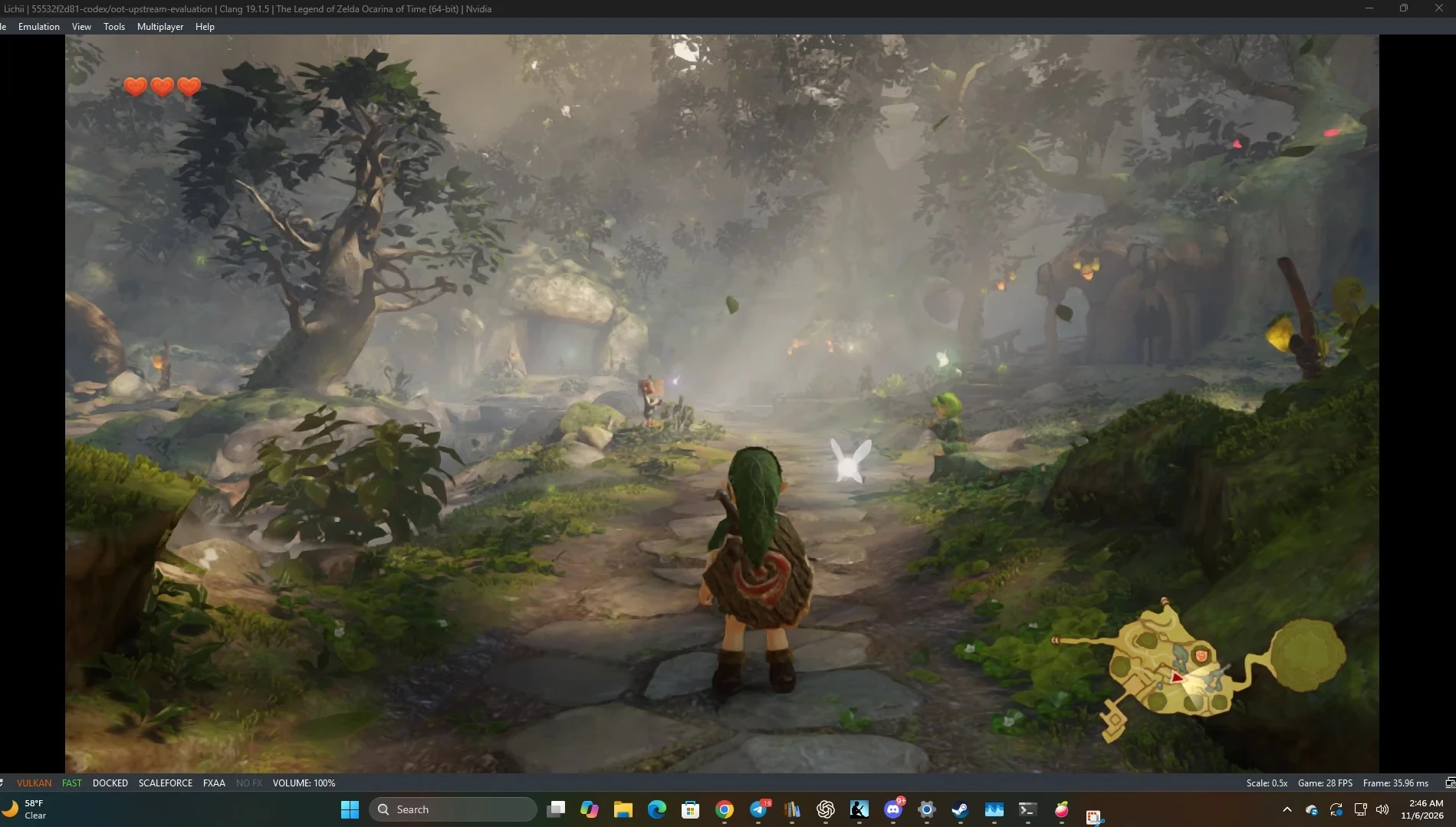
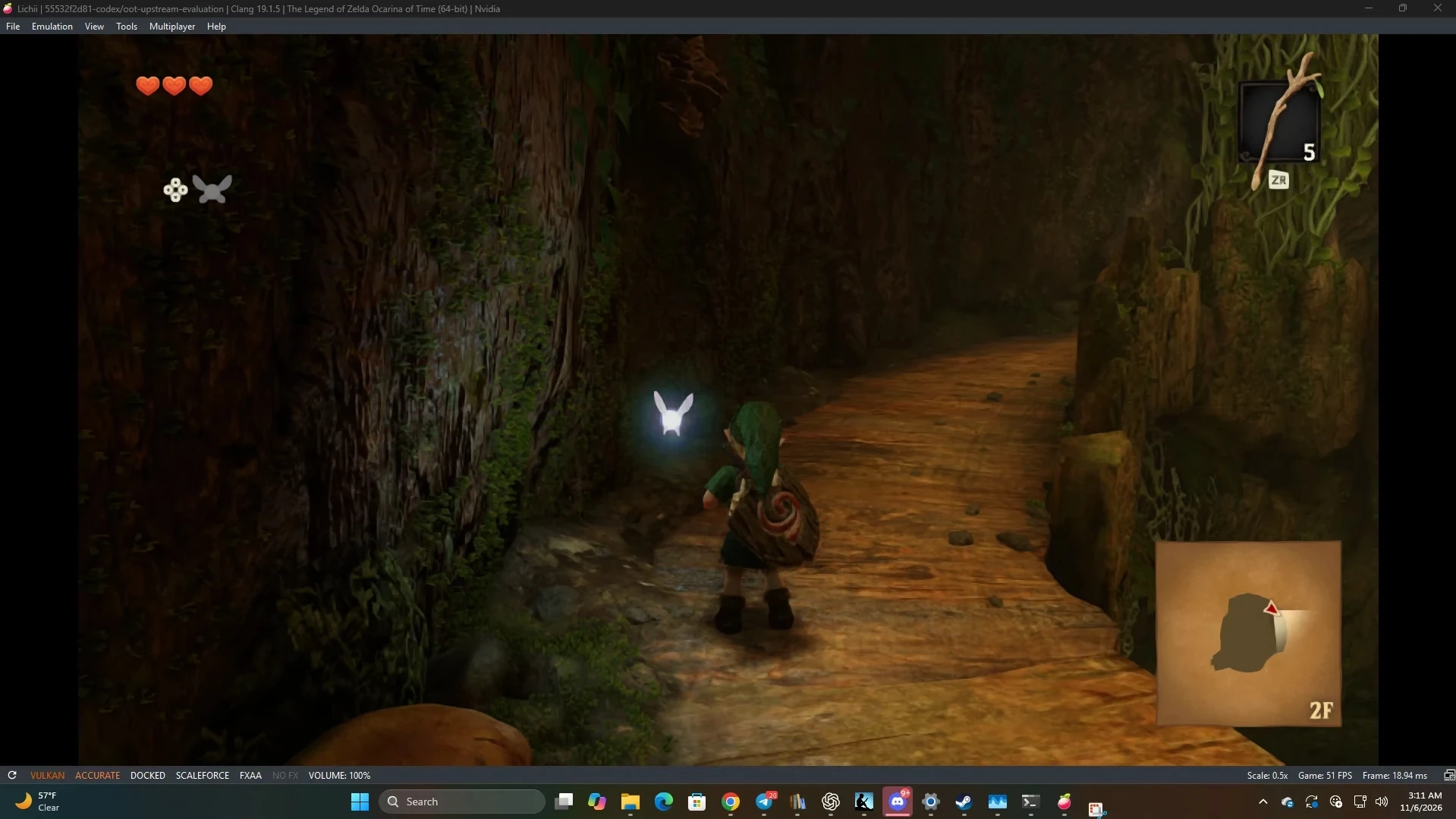
juliptree’s early captures show 28 fps outdoors in Fast mode and 51 fps inside the Great Deku Tree in Accurate mode, alongside overexposure in another forest view. These are different workloads and settings, rather than a direct mode comparison. Original test.
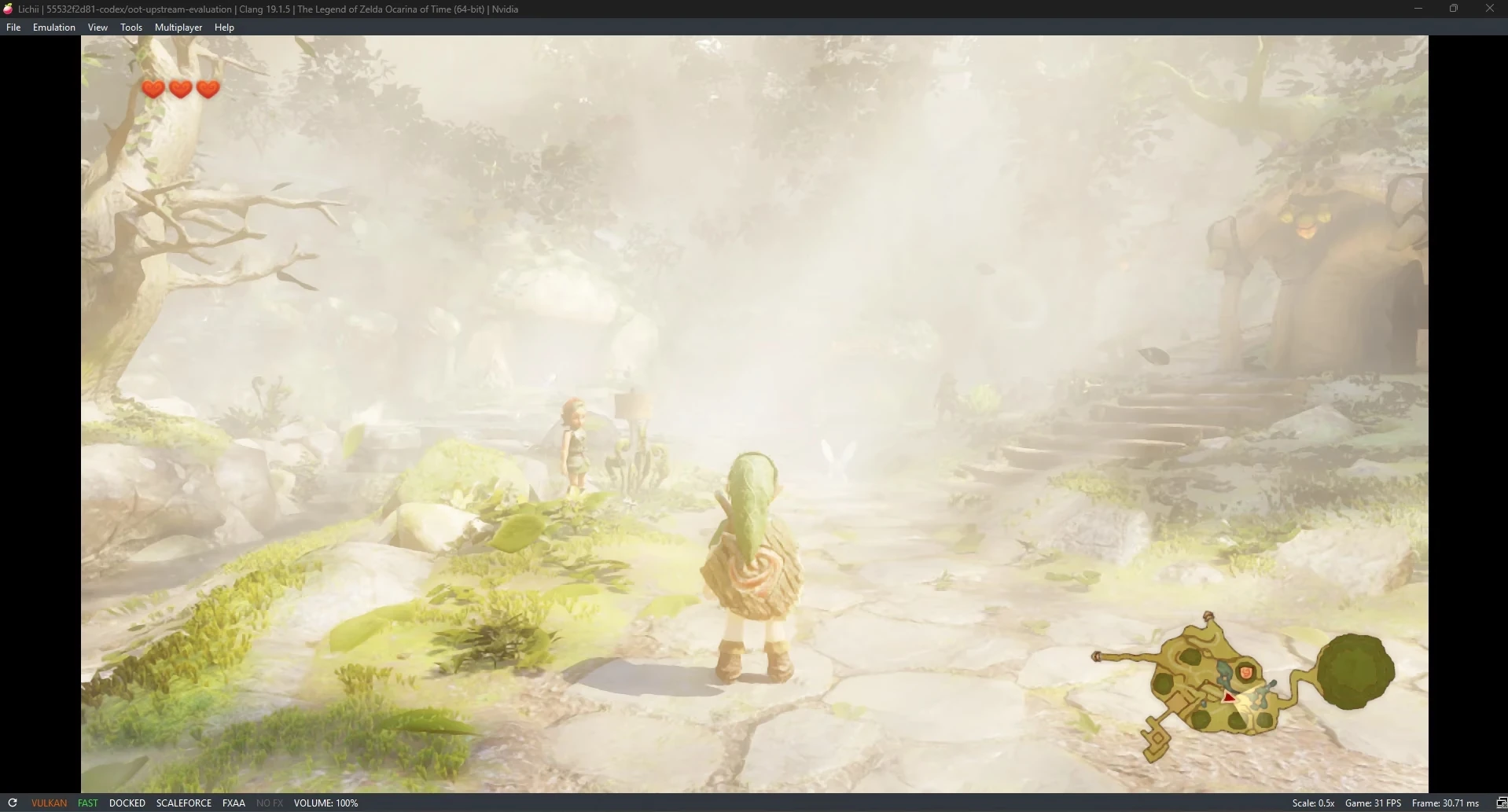
Build 177, released November 13, addresses floating distant foliage and a Hyrule Field performance regression associated with NVIDIA shader compilation. Current reports also identify flickering and a GTX 1070 cutscene crash, making the exact build and GPU important when comparing results.
Current Lichii uses a separate profile, with an import wizard for existing installations. The setup section below covers migration. Download from the project’s GitHub releases; lichii.zortos.me hosts compatibility reports. The maintainers warn about an unrelated download site in issue 545.
akakevin’s November 5 clip captures the early performance gains. Our earlier Ocarina of Time report follows that first week of footage and fixes.
Build 177 also illustrates why shader fixes are GPU-specific. The developers changed how foliage shader helpers were generated after NVIDIA compiler behavior caused incorrect distant geometry and slower rendering in a test scene. Returning to the earlier form addressed that case, with a trade-off in cold compilation time. That is a more informative result than a generic optimization claim: it identifies the affected rendering path, the driver compiler involved, and a reason startup work might increase while gameplay improves. Keep that distinction in mind when comparing a first launch with an already cached session.
PokeDinner: Pokopia performance and game-specific builds
Pokémon Pokopia is PokeDinner’s main focus, with fixes for missing objects, sky rendering, and reflections. The fork also incorporates work for other titles: its 2.0.0 notes report Mario Kart World reaching gameplay.
Version 2.5.0 has Windows, Linux, and Apple silicon Mac assets. Its notes flag uneven Donkey Kong performance and instruct users to enable only one dynamic-FPS or 30-fps lock. Later 2.7.7 is a Windows-only Ocarina experiment, warns against AMD use, and leaves other games untested. Its matching code is promised for a later stable release; do not assume the older public source matches that binary.
“The game is butter smooth and so far found no bugs or glitches in my RTX 5070.”
Reddit user u/willowwhisp000, describing PokeDinner.
That player identifies a Core Ultra 9, 32 GB of RAM, and an RTX 5070, and confirms Pokopia was the only game tested. It is an encouraging report of smooth gameplay on a capable PC, with a useful hardware reference.
PokeDinner’s release notes also separate visual progress from timing problems. A corrected sky or newly visible object can improve compatibility without improving frame pacing. Donkey Kong’s reported uneven speed is a separate issue from whether terrain renders correctly. Likewise, the availability of a Mac asset in 2.5.0 does not mean the Windows-only changes in 2.7.7 were built or tested for macOS. For a useful comparison, record the full release version rather than only the fork’s name, and retain the previous package when a newer release targets a different game.
Fritchii: Windows tuning and uncertain availability
Fritchii is a Lichii-derived Windows fork associated with Ocarina of Time tuning. The v5.8.4 release record, dated November 11, describes save-copy fixes, automatic backups, and per-game DLSS settings. Its executable is still named lichii.exe.
Repository availability was inconsistent during our checks, and community posts reported its withdrawal. The reason remains unconfirmed. Use the maintainer’s repository if available, rather than assuming a similarly named download site is a replacement. Back up saves before migrating between forks.
Other desktop forks and their technical focus
SmileyTatsu’s Eglantine: the November 8 experimental merge build combines upstream changes with texture-decoding and cache-memory work. That build provides Windows and Linux assets. Release notes.
notsapinho’s Eglantine: build 24 uses PGO, requires AVX2 for x64 packages, and requires glibc 2.39 or newer for its Linux AppImage. The Windows archive bundles its DLLs. Requirements.
Chungus Emulation: Linux-tested version 0.2.0 fixes GPU-generated drawing arguments being overwritten by stale data. Its Recommended and experimental Maximum presets trade rendering reliability against more aggressive GPU execution. Most documented testing uses an RTX 3070 and Core i5-11400F. Documentation.
rdenno’s Eglantine: the November 12 Hyrule dynamic-FPS branch targets game timing. It is a replaceable test build rather than a general release. Branch builds.
ZendNevs: version 2.0.5 advertises merged fixes and frame generation, with Windows and source archives. Its combined changes have not been independently validated here. Release record.
Orchid: previously described as AMD-focused, but the named repository had no available README or release packages on November 13. We could not verify a current download.
The differences between these builds are often below the settings menu. PGO uses execution profiles to guide compiler decisions about frequently used code paths; AVX2 is an instruction-set requirement of particular x64 packages. Neither guarantees a faster renderer for every game. Linux dependencies matter independently: an AppImage with a glibc requirement can fail before the emulator reaches its own interface. Check those host requirements before diagnosing a game problem, and keep the package’s runtime libraries together. Mixing files between forks makes it harder to establish which build produced a result.
nxnative: native execution on Apple silicon
nxnative runs game code on Apple silicon, implements the expected host services, and translates graphics for Metal. It is a native execution and translation pipeline, rather than a conventional emulator.
Switch 2 validation is documented on Mac. Its broader original-Switch phone support should not be treated as confirmation of Switch 2 compatibility on iPhone or iPad. Separate Mario Kart World and Pokopia profiles describe per-game work. There are no ready-made GitHub release packages in this snapshot; building requires the specified Mac toolchain and your own game files.
The native route changes the CPU side of the workload, but it still needs compatible system services and graphics behavior. Translating the rendering path to Metal, supplying the expected environment, and configuring a supported game remain substantial parts of the process. This is why nxnative keeps separate game profiles rather than treating every executable as interchangeable. Its Mac build command produces an application around the supplied game files. It is not a general compatibility guarantee for other games using similar hardware or for a different Apple device.
Android: Eden SX2A’s final experimental release
moceure’s unofficial Eden SX2A reached its final release, 0.3.2, on November 2. It is no longer maintained and is not supported by the official Eden team.
Earlier testing used a Snapdragon SM8850, Adreno 840, and 16 GB of RAM. The notes document low frame rates and memory pressure. The final release directs users toward Banana Native, but that linked repository returned 404 during our check. SX2A remains a documented Android experiment, with limited device testing and no ongoing maintenance.
Research projects: oboromi and NeXo2
oboromi uses a Rust core and Qt 6 debugging frontend, with work targeting ARMv9 CPU support and NVIDIA SM86 GPU behavior. Its current status is explicit:
“oboromi cannot currently run commercial games or firmware.”
The oboromi developers, current project README.
The listed Dynarmic prerelease dates to October 2025 and does not establish current commercial compatibility.
NeXo2 documents homebrew progress, including NZ:P and sample applications. Its current architecture description includes a Maxwell GPU implementation, and commercial games remain unsupported. We found no GitHub release assets. Both projects belong on the research watchlist rather than the playable-commercial-game list.
Eden, Eden-NX2, and Eden-NS2
Official Eden covers original-Switch emulation. Independent Switch 2 forks have separate maintainers and support.
Takoroka’s Eden-NX2 has an October 29 Windows release with missing-mesh and shader warnings. Its repository did not report itself archived, although only that dated release was found. 0x2593’s Eden-NS2 is a different, archived repository with no release packages in our snapshot. Eden SX2A is the Android experiment covered above.
Short setup guides
Use your own game files and any console files the selected project requires. None of these projects supplies commercial games, keys, or firmware. These steps begin after you have those files; they do not require downloading an unknown “complete pack.”
Eglantine on Windows, Linux, or Mac
- Open the maintainer’s releases page. Match the archive to your operating system and architecture. Pick a normal packaged build before experimenting with a branch test.
- Extract the entire Windows archive, or follow the package instructions for Linux or macOS. Keep the build’s files together. Do not mix a new executable with DLLs from an older fork.
- Read that build’s notes for supported game formats. Some Switch 2 paths use an unpacked folder containing
exefsandromfs; newer releases may accept containers too. Original-Switch NSP instructions do not automatically apply to every Switch 2 dump. - Configure the controller, start with default graphics settings, and test one game. Record the build and game update before changing anything. Keep a separate save backup.
The inherited quick start explains the general interface, including the Tools menus for keys and firmware. Some wording still names Eden. Follow the current release’s Switch 2 notes when file handling differs.
Lichii, especially if you already use Eden
- Get the package from Lichii’s GitHub releases. On Windows, extract it fully and launch
lichii.exe. - Close the old emulator and back up its data. In the first-run import wizard, Keep Old Data copies the source instead of deliberately linking the two profiles. Check the destination and saves before playing.
- Configure input and load your own game in a supported format. Leave advanced options at their defaults for the first test.
- Compare your exact game, GPU, and build with the community reports. If you submit a report, review its contents and include the settings that produced the result.
PokeDinner and Chungus
For PokeDinner, begin at the release list, then read the note for your game before choosing the platform asset. The 2.7.7 Ocarina experiment is Windows-only and carries an explicit AMD warning. Do not enable competing frame-rate fixes. Keep one working configuration before testing another.
For Chungus on Linux, get its 0.2.0 AppImage, make that downloaded file executable through its properties or chmod +x, and launch it. Choose Recommended first. Maximum is experimental, with the rendering and freezing risks its documentation describes.
Takoroka’s original Windows experiment
The October 29 release specifies Windows 10/11 x64, the x64 Visual C++ runtime, a Vulkan GPU with at least 8 GB of VRAM, and at least 16 GB of system RAM. Those are that release’s requirements. Extract its Windows package, run eden.exe, then use File > Load File to select exefs\main inside your unpacked game folder. Its missing-graphics warnings still apply.
nxnative on an Apple silicon Mac
The current requirements specify macOS 26.6 or later, Xcode 27.2, and additional build tools. Follow its installation commands rather than an older phone guide. For the Switch 2 path, use a supported game’s own NUP file or unpacked folder. The documented command takes this form:
python3 scripts/build_ipa_from_nsp.py ~/Games/DonkeyKongBananza.nup --platform mac-appThe script’s name mentions NSP, but this command takes a NUP. The documented path does not require prod.keys for these already unpacked inputs. Read the matching game profile before spending time on a build, and keep Mac validation separate from untested phone output. Switch 2 instructions.
Performance: frame rates, shaders, and hardware
The strongest reports already show playable speeds, including 60-fps scenes in Mario Kart World and smooth Pokopia sessions. Useful comparisons need the emulator build, game update, CPU, GPU, driver, resolution, and cache state. Sustained frame times tell you more than a counter in a single capture.
Rendering regressions can still affect otherwise fast builds. AugustDeer’s Linux/NVIDIA report shows Mario Kart World scenery disappearing while driving quickly and identifies an earlier release candidate as working better.
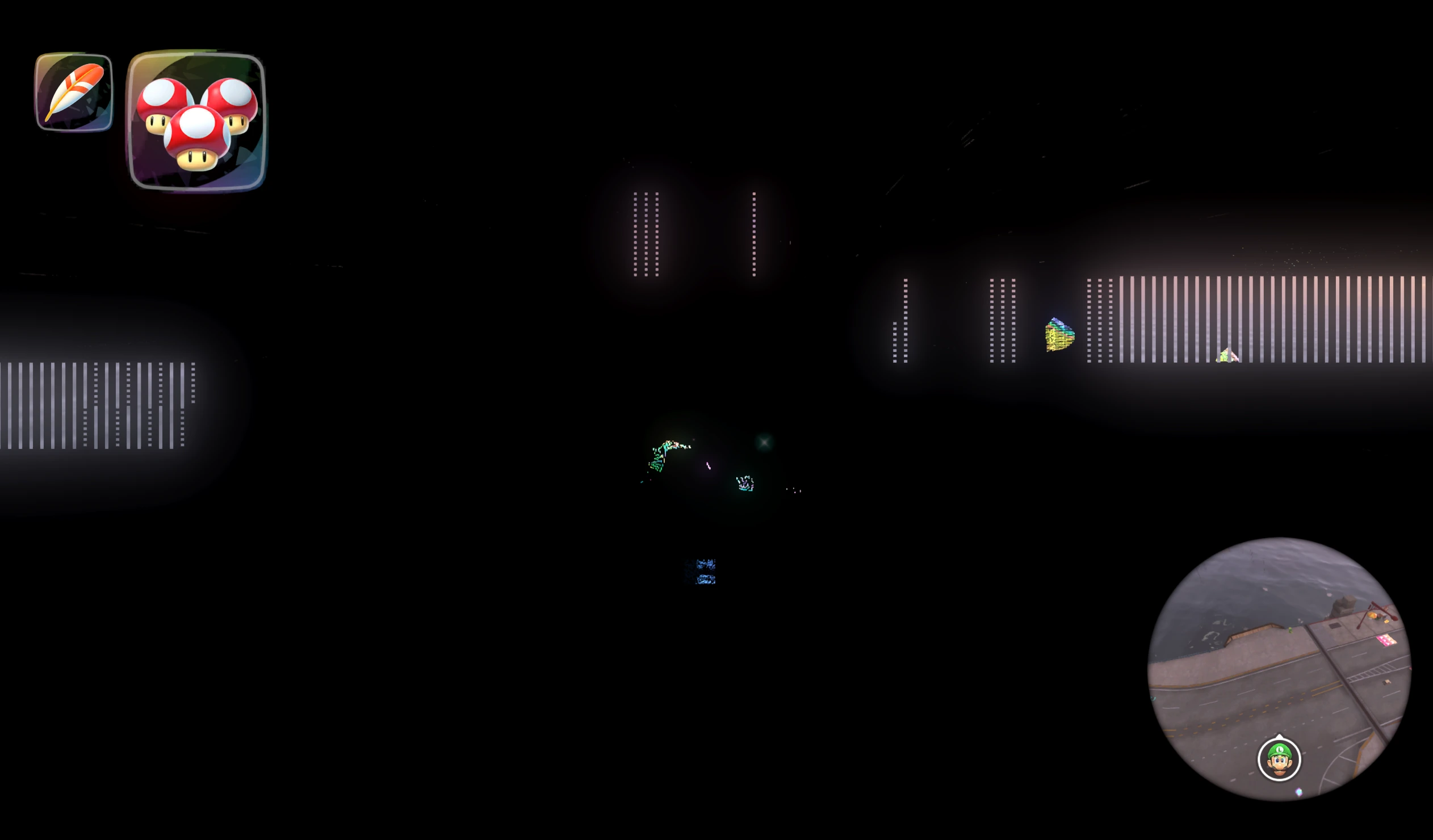
Shader compilation can stall the first appearance of an effect. A warm cache reduces repeat work, provided the cache is saved correctly. dubla-dor’s report identifies a cache-directory failure that repeatedly triggered pipeline rebuilding on an RTX 5070 Ti.
Stutter is not exclusive to one GPU vendor. A Fritchii discussion begins with an RX 7800 XT/Ryzen 7 7700X report, followed by this NVIDIA result:
“I’m getting them on an rtx 3080ti. I thought this version was supposed to preload all the shaders but it’s still building shaders every second I’m playing.”
Reddit user u/bufket, replying in the Fritchii stutter discussion.
Separately, diafebus documents a build-160 GPU reset on an RX 6950 XT with a specific RADV driver. These reports are useful when their hardware and software match yours.
Frame generation increases displayed output without necessarily increasing the game’s simulation rate. Test it separately from baseline rendering. Dynamic-FPS patches also differ from simple frame caps: games with frame-dependent timing need the correct fix, and competing patches can interfere.
Frame time is particularly helpful when average fps hides interruptions. At 60 fps, evenly delivered frames are about 16.7 milliseconds apart; at 30 fps, the interval is about 33.3 milliseconds. A long compilation stall can remain obvious even if the counter quickly returns to 60. Compare the same route with cold and warm caches, and note whether generated frames are included in the displayed number. Resolution changes primarily affect rendering workload, while CPU translation, service synchronization, and compilation can remain limiting factors even at a lower resolution.
Getting a useful baseline
Test one repeatable route with default graphics settings and frame generation disabled. Check audio, cutscenes, input, and saves, then change one setting at a time. Keep a working build and external save backup. Retain compatible shader caches rather than rebuilding them unnecessarily.
Memory settings need similar care. Guest memory allocation, host system RAM, GPU memory, and pagefile or swap capacity are different resources. Increasing one does not automatically compensate for pressure in another. Use the selected release’s documented configuration rather than applying an old fork’s settings globally. When reporting a crash, include the exact build, game update, driver, memory configuration, and a reproducible scene. That information makes reports comparable and helps developers distinguish a rendering regression from an out-of-memory failure or a broken shader-cache path.
Where to start
Windows and Linux: start by checking Eglantine and Lichii against your game and GPU. Both have active development, public packages, and detailed issue tracking. PokeDinner is worth comparing for Pokopia; choose the release intended for your platform and title.
Apple silicon: compare desktop emulator builds with nxnative’s source-built approach. Android: SX2A is unmaintained, while oboromi and NeXo2 remain research projects without commercial-game support.
The exciting part is already established: commercial Switch 2 games are playable outside the console, and some configurations deliver good speeds. Development is now addressing the details that make those results more consistent across games and hardware: shader compilation, frame pacing, memory use, and rendering accuracy.
More from Retro Replay
- Switch 2 emulation and the new Ocarina of Time
- Eden emulator profile and setup guide
- Browse the emulator database
- Our review of Ocarina of Time on Switch 2
Sources and further reading
- Eglantine repository. Project ancestry and current status.
- Eglantine November 12 assets. Platform packages checked for this snapshot.
- Early Switch 2 investigation. Boot blockers and implementation history, not current compatibility.
- kraibse’s texture fix. The starting-grid screenshot and technical investigation.
- AugustDeer’s scenery regression. Linux/NVIDIA capture of missing scenery.
- dubla-dor’s cache report. Repeated pipeline compilation in one Windows setup.
- Lichii repository. Profile migration, release links, and compatibility reporting.
- Lichii build 177. November 13 changes and shader fixes.
- juliptree’s Zelda test. Original forest, washout, and interior captures, with different scenes and modes.
- Lichii flickering report. A current-build regression report.
- Lichii cutscene crash. A user’s GTX 1070 result.
- diafebus’ AMD/RADV incident. Detailed build-160 GPU reset report.
- PokeDinner release history. Per-game changes, platform assets, and the 2.7.7 experiment.
- Fritchii v5.8.4. Windows and save-management notes. Access was inconsistent during this check.
- SmileyTatsu releases. Experimental merge details.
- notsapinho build 24. PGO, AVX2, and Linux requirements.
- Chungus Emulation. Linux testing, presets, and limitations.
- rdenno branch builds. Game-specific timing tests.
- ZendNevs releases. Release-author claims and assets.
- Orchid repository. Availability check only; no README or releases found.
- Takoroka’s Eden-NX2. Original Windows instructions and limits.
- Archived Eden-NS2. Separate from Takoroka’s fork and official Eden.
- Eden SX2A final release. Explicit end-of-maintenance notice.
- Eden SX2A phone testing. Hardware context and limitations.
- nxnative documentation. Native pipeline, tool requirements, and per-game profiles.
- oboromi. Research foundation and commercial-software limitations.
- NeXo2. Current homebrew scope.
- Modern Vintage Gamer’s discussion. Embedded video by its named creator.
- FunkyScott47’s early overview. Embedded early-scene overview.
- Unreal Gaming PC’s Zelda recording. A creator’s recording, not our benchmark.
- akakevin’s November 5 clip. Original performance claim embedded above.
- Pokopia player discussion. Attributed experience and hardware context.
- Fritchii stutter discussion. Individual AMD and NVIDIA experiences.
- Which Forks index. Discovery aid, checked against individual repositories.