 Retro Replay Retro Gaming History, Reviews & Emulation
GAME BOY COLOR EMULATOR
CAMLBOY
CAMLBOY is an open-source Game Boy emulator written in OCaml that runs natively (SDL2) and in the browser (compiled to JS/WASM). The project focuses on readable OCaml code, portability and being a benchmark target rather than maximum compatibility.
WHY IT MATTERS
Why CAMLBOY exists
CAMLBOY was created as an educational, readable Game Boy implementation in OCaml that can run in the browser and natively. It is intended to be maintainable, easy to read, and useful as a benchmark/implementation example for OCaml compile backends.
BEST FOR
What it's best for
Learning emulator internals from a modern OCaml codebase, running Game Boy (DMG) titles in-browser or natively for experimentation, benchmarking OCaml-to-WASM/JS backends, and as a base for further OCaml-based emulator work.

The people behind CAMLBOY
History and status
CAMLBOY is an actively developed repository on GitHub with extensive commits, tests and build tooling. The author documents design decisions and accompanies the project with blog posts describing implementation details. The README and repository describe goals and current limitations: the project passes several CPU instruction test ROMs and runs many games at playable frame rates. The README lists 'Game Boy Color mode' as a TODO item, so full GBC-mode emulation is not implemented according to project documentation. The emulator has been compiled to both JavaScript and WebAssembly targets; the README notes a transition to WASM. The repository contains native (SDL2) UI code as well as web UI code and headless benchmarking tools.
What CAMLBOY supports
- Game Boy (DMG) ROMs — CPU/test-ROM compatibility documented; Game Boy Color mode listed as TODO (not implemented).
- Web (browser) via compiled JS/WASM (web UI in repository)
- Native builds on desktop using SDL2 (Linux/Windows/macOS supported by SDL2)
- Headless benchmarking and test harnesses included
Download and availability
OFFICIAL DOWNLOADS
Get CAMLBOY
Official source, releases and prebuilt artifacts are on the project's GitHub. Source code, build instructions and releases are available from the repository and GitHub Releases page; web demo is published on the project's GitHub Pages site.
Get CAMLBOY ↗DOCUMENTATION
Official documentation
Read the official configuration, compatibility, and troubleshooting material before changing advanced options.
Read official documentation ↗CAMLBOY setup guide
Setup note: This setup guide follows the project's README and describes how to build and run CAMLBOY natively with the SDL2 UI and in the browser. It assumes you will build from source; CAMLBOY is distributed via its GitHub repository and releases.
- Prerequisites: Install OCaml toolchain (opam 2.1+ is required) and dune. For native builds you need SDL2 development libraries installed for your OS. For the browser build ensure Python (or another static web server) is available to serve the built web directory.
- Obtain the source: Clone the official repository: git clone https://github.com/linoscope/CAMLBOY.git and switch into the project directory.
- Set up the OCaml switch and dependencies: From the project root run: opam switch create . –locked –with-test then eval $(opam env). This uses the repository's pinned/opam lock files to create the proper environment.
- Build (native and web): Use dune to build: dune build. The repository contains bin/sdl2 for the native SDL2 UI and bin/web for the web UI. Native executable examples are built under _build/default/bin/sdl2/ and web artifacts under _build/default/bin/web/.
- Run native (SDL2) UI: After building, run via dune exec: dune exec bin/sdl2/main.exe — resource/games/tobu.gb (replace the example ROM path with your own test ROM). Command-line flags include modes such as default, withtrace and no-throttle as documented in the README.
- Run web UI (browser): After building the web target, serve the web directory and open it in a browser. Example from README: python -m http.server 8000 –directory _build/default/bin/web then open http://localhost:8000 in your browser. The web build is compiled to JS/WASM according to the repository notes.
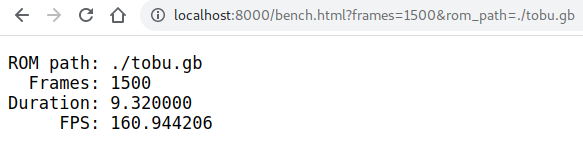
- Benchmarks and tests: The project includes headless benchmark tools and test suites. Native benchmark example: dune exec bin/sdl2/bench.exe — resource/games/tobu.gb –frames 1500. Run tests with dune runtest or run specific test suites (unit or rom_test) as described in the README.
- Notes on compatibility and limitations: CAMLBOY passes various instruction and timing test ROMs, but the README explicitly lists 'Game Boy Color mode' as TODO. Do not assume full GBC-mode support. The project also lists missing APU (audio) and some mapper features as TODO. Commercial games and BIOS/firmware are not included and must not be obtained from this project's distribution.
Software reminder: You must provide your own ROMs and any vendor firmware/BIOS required; CAMLBOY does not include commercial game ROMs or proprietary BIOS files.
Sources and further reading
Detailed guides and tutorials
Explore step-by-step guides for CAMLBOY as they are published.