 Retro Replay Retro Gaming History, Reviews & Emulation
NINTENDO 64 EMULATOR
cor64
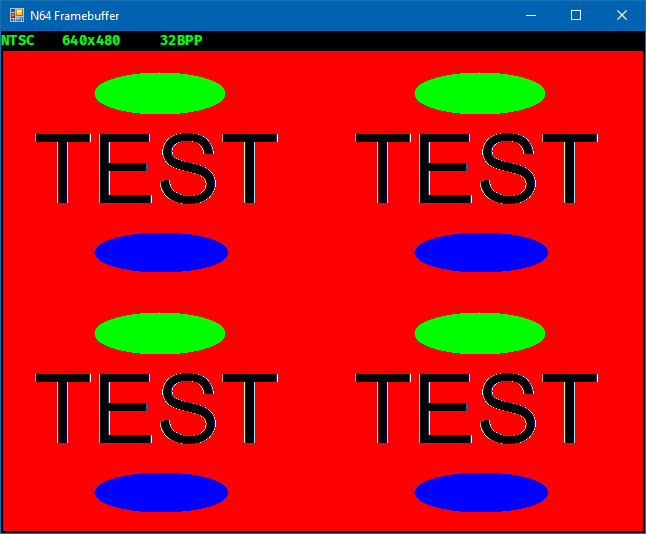
cor64 — a C#-based, in-development Nintendo 64 emulator hosted on GitHub. The project is a work-in-progress freetime implementation that targets .NET runtimes and provides build scripts and references for native libraries used by other N64 projects.
WHY IT MATTERS
Why this project exists
Author describes cor64 as a personal, work-in-progress N64 emulator written in C#. The repo references existing N64 emulation projects and test ROM collections as development resources, indicating the project is intended for research, learning, and experimental reimplementation rather than as a finished end-user product.
BEST FOR
Best fit for
Developers and tinkerers who want a C#/.NET-based codebase for studying or experimenting with Nintendo 64 internals, recompilation approaches, or building high-level tooling around an N64 CPU/RSP interpreter. Not recommended as a primary consumer emulator for full commercial-game compatibility at this time.

The people behind cor64
Project status & history
The project repository shows active source files and build scripts and is explicitly described in its README as a "work-in-progress freetime project." The repository contains build automation (nuke), references to .NET Framework / Mono and .NET Core 3.x+, and links to several N64 emulation resources (Project64, Mupen64Plus, Cen64, AngryLion RDP). The codebase includes scripts and notes for building on Linux (GLFW development libraries) and optional guidance for CppSharp on Ubuntu. The repository includes unit tests and about thirty commits, but the README and repository do not present cor64 as a completed, broadly compatible emulator — instead it is presented as an ongoing development effort.
What cor64 supports
- Windows (via .NET/.NET Framework)
- Linux (via .NET Core / GLFW)
- macOS (via .NET Core)
- Requires dotnet runtime or Mono for host execution
Download and availability
OFFICIAL DOWNLOADS
Get cor64
Official releases and any prebuilt artifacts are published on the project's GitHub Releases page. Source code and build scripts are available directly from the repository; building from source is the primary distribution path. Do not expect included commercial ROMs, BIOSes, or firmware in the release artifacts.
Get cor64 ↗DOCUMENTATION
Official documentation
Read the official configuration, compatibility, and troubleshooting material before changing advanced options.
Read official documentation ↗cor64 setup guide
Setup note: Setup requires a working .NET toolchain, the project's global dotnet tools (Paket and nuke.globaltool), and platform-specific native libraries on Linux. The README contains the canonical build/run commands and notes about test resources — follow those files in the repository for exact build steps.
- 1) Get the source: Clone the official cor64 repository (GitHub: bdragoncore/cor64). Use git clone to obtain the full tree so submodules and scripts are available.
- 2) Install prerequisites: Install a supported .NET runtime: either Mono/.NET Framework for Windows or .NET Core 3.x+ / .NET SDK for cross-platform builds. Install Paket and nuke.globaltool as global dotnet tools (the README lists these as required global dotnet tools). On Linux install GLFW development libraries (the README specifically lists GLFW for Linux builds).
- 3) Prepare native dependencies (optional/conditional): If you intend to use native plugins referenced by the project (for example Glide-related renderers), follow the repository notes: ensure fonts exist at the paths referenced (the README mentions /usr/share/fonts/truetype/freefont/FreeSans.ttf for a GlideN64 crash issue) and add built native libraries to LD_LIBRARY_PATH or your system ld configuration. The README also documents an involved procedure for building CppSharp on Ubuntu if you need that bridge.
- 4) Build with the project's automation: The repository includes build scripts and a simple invocation: run the nuke build tooling as described in the README (example: nuke Run). Unit tests run via nuke Test. Use the provided platform shell scripts (build.sh/run.sh/run_release.sh) for Linux/macOS workflows where present.
- 5) Running and testing: Follow the repository's test and development notes. The README references N64 test ROMs and other projects used for verification; do not expect commercial games or BIOS files to be bundled. Use test ROM sets you legally possess or public test ROMs listed in the project's references.
- 6) Troubleshooting common issues: If you encounter graphics plugin crashes, check for missing fonts and native library path issues as noted in the README. On Linux ensure GLFW dev libraries are installed. For any missing dependency errors, inspect the build scripts and paket.lock/paket.dependencies included in the repository.
Software reminder: cor64 does not ship commercial game ROMs, firmware, or Nintendo BIOS files. Obtain those files only from legal sources you control; the project provides only emulator code and build instructions.
Sources and further reading
Detailed guides and tutorials
Explore step-by-step guides for cor64 as they are published.