 Retro Replay Retro Gaming History, Reviews & Emulation
NINTENDO DS 3DS 2 EMULATOR
dust
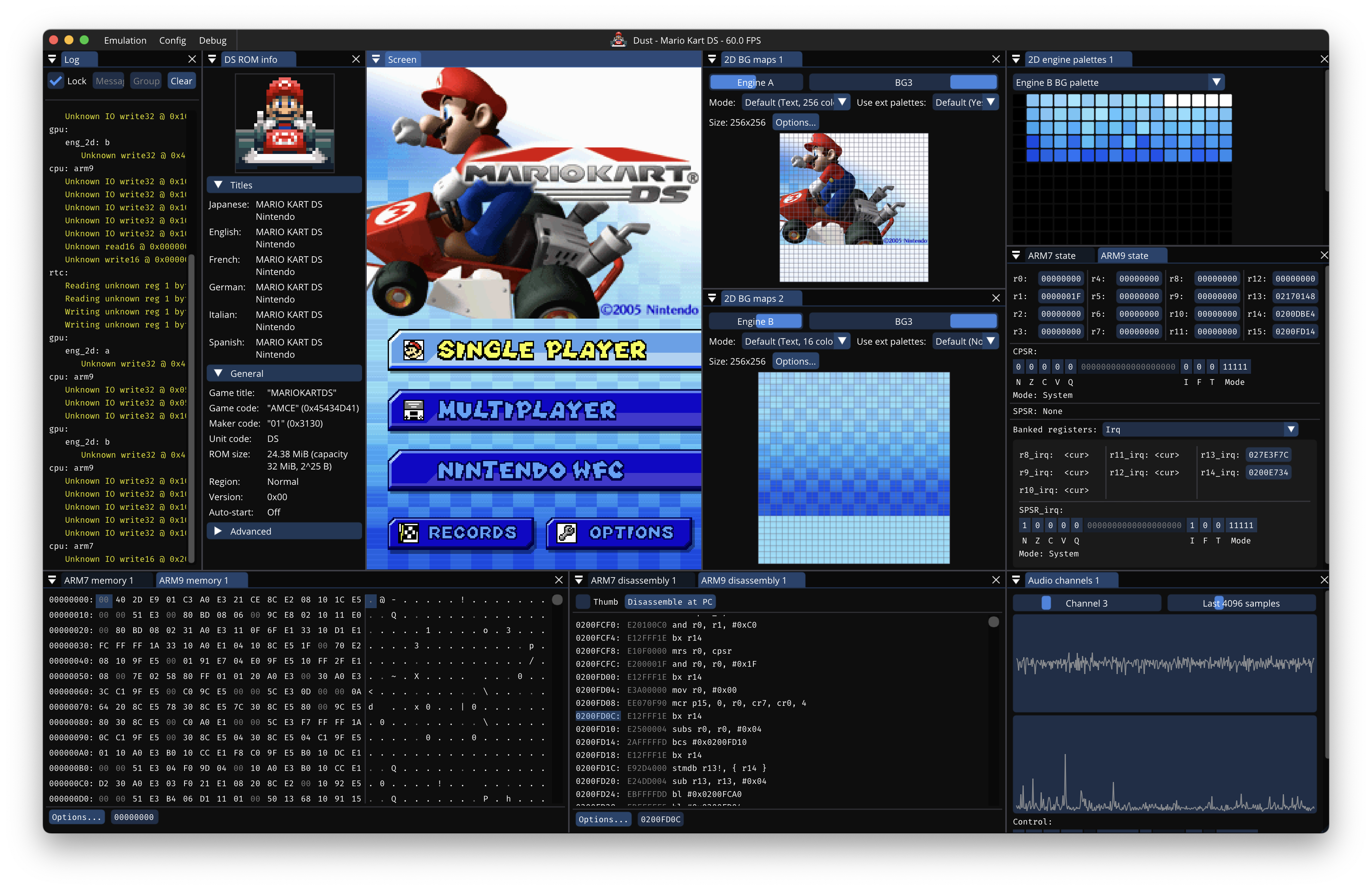
Dust is an open-source Nintendo DS emulator written in Rust with desktop and web frontends, debugging features, and a focus on accuracy.
WHY IT MATTERS
Why Dust matters
Dust is a modern-language (Rust) reimplementation of a Nintendo DS emulator with attention to accuracy and developer tooling: it targets desktop platforms and the web, includes debugging views (memory, registers, disassembly), and can run with an optional GDB server for debugging emulated programs.
BEST FOR
Where Dust stands out
Cross-platform Rust core with an official web frontend and prebuilt desktop binaries; multiple build configurations (base, debugging, debugging + GDB); integrated debugging UI aimed at developers and researchers rather than purely consumer-facing features.

The people behind dust
Project history and status
Dust is developed on GitHub (repository maintained by user kelpsyberry). The repository shows an active commit history and includes a core, a frontend, and render components. The README documents a web frontend and lists prebuilt binaries for Windows, Linux and macOS. The project is presented as a work-in-progress with debugging-focused features; issues and pull requests are present in the repo, indicating active maintenance at the time of inspection. For detailed change history or the initial creation date consult the repository commit history directly.
What dust supports
- Nintendo DS (arm9/arm7) software execution (emulation)
- Desktop platforms: Windows, Linux, macOS (x86_64 and macOS ARM64 variants noted in prebuilt binaries)
- Web frontend (WASM) — official hosted preview referenced in the README
- Debugging features: memory/register viewers, disassembly, optional GDB server
Download and availability
OFFICIAL DOWNLOADS
Get dust
Prebuilt binaries are published from the project's releases and nightly links. The README lists packaged downloads for Windows (.exe zip), Linux (x86_64 binary), and macOS (universal, x86_64, and ARM64 variants) in three configurations: base, debugging, and debugging + GDB server. Consult the project's Releases page for the latest published assets.
Get dust ↗DOCUMENTATION
Official documentation
Read the official configuration, compatibility, and troubleshooting material before changing advanced options.
Read official documentation ↗dust setup guide
Setup note: This setup guide explains verified, emulator-specific steps to get Dust running on desktop or in the web frontend and how to enable its debugging features. It assumes you have legal access to any game ROMs and any required firmware; commercial game files and BIOS/firmware are not included with Dust.
- 1) Get the official build: Download the appropriate prebuilt archive from the project's Releases page on GitHub. Choose the OS and configuration you need: 'Base' for end-user gameplay, 'Debugging' for extra diagnostic views, or 'Debugging + GDB server' to enable remote debugging. If you prefer to build from source, clone the repository and follow the project's README build instructions (the project uses Rust and contains a core/ and frontend/ workspace layout).
- 2) Desktop: extract and run: Unpack the downloaded archive. On Windows the executable is provided in a .zip; on Linux and macOS the package contains a binary or app bundle. Run the binary; the UI exposes file-open controls to load a DS ROM (.nds). The README notes binaries are compiled with optimizations; debugging builds add diagnostics but the emulator binaries themselves are not shipped with native debug symbols.
- 3) Web frontend (quick test): The README documents an official web frontend URL where Dust runs in-browser via WASM. Use that hosted demo to quickly test compatibility with a ROM (if the demo supports loading local ROM files). The web frontend is useful for quick checks but may have performance or browser-specific limitations compared to native builds.
- 4) Enabling debugging features: To use the debugging UI load the Debugging build or select the Debugging configuration if provided. The Debug menu exposes memory and register viewers and a disassembly view. For remote debugging, use the 'Debugging + GDB server' build and start the bundled GDB server from the Debug menu; then attach a GDB client to the server from your development host as documented in the project's README.
- 5) Building from source (Rust toolchain): If building from source, install the Rust toolchain (rustup, cargo) for your platform. Clone the repository and inspect the workspace layout (core/, frontend/, render/). Build the desktop frontend with cargo build –release in the appropriate workspace package or use provided build scripts in the README. For the web frontend, build the WASM-targeted frontend as described in the repository docs (the project includes instructions and CI/workflow files).
- 6) Controller, audio and performance notes: Configure input and audio from the emulator UI or OS-level controls as exposed by the frontend. Performance and accuracy will depend on your host CPU and the chosen build configuration; debugging builds may log additional events and slightly affect performance. For best performance use the release/base build on modern hardware.
- 7) Troubleshooting and reporting: If you encounter crashes or compatibility issues, collect logs and reproduce steps. Use the project's GitHub Issues to report bugs and include details such as OS, build variant, binary version (release tag or commit), and sample ROM/test case if legally sharable. The repository contains a TODO and credits that may help when triaging low-level emulation issues.
Software reminder: Do not distribute or request commercial games, BIOS/firmware, or other copyrighted files. Use Dust only with ROMs and firmware you legally own. When building from source, install Rust from the official rustup distribution.
Sources and further reading
Detailed guides and tutorials
Explore step-by-step guides for dust as they are published.