 Retro Replay Retro Gaming History, Reviews & Emulation
NES EMULATOR
Fearless-NES
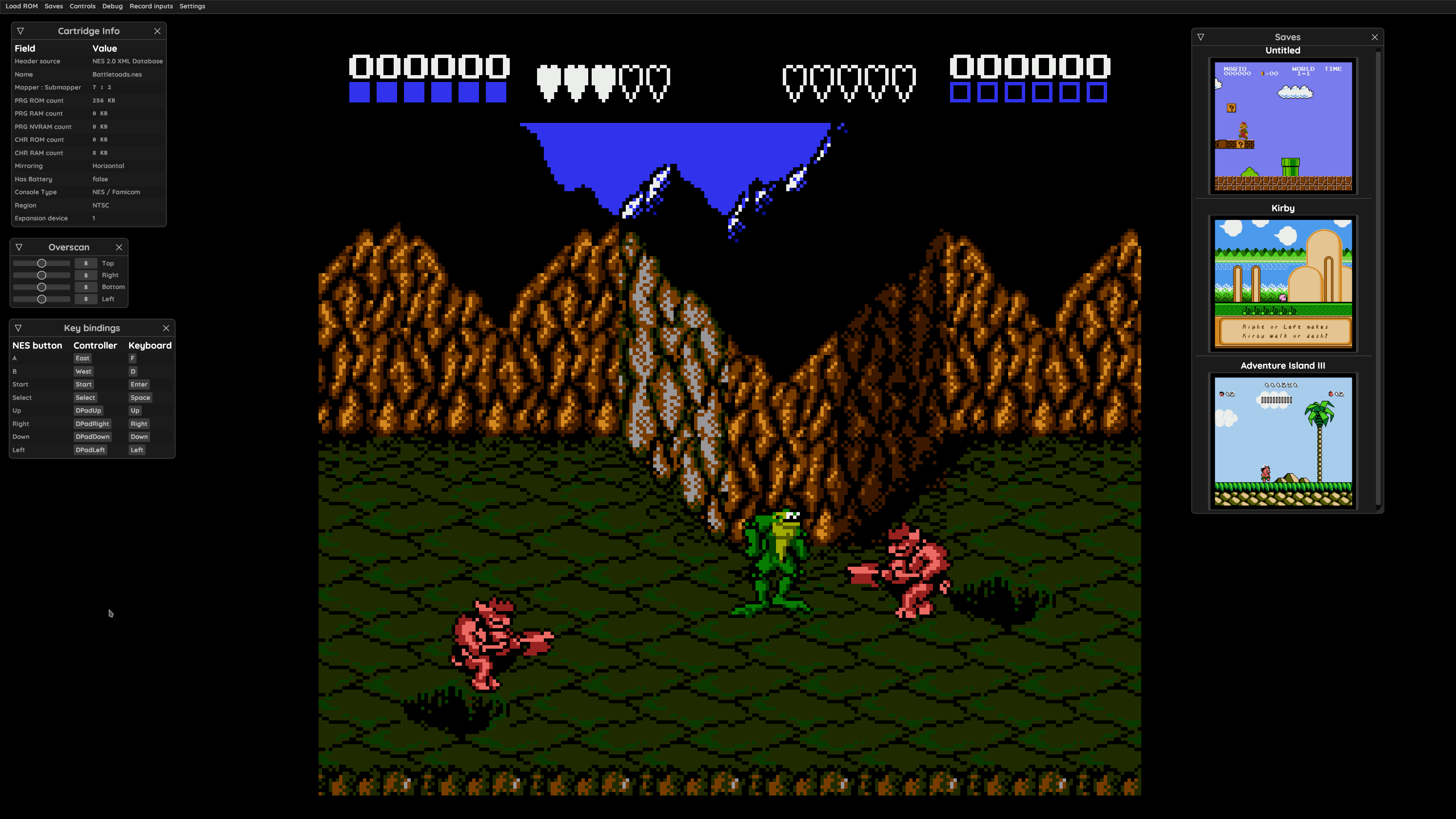
Fearless-NES is an in-development NES (Nintendo Entertainment System) emulator implemented in Rust. It aims for cycle-accurate CPU and accurate PPU/APU emulation, provides a basic egui frontend with save states and gamepad support, and implements a number of common mappers.
WHY IT MATTERS
Why use Fearless-NES?
Educational, Rust-based NES implementation focused on accuracy and testing. Good for developers, researchers, or hobbyists who want a source-level, cycle-aware NES core written in Rust with an integrated simple GUI and a test suite.
BEST FOR
What Fearless-NES does well
Cycle-accurate CPU emulation, an accurate PPU implementation (noted as 'mostly cycle-accurate' with some timing bugs), APU emulation using the blip buffer, built-in save states, configurable controls, and support for many common mappers (including NROM, MMC1, UxROM, CNROM, MMC3 (partial), AxROM and FME-7). The codebase includes tests and a TESTS.md for accuracy verification.

The people behind Fearless-NES
History & status
Fearless-NES is an active, work-in-progress open-source project hosted on GitHub. The repository contains a history of commits and explicit TODO items in the README for further mapper support, iNES 2.0 support, additional accuracy tests and frontend features. The author describes the project as "work-in-progress" and documents known issues (for example some MMC3 graphical glitches). The project includes tests (TESTS.md) and a BUGS.md to guide development and verification.
What Fearless-NES supports
- Nintendo Entertainment System (NES) — ROMs in iNES format
- mappers: NROM (0), MMC1 (1), UxROM (2), CNROM (3), MMC3 (4) (partial), AxROM (7), FME-7 (69) — partial/limited for some mappers
- Gamepad input and keyboard controls
- Save states
Download and availability
OFFICIAL DOWNLOADS
Get Fearless-NES
Official releases and source are available from the project's GitHub repository and the Releases page. Prebuilt binaries are provided only if the repository's Releases include them; otherwise build from source with Rust and cargo.
Get Fearless-NES ↗DOCUMENTATION
Official documentation
Read the official configuration, compatibility, and troubleshooting material before changing advanced options.
Read official documentation ↗Fearless-NES setup guide
Setup note: This is a repository-first emulator that is built and run with Rust's toolchain. The guide below follows the repository's instructions and points out practical steps for building and running Fearless-NES safely and practically. The emulator does not include commercial game ROMs, firmware, or BIOS files.
- 1) Review repository and requirements: Check the GitHub repository for the README, TESTS.md and BUGS.md to see current features, mapper coverage, known issues, and testing instructions. The project is implemented in Rust; confirm you have a recent stable Rust toolchain (rustc and cargo). See the repository for exact commands and any CI workflow hints.
- 2) Install Rust toolchain: Install Rust using the official installer (rustup) so that cargo and rustc are available. A typical command: curl –proto '=https' –tlsv1.2 -sSf https://sh.rustup.rs | sh and then follow the prompts. Ensure cargo is on PATH and run cargo –version to verify.
- 3) Clone the repository: Clone the official repository from GitHub (to-mas-kral/Fearless-NES). Inspect Cargo.toml and the README before building. Do not download or run commercial ROM files from unknown sources; use legally obtained test ROMs or homebrew for testing.
- 4) Build and run (development): The README shows a simple build/run step using cargo. To run in development mode: cargo run. For a release-style build the repository recommends: cargo run –profile=release-lto. These commands build and launch the included egui-based frontend. Building may require a recent Rust toolchain and target-specific toolchain components if cross-compiling.
- 5) Loading ROMs and game database: Fearless-NES supports game loading using the NES 2.0 XML Game Database (per the README). Place iNES-format .nes files in an accessible location and load them via the GUI's game loading option. The emulator does not supply ROMs — obtain them from your own legally acquired dumps or use public-domain/homebrew ROMs.
- 6) Controls and input: Keyboard defaults are documented in the README (A=F, B=D, Select=Space, Start=Enter, arrow keys for directions). Gamepad input is supported; map controls through the frontend if needed.
- 7) Testing and accuracy verification: The repository includes TESTS.md and a test suite runnable with cargo test. Use these tests to verify CPU/APU/PPU behavior and guide contributions. The README notes known timing bugs and partial mapper implementations; consult TESTS.md for running accuracy tests.
- 8) Platform notes and building on different OSes: The project is written in Rust and uses egui for the frontend; it should build on platforms supported by Rust and egui (Linux, Windows, macOS) if typical build toolchains are installed. If you plan to cross-compile or build for a specific platform, ensure any platform-specific dependencies (graphics or input backends used by egui) are installed and consult the repository and cargo output for missing crates or linker errors.
Software reminder: Fearless-NES does not include commercial ROMs, BIOS, or firmware. Use only legally obtained ROMs and respect copyright.
Sources and further reading
Detailed guides and tutorials
Explore step-by-step guides for Fearless-NES as they are published.