 Retro Replay Retro Gaming History, Reviews & Emulation
NES EMULATOR
fnes
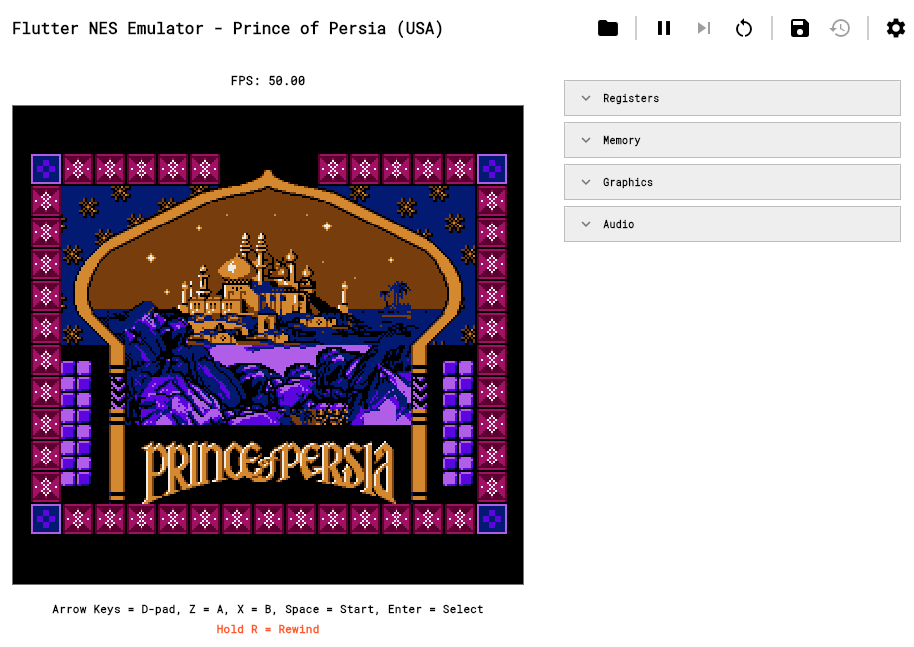
Cycle-accurate NES (Nintendo Entertainment System) emulator implemented in Dart with a Flutter UI. Implements MOS 6502 CPU, PPU, APU, several cartridge mappers, save states/rewind, and basic input/audio features.
WHY IT MATTERS
Why fnes
fnes is aimed at demonstrating a complete NES implementation written in Dart and delivered cross‑platform via Flutter. It focuses on cycle-accurate emulation of the CPU/PPU/APU and includes common mapper support and features such as save states, rewind, and Game Genie cheats.
BEST FOR
Best for
Developers, researchers, and hobbyists who want a NES implementation in Dart/Flutter, or those who need a cross-platform Flutter-based emulator core with a UI for testing and experimentation.

The people behind fnes
History & status
fnes is an active open-source project hosted on GitHub. The repository documents a cycle-accurate NES design (MOS 6502, PPU, APU) and a Flutter front end; the repository shows a long commit history and multiple automated releases published via GitHub releases throughout 2025–2026. The codebase contains platform-specific folders (android, ios, macos, windows, linux, web) indicating cross-platform targets and prebuilt release assets are published on the project's GitHub releases page. The project is maintained in the repository but users should check the repo directly for the current activity and latest release.
What fnes supports
- Android
- iOS
- Windows (desktop)
- macOS (desktop)
- Linux (desktop)
- Web (Flutter web)
Download and availability
OFFICIAL DOWNLOADS
Get fnes
Official downloads and prebuilt release assets are available from the project's GitHub releases page. You can also build from source using Flutter by cloning the repository and running flutter build or flutter run for the target platform.
Get fnes ↗DOCUMENTATION
Official documentation
Read the official configuration, compatibility, and troubleshooting material before changing advanced options.
Read official documentation ↗fnes setup guide
Setup note: Two practical ways to run fnes: download a release asset or build from source with Flutter. The guide below gives verified, platform-specific steps based on the repository structure and the project's documentation.
- 1) Get the official release or source: Visit the project's GitHub repository to view the source, documentation, and the releases page. Download a prebuilt asset from the Releases page if an asset is available for your platform. If you prefer the latest code or a platform not provided as an asset, clone the repository.
- 2) Build prerequisites: Install Flutter (stable channel) and any platform toolchains required by Flutter for your target (Android SDK for Android, Xcode for iOS/macOS, appropriate Linux toolchain for desktop, Visual Studio with desktop workload for Windows). Confirm flutter doctor reports no blocking issues before building.
- 3) Clone and fetch dependencies: Clone the repo: git clone https://github.com/hamed-rezaee/fnes.git. From the project root run flutter pub get to fetch Dart/Flutter dependencies. The repository contains platform folders (android, ios, linux, macos, web, windows) and assets which are used by the Flutter project.
- 4) Run on a development device: For a quick test, connect a device or start an emulator/simulator and run flutter run. For web: flutter run -d chrome (or another supported web target). For desktop (if enabled in your Flutter SDK): flutter run -d windows / -d macos / -d linux.
- 5) Produce release builds: Use Flutter's build commands for production artifacts: flutter build apk (Android), flutter build ios (iOS – Xcode required), flutter build macos, flutter build linux, flutter build windows, or flutter build web. After building, install or distribute the produced binaries as appropriate for the platform.
- 6) Loading ROMs and expected behavior: The repository documents cartridge support (MMC1, MMC3, UxROM and other mappers) and typical NES features (NTSC/PAL, Zapper support, APU audio). The project does not include commercial ROMs or NES firmware; you must provide legally obtained game ROM files. The app supports save states, rewind, and Game Genie-type cheats as implemented by the codebase.
- 7) Troubleshooting & contribution: If you encounter issues, check the repository’s README, issues page, and the documentation site for known limitations and usage notes. For bugs or feature requests, open an issue or submit a pull request on the GitHub repository following the project's contribution guidelines.
Software reminder: fnes is distributed as source and release binaries only. You must supply your own NES ROM files and any required firmware; commercial games and BIOS/firmware are not provided by the project.
Sources and further reading
Detailed guides and tutorials
Explore step-by-step guides for fnes as they are published.