 Retro Replay Retro Gaming History, Reviews & Emulation
GAME BOY COLOR EMULATOR
metroboy
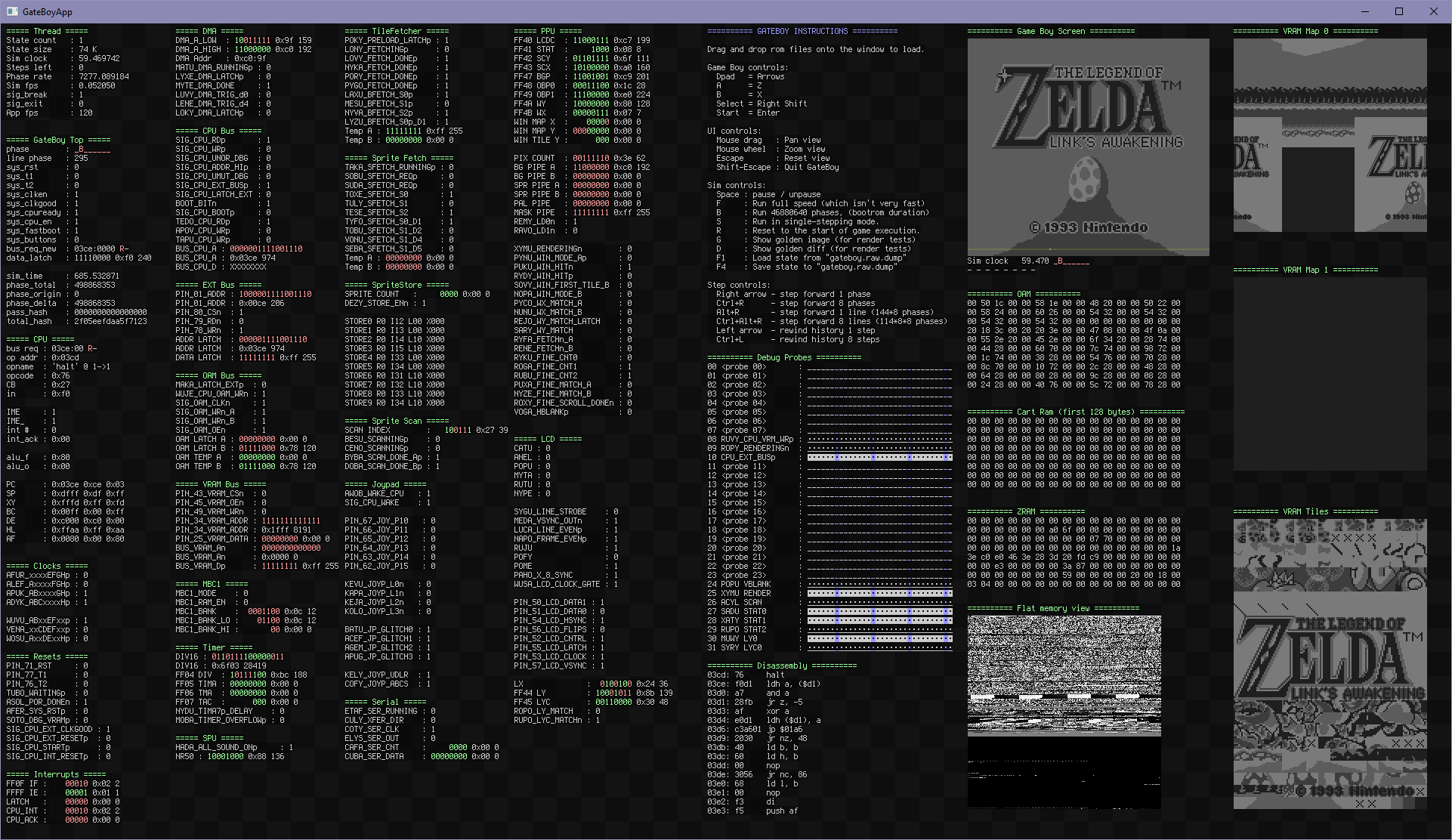
MetroBoy (MetroBoy / GateBoy) is an open-source collection of Game Boy simulators and tools that includes MetroBoy (a cycle-accurate/high-level emulator) and GateBoy (a gate-level simulation of the original DMG Game Boy). It focuses on extreme hardware accuracy and test-suite compliance rather than speed or Game Boy Color compatibility.
WHY IT MATTERS
Why MetroBoy / GateBoy matters
This project attempts to reproduce the original Nintendo Game Boy hardware at a much lower level than typical emulators. GateBoy is a gate-level simulation reconstructed from die shots and schematics; MetroBoy is a related higher-level emulator in the same repo that aims for compatibility with major test suites. The repo includes test harnesses and precompiled test builds intended for developers and researchers rather than casual players.
BEST FOR
Notable strengths
Gate-level simulation of the DMG-01 (GateBoy) with a substantial test-suite and detailed mapping between die/schematic gates and source code; MetroBoy builds that target Blargg/Mooneye/WPol test compliance; precompiled GateBoy/MetroBoy release assets and test ROM bundles are provided in the project's releases.

The people behind metroboy
Project history and scope
The project's repository contains multiple related projects (MetroBoy, GateBoy, LogicBoy) and a long commit history and release tags. GateBoy is a gate-level reimplementation derived from reverse-engineered die shots and the Furrtek schematics; the author documents limitations where asynchronous gate behavior and timing-sensitive glitches cannot be fully predicted from schematics alone. MetroBoy provides a higher-level emulator in the same repository and release set; releases show tags for MetroBoy 1.0/1.01/1.02 and GateBoy v0.1.1 with precompiled binaries and test ROMs. The codebase is maintained in the public GitHub repository and is oriented toward research, verification, and accuracy-first emulation. The repository focuses on the original Game Boy (DMG) hardware; it does not advertise Game Boy Color (GBC) support as a goal and GateBoy is explicitly tied to DMG reproduction.
What metroboy supports
- Nintendo Game Boy (DMG-01) — original Game Boy hardware (GateBoy gate-level simulation)
- MetroBoy higher-level emulator — runs many DMG test ROMs and games (compatibility-focused)
- Test-suite compatibility: Blargg, Mooneye, and WPol tests (project claims passing tests for MetroBoy builds)
- Precompiled GateBoy 'fast mode' builds and test ROM bundles (available as release assets)
Download and availability
OFFICIAL DOWNLOADS
Get metroboy
Official source code and precompiled release assets are available from the project's GitHub repository releases page. Precompiled GateBoy/MetroBoy release assets include binaries and test ROM archives; Linux builds note a dependency on SDL2 development libraries.
Get metroboy ↗DOCUMENTATION
Official documentation
Read the official configuration, compatibility, and troubleshooting material before changing advanced options.
Read official documentation ↗metroboy setup guide
Setup note: This guide covers verifying, building, and running MetroBoy/GateBoy from the official repository. The repo and releases are the authoritative download points; do not expect commercial game ROMs, firmware, or BIOS files to be included — supply your own legally obtained ROMs for testing.
- 1) Verify the official project and releases: Confirm you are using the repository maintained at github.com/aappleby/metroboy and its Releases page. The project's releases include MetroBoy and GateBoy tags plus precompiled assets. Use the Releases page to download prebuilt GateBoy/MetroBoy packages if you prefer not to build from source.
- 2) Prepare build environment (Linux example): Install a recent C++ toolchain (g++ or clang), ninja or your chosen build system, and SDL2 development headers. For Debian/Ubuntu: sudo apt update && sudo apt install build-essential libsdl2-dev cmake ninja-build git. The releases and README specifically note SDL2 as a runtime/development dependency for GUI binaries.
- 3) Clone the repository: git clone https://github.com/aappleby/metroboy.git && cd metroboy. Work from the repository root and inspect README.md for project-specific build targets and subprojects (MetroBoy, GateBoy, LogicBoy).
- 4) Build (general workflow): Follow the repo's build instructions in README.md. The project contains multiple subprojects; build tools and steps may vary between MetroBoy (higher-level emulator) and GateBoy (gate-level simulator). The README mentions using ninja on Linux; run any provided build scripts or use cmake/ninja as directed by the repo.
- 5) Running precompiled binaries: If you downloaded a release asset (GateBoy_0.1.1.zip or MetroBoy release), unpack it and run the provided binary for your platform. Linux release notes explicitly advise installing libsdl2-dev for SDL dependencies. GateBoy 'fast mode' builds are available; they are significantly faster because development error checks are disabled, but the gate-level simulation remains far slower than realtime compared with typical emulators.
- 6) Using test ROMs and verification: Release assets bundle test ROMs and Plait data for regression/testing. The project runs Blargg/Mooneye/WPol test suites and provides automated tests; consult the repo's tests/ and docs/ folders for how to run these harnesses. These tests are useful for regression and developer verification but are not a substitute for supplying legally obtained commercial ROMs.
- 7) Performance expectations and notes: GateBoy simulates individual logic gates and clock phases; expect significantly reduced speed (GateBoy debug builds are extremely slow; 'fast mode' is faster but usually still below realtime). MetroBoy is faster and targeted at accuracy and test compliance rather than high-performance play. If your goal is to play a large commercial library on a desktop, a purpose-built GBC-capable emulator (e.g., Gambatte/SameBoy/GB/GBC emulators) will give better performance and GBC compatibility.
- 8) Platform notes and troubleshooting: The repository and releases target desktop platforms (Linux, Windows, macOS). Platform-specific dependencies (SDL2, C++ toolchain) must be satisfied. If builds fail, check the repository issues and README for known problems and recommended tool versions. For Linux the README explicitly mentions installing libsdl2-dev before running prebuilt GateBoy bundles.
Software reminder: This project does not include commercial game ROMs, Game Boy Color BIOS, or other proprietary firmware. Provide only legally obtained ROMs. GateBoy is focused on DMG reproduction and is not a Game Boy Color emulator; do not expect GBC-only games to work.
Sources and further reading
Detailed guides and tutorials
Explore step-by-step guides for metroboy as they are published.