 Retro Replay Retro Gaming History, Reviews & Emulation
MAME MESS EMULATOR
pac-man-emulator
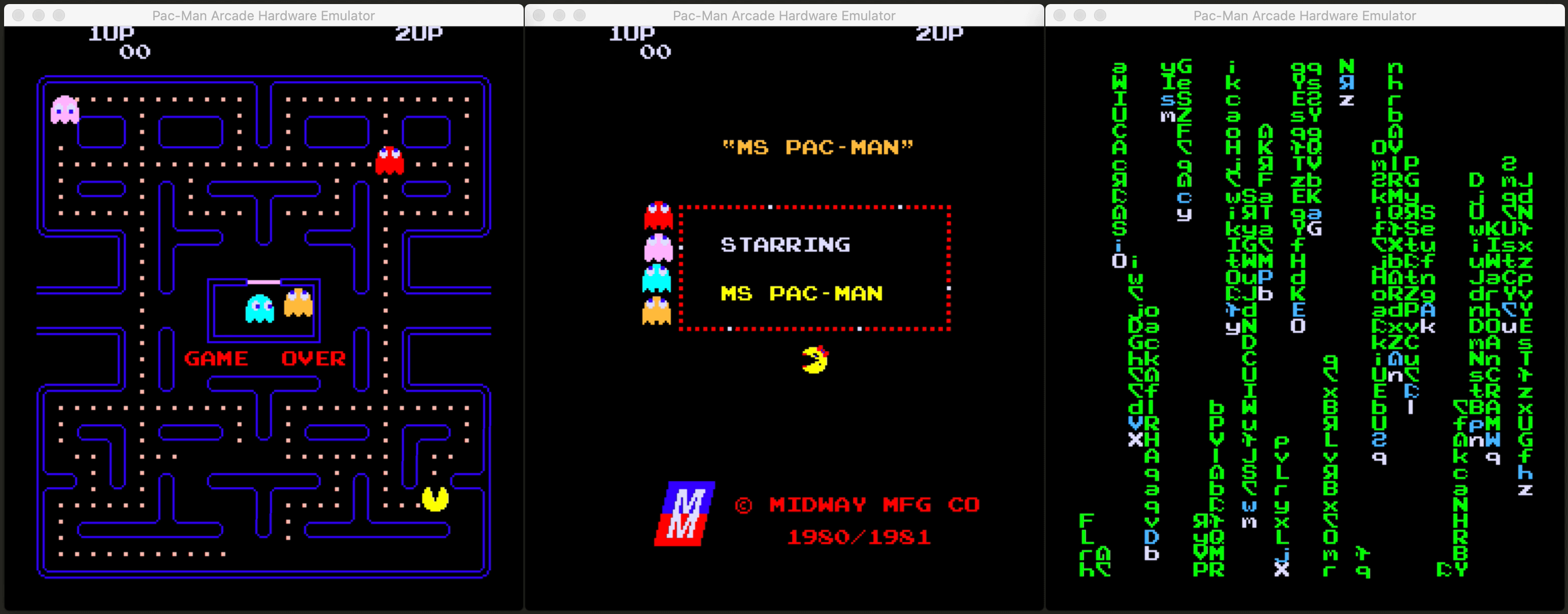
A cross-platform open-source emulator that implements the Zilog Z80 CPU and arcade hardware for the original Pac‑Man (and Ms. Pac‑Man) PCB, runnable on desktop OSes and Xbox One. Written in C#/.NET with SDL2 for graphics/audio, with an interactive debugger, save states, and tools for homebrew ROMs.
WHY IT MATTERS
Why this project matters
Small, focused re‑implementation of the Pac‑Man arcade hardware intended for accuracy, test coverage and developer tooling. Useful to developers, researchers, and hobbyists who want a compact emulator of the original Pac‑Man/Ms. Pac‑Man PCB rather than a large multi‑system framework.
BEST FOR
Notable features
– Complete Z80 CPU core and Pac‑Man hardware emulation (graphics, sound, input). – Cross‑platform desktop app (Windows, macOS, Linux) plus a UWP Xbox One build. – Interactive debugger with breakpoints, single stepping and reverse stepping. – Save states and support for homebrew ROMs targeting the Pac‑Man hardware. – Extensive unit tests (thousands of cases) and included assembler/disassembler tooling.
The people behind pac-man-emulator
History and status
The project is maintained publicly on GitHub by the author and documented in a project blog post. The repository shows an established codebase with many commits, build instructions, and both desktop and Xbox UWP targets. The codebase is implemented in C# targeting .NET and uses SDL2 on desktop. At time of inspection the project appears actively hosted and usable — releases are provided on the repository. This is a single‑system emulator (Pac‑Man hardware) rather than a general arcade framework like MAME.
What pac-man-emulator supports
- Arcade — Namco/Midway Pac‑Man PCB (original Pac‑Man)
- Ms. Pac‑Man (supported ROM set option)
- Homebrew ROMs targeting Pac‑Man hardware
- Host platforms: Windows, macOS, Linux, Xbox One (UWP)
Download and availability
OFFICIAL DOWNLOADS
Get pac-man-emulator
Official releases and source are available from the project's GitHub repository releases page. Clone the source or download prebuilt release artifacts from the repository's Releases section.
Get pac-man-emulator ↗DOCUMENTATION
Official documentation
Read the official configuration, compatibility, and troubleshooting material before changing advanced options.
Read official documentation ↗pac-man-emulator setup guide
Setup note: This guide summarizes the verified, repository‑documented setup and run steps for the desktop and Xbox targets. It follows the project's README and build notes — follow the repository for any updates or platform‑specific notes.
- 1) Obtain ROMs (required): The emulator does not include commercial game ROMs or firmware. Obtain a Pac‑Man or Ms. Pac‑Man ROM set yourself and place the ROM files into a folder you will point the emulator at. The repository expects a directory per ROM set (e.g. ../roms/pacman).
- 2) Desktop prerequisites: Install .NET runtime/sdk as required by the repository (README documents .NET Core / .NET versions). Install SDL2 on your host: macOS: brew install sdl2; Linux: use your distro package manager to install SDL2; Windows: download SDL2 binaries and place SDL2.dll alongside the emulator.cli binary as documented in the README.
- 3) Build and run (desktop): Clone the repository, open a shell in emulator.cli, run dotnet restore, then use dotnet run — run <path-to-rom-dir>. Example: dotnet run — run ../roms/pacman. Use the –rom-set option to switch to mspacman if running Ms. Pac‑Man. Additional CLI options documented in the README allow loading save states, skipping checksum checks, enabling debug mode, and reverse stepping.
- 4) Xbox One (UWP) build and deploy: Follow the repository's Xbox instructions: enable Xbox Dev Mode, install Visual Studio with UWP components and the specified Windows SDK, open emulator.uwp pac‑man solution, configure signing and remote deployment settings, place ROMs into emulator.uwp/roms, then deploy to the Xbox in Debug/Remote mode. The repository documents the necessary Visual Studio/SDK settings.
- 5) Controls and input: Keyboard mappings are hardcoded in the README (arrow keys for player movement, 1/2 for start, 5/6 for coin, etc.). Xbox‑style controllers are supported (Left Stick/D‑Pad for movement; A/Y/X for start/coin mappings on controller). Adjust controller/keyboard behavior per your platform input configuration.
- 6) Debugging, DIP switches, and homebrew: Launch with –debug to enable the interactive debugger and use F‑keys for stepping and save/load. Edit dip‑switches.json to change game settings (lives, difficulty). To run homebrew ROMs you may need –skip-checksums and –writable-rom per the README.
- 7) Packaging and dependencies: On macOS arm64 there is a documented macOS-specific note linking libSDL2 to /usr/local/lib for compatibility. On Windows, ensure SDL2.dll is available to the emulator.cli executable. The README lists project layout and where to build each target (z80 library, emulator libraries, CLI front end, UWP project).
Software reminder: This project does not include commercial game ROMs, BIOS, or firmware — you must provide your own ROM files. Follow legal guidance for ROM ownership in your jurisdiction.
Sources and further reading
Detailed guides and tutorials
Explore step-by-step guides for pac-man-emulator as they are published.