 Retro Replay Retro Gaming History, Reviews & Emulation
PSP EMULATOR
pcsp
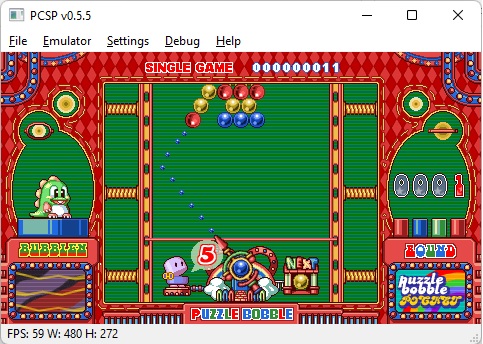
PCSP — a long-standing, Windows-focused PSP emulator project (work-in-progress/abandoned status unclear). Historically provided Windows builds (e.g. v0.5.x) and companion utilities (pcsp-udb, pcsp-xmb).
WHY IT MATTERS
Why this profile
PCSP appears in historical PSP-emulation lists and community archives as a Windows PSP emulator with public builds and auxiliary utilities. It is not the actively developed cross-platform PSP emulator PPSSPP; current mainstream PSP emulation is dominated by PPSSPP and JVM-based JPCSP. PCSP remains of interest for archival context and for users investigating historical Windows PSP emulator builds.
BEST FOR
Best known for
Windows-targeted PSP emulation builds and a small ecosystem of helper tools (pcsp-udb, pcsp-xmb) that were used to catalogue and launch PSP games via the PCSP binary.

The people behind pcsp
History (verified notes and caveats)
Community references and emulator archives document PCSP development and releases in the late 2000s–early 2010s (examples include mentions of v0.2, v0.5.4 and v0.5.5 in community changelogs and download sites). Some community mirrors and documents (changelogs hosted on archive sites and user-contributed PDFs) describe development up through a 0.5.5 release. Multiple modern emulator overviews note PCSP as an older PSP emulator that did not reach the same adoption or active development level as PPSSPP. I could not locate a clearly maintained official source code repository at the URL the selection supplied (github.com/georgemoralis/pcsp) during verification, so project provenance and current maintenance status are uncertain; community pages and archives appear to be the primary surviving references. Details below are limited to what those sources explicitly state or imply; where I could not verify something (authors, up-to-date repo, active maintenance) I have not asserted it as fact.
What pcsp supports
- Sony PlayStation Portable (PSP) — emulation target (historical Windows builds)
- Windows (32-bit/older 32/64-bit builds referenced in archives)
- Companion utilities: pcsp-udb, pcsp-xmb (launcher / database tools) as historically distributed by community archives or third-party sites.
- Note: modern mainstream PSP emulator: PPSSPP (actively maintained) — not the same project.
Download and availability
OFFICIAL DOWNLOADS
Get pcsp
Verified official repository or download at the supplied GitHub URL could not be located during research. Community archives and emulator download sites host historical PCSP builds (examples list below). If you locate an authoritative upstream repository or release page, prefer that source (official GitHub release pages or the project’s documented website). Do not expect commercial games, PSP firmware/BIN/CPL or BIOS to be bundled; those must be provided by the user where legally required.
Get pcsp ↗DOCUMENTATION
Official documentation
Read the official configuration, compatibility, and troubleshooting material before changing advanced options.
Read official documentation ↗pcsp setup guide
Setup note: Practical setup notes and checklist (based on archived PCSP builds and community documentation). Because the official current repo/releases could not be verified, treat these steps as a reconstruction for using archived PCSP Windows builds and companion tools. If you find an official maintained release, follow that project's README instead.
- Obtain a verified PCSP build: Use only reputable archive sites or the project’s official releases if you can find them. Community mirrors and archival emulator sites list historical PCSP builds (e.g. v0.5.x). Avoid untrusted executables from random file-hosting sites. If you locate a GitHub release page or an official repo, prefer downloading releases there.
- Check hashes and antivirus: If the archive provides checksums (MD5/SHA1/SHA256), verify them. Scan downloaded executables with up-to-date antivirus. Historical emulator builds may trigger heuristics or be compiled against old runtimes.
- Windows runtime requirements: Community references indicate PCSP targeted Windows and in some documentation listed dependencies such as older Microsoft frameworks (community mentions include .NET or legacy Visual C++ runtimes for related utilities). Ensure you have the correct runtime libraries installed (Visual C++ redistributables matching the build year). If a build includes a README or a bundle, follow its listed requirements.
- Place game images and memory card files: PCSP historically uses PSP ISO/EBOOT formats placed in a user-specified folder. Create a dedicated folder for PSP ISOs/EBoots and for savedata/memory card equivalents. Do not expect the emulator to include commercial game images; obtain those legally yourself.
- Using companion utilities (pcsp-udb / pcsp-xmb): Archived pages mention pcsp-udb (game database/launcher) and pcsp-xmb (XMB-like launcher) that call the PCSP executable. Keep pcsp.exe and the utilities in the same directory or configure paths in the utility’s configuration so the launcher can invoke the emulator binary.
- Graphics and audio settings: Older PCSP builds likely include basic configuration dialogs for video and audio. Start with default settings; if the build exposes framebuffer/renderer choices, try the one that matches your GPU and drivers. Expect lower compatibility and more graphical glitches compared to modern PPSSPP.
- Savedata and memory management: Back up savedata before experimenting. If the emulator exposes memory card or save file paths, use separate directories per game. Archived docs reference save and memory handling in changelogs; follow shipped README instructions when present.
- Troubleshooting: If a build fails to run, check the Windows Event Viewer or emulator log (if provided). Common causes: missing VC++ runtimes, incompatible GPU drivers, incompatible Windows architecture (some builds may be 32-bit only). Consider running in compatibility mode on modern Windows if the binary is old.
Software reminder: I could not verify an authoritative, actively maintained project repository at the supplied GitHub URL. If you need a modern, actively supported PSP emulator for Windows, consider PPSSPP (actively maintained cross-platform project) or JPCSP for Java-based compatibility; those projects have clear upstream repositories and frequent releases.
Sources and further reading
Detailed guides and tutorials
Explore step-by-step guides for pcsp as they are published.