 Retro Replay Retro Gaming History, Reviews & Emulation
NINTENDO 64 EMULATOR
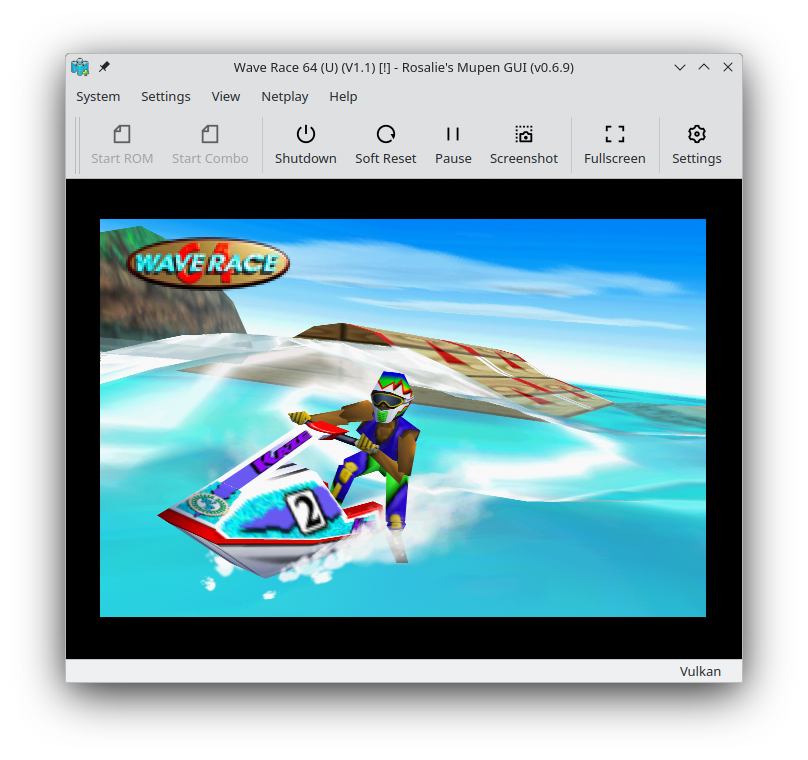
Rosalie's Mupen GUI
Rosalie's Mupen GUI (RMG) is an open-source Qt/C++ front-end for the Mupen64Plus N64 emulator core. It provides a graphical interface, per-game settings, plugin selection, netplay support, and prebuilt Linux (AppImage/Flatpak/AUR/COPR) and Windows releases.
WHY IT MATTERS
Why pick RMG
RMG focuses on giving Mupen64Plus a modern, user-friendly Qt GUI while exposing per-game configuration, plugin selection and netplay features. Official releases are distributed for Windows and multiple Linux packaging formats (AppImage, Flatpak, AUR, COPR), and the project is actively maintained on GitHub.
BEST FOR
Best for
Users who want a full-featured, actively maintained GUI for mupen64plus on Windows or Linux, with easy packaging (AppImage/Flatpak) and customizable per-game plugin/config options.

The people behind Rosalie's Mupen GUI
Project & repository notes
The project's official repository on GitHub identifies RMG as a mupen64plus front-end written in C++. The README describes downloadable Windows releases and multiple Linux packaging options (AppImage, Flatpak on Flathub, AUR, Fedora COPR) and documents build instructions for Linux and Windows. The repository contains source, packaging, build scripts and many commits. The project README and release notes mention netplay support and a companion rmg-netplay-server for self-hosted servers. External pages and packaging channels (Flathub, AUR, COPR) also list the project. Some third-party analyses note that the project vendors or forks mupen64plus-core inside its source tree; if that detail matters for your setup verify within the repository or release assets for the specific build you download.
What Rosalie's Mupen GUI supports
- Nintendo 64 (via mupen64plus core)
- Windows (prebuilt releases on GitHub)
- Linux (AppImage, Flatpak/Flathub, Arch AUR, Fedora COPR)
- Netplay (self-hosted rmg-netplay-server)
Download and availability
OFFICIAL DOWNLOADS
Get Rosalie's Mupen GUI
Official downloads and release assets are provided from the project's GitHub Releases page. Linux distribution packaging is available as AppImage (Releases), Flatpak on Flathub, and community packages (AUR, Fedora COPR).
Get Rosalie's Mupen GUI ↗DOCUMENTATION
Official documentation
Read the official configuration, compatibility, and troubleshooting material before changing advanced options.
Read official documentation ↗Rosalie's Mupen GUI setup guide
Setup note: Below are practical, repository-verified setup and build steps tailored to RMG. Follow the path matching your platform and whether you prefer prebuilt releases or building from source. Check the release assets or README before assuming a bundled mupen64plus core is included — the GUI is tightly coupled with mupen64plus but builds and releases may include or reference the core differently depending on the release.
- 1) Choose release vs build from source: If you want the quickest route use the GitHub Releases assets for Windows or the AppImage/Flatpak for Linux. If you need a custom build (e.g., change compilation options or package for your distro) follow the project's build instructions in the repository.
- 2) Verify emulator core presence: RMG is a front-end for Mupen64Plus. Before running, inspect the release asset or the packaged files to confirm whether a mupen64plus core (or RMG's vendored fork of it) is included. The README and release notes discuss bundled components; if the release does not include a core, install mupen64plus (or provide the core binaries/libraries) per your platform and point RMG to them in Settings -> Core/Plugins.
- 3) Windows — use prebuilt release or build: Download the latest Windows release from the GitHub Releases page. If you build from source on Windows the README recommends MSYS2 (UCRT64) and lists pacman packages to install (cmake, gcc, Qt6, SDL3, libusb, hidapi, etc.) then run ./Source/Script/Build.sh Release. Built executables are placed in Bin/Release.
- 4) Linux — AppImage / Flatpak / build from source: For most Linux desktops install the AppImage from Releases or the Flatpak from Flathub. For distribution packaging or building: install the required development packages listed in the README (examples for Debian/Ubuntu, Fedora, Arch, OpenSUSE are provided), then run ./Source/Script/Build.sh Release. When using the Flatpak or AppImage, check whether the release includes a mupen64plus core; if not, install mupen64plus on your system or use a core pair compatible with RMG.
- 5) Configure controllers and plugins: Open Settings in RMG to configure input devices and map controllers. The GUI exposes plugin selection (video, audio, RSP, CPU). For accurate results select a compatible video plugin (GLideN64 or others) and ensure plugin binaries are accessible to RMG or the mupen64plus core.
- 6) Netplay (self-hosted): RMG documents netplay using a companion rmg-netplay-server. The README explains two methods: (A) port-forwarding with a JSON server list URL you supply, or (B) use a tunneling solution (e.g., Radmin VPN) and run the rmg-netplay-server on the host. Follow the README netplay section exactly; release notes mention that previously hosted servers were removed and self-hosting is now required.
- 7) Per-game settings and compatibility: RMG supports per-game configuration. If a game needs specific plugin or core settings, set those in the per-game options inside the GUI. For problems, consult the project's Issues page on GitHub and the README troubleshooting notes.
- 8) Building and packaging tips: When building for distribution use the repository packaging files (Package/ directory) and the project's CMake build flow: create a build dir, run cmake -S <src> -B <build> -G Ninja -DCMAKE_BUILD_TYPE=Release, then cmake –build and cmake –install. Built executables are placed in Bin/Release per the README.
Software reminder: RMG is a GUI for the mupen64plus core. RMG itself is distributed under GPLv3. The emulator does not include commercial game ROMs, firmware, BIOS files or keys; you must provide legally obtained game files and any required core/plugin binaries if not included in the release.
Sources and further reading
- Rosalie241 / RMG (GitHub repository README & build instructions)
- RMG Releases (official download assets)
- RMG Flathub listing (Flatpak packaging information)
- Mupen64Plus project documentation (core info and front-end relationship)
- RetroBIOS / third-party analysis (notes about vendored core in RMG source)
- Featured-image source and credit
Detailed guides and tutorials
Explore step-by-step guides for Rosalie's Mupen GUI as they are published.