 Retro Replay Retro Gaming History, Reviews & Emulation
COMMODORE 64 AMIGA EMULATOR
rust64
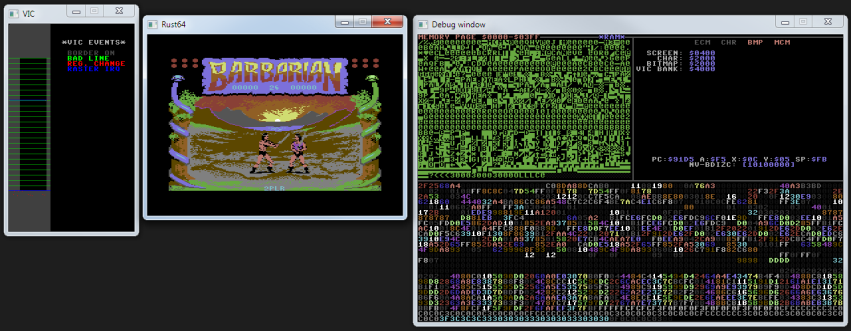
Rust64 is an open-source, cycle-based Commodore 64 emulator written in Rust with a built-in visual debugger and support for running .prg programs.
WHY IT MATTERS
Why Rust64 matters
Rust64 is a learning-focused, from-scratch C64 implementation intended to show how the machine works while providing a usable cycle-based emulator and an integrated visual debugger. It is useful for developers and hobbyists who want readable Rust source, a per-cycle VIC raster view, and a hands-on reference implementation rather than a production-grade, compatibility-first emulator.
BEST FOR
Best for
Developers, emulator learners, and hobbyists who want a readable Rust codebase implementing VIC-II, SID and CIA behavior and an interactive debugger for inspecting memory pages, VIC raster cycles, and chip registers.
The people behind rust64
History & status
The project is hosted on GitHub and described by its author as an attempt to learn Rust and study Commodore 64 internals. The repository contains source, documentation and example .prg test programs; development is an on-off WIP with many commits and an active README describing known issues, TODO items and dependencies. The README documents that the emulator is cycle based and 'fairly accurate at this point' but still missing serial bus/disk drive emulation and has limitations for programs that require very precise timing. The project is not a packaged end-user product — it is intended to be built from source. The repository lists dependencies (minifb and optional SDL2), build/run instructions and explains missing features such as disk drive support and SID improvement plans.
What rust64 supports
- Commodore 64 (emulated via .prg binaries loaded into RAM)
- Linux (build from source with Rust/cargo)
- macOS (build from source; SDL2/audio requires extra steps)
- Windows (build from source)
Download and availability
OFFICIAL DOWNLOADS
Get rust64
Official source and any release artifacts are available from the project's GitHub repository and Releases page. The emulator is distributed under the MIT license; users build the binary from source with cargo or download release artifacts if the repository provides them.
Get rust64 ↗DOCUMENTATION
Official documentation
Read the official configuration, compatibility, and troubleshooting material before changing advanced options.
Read official documentation ↗rust64 setup guide
Setup note: This is a precise, source-first emulator. The practical setup is to install Rust toolchain, fetch the repository, build with cargo, and run a .prg test program. Below are step-by-step setup and usage notes tailored to Rust64's README and its dependencies.
- 1) Install Rust (stable) and cargo: Install rustup and the stable Rust toolchain (README specifies Rust 1.58.0 or higher). On Linux/macOS follow https://rustup.rs; on Windows use the Rust installer or rustup. Verify with rustc –version and cargo –version.
- 2) Clone the repository: Clone the official repository: git clone https://github.com/kondrak/rust64.git and change into the rust64 directory.
- 3) Install native dependencies (if using SDL2): Rust64 supports two backends: minifb (works out of the box) and SDL2 (requires extra native setup). If you plan to use SDL2 for input/audio, install SDL2 development libraries for your OS (package names vary: libsdl2-dev on Debian/Ubuntu, sdl2 via Homebrew on macOS, SDL2 development package on Windows). The README notes SDL2 requires extra steps — follow your OS package manager or SDL2's install docs.
- 4) Build the emulator: From the repository root run cargo build –release. The README shows cargo run –release for running directly. If you have features or backends toggles in Cargo.toml, configure those per the repo (the README identifies minifb as the out-of-the-box option).
- 5) Run a .prg program: Run the emulator with cargo run –release prgs/colors.prg (example from repository). You can pass a .prg file on the command line to load into memory at boot; type RUN at the C64 prompt to start. To run with double-sized window: cargo run –release x2 prgs/colors.prg. To enable debug windows: cargo run –release x2 debugger prgs/colors.prg.
- 6) Controls and debugger features: Key mappings are documented in README (ESC Run/Stop, END Restore, TAB Control, LCTRL C=, function keys for debugger and reset). The emulator exposes a visual VIC raster debugger where each pixel represents a VIC cycle, plus memory page viewers for RAM, Color RAM and registers (VIC, CIA, SID). Use the indicated keys (F11, F12, PGUP/PGDN, HOME/END) to operate debugger windows.
- 7) Audio and SID limitations: README notes SID emulation needs improvement and that the author planned to switch to cpal for audio once it supported macOS. Expect SID/audio to be approximate; do not expect bit-perfect reproduction of all software. No commercial ROMs, BIOS or firmware are included — provide your own PRGs and any ROM images if required by your testcases (the project loads .prg files).
- 8) Disk images, tape and serial bus: The project currently lacks serial bus/disk drive (D64/T64/TAP) support. Programs relying on attachment to virtual drives may not run correctly. The README lists serial bus/disk drive emulation as TODO.
Software reminder: The emulator is source-distributed under MIT license. You must provide your own game/prg files and any copyrighted firmware; commercial games and BIOS are not included.
Sources and further reading
Detailed guides and tutorials
Explore step-by-step guides for rust64 as they are published.