 Retro Replay Retro Gaming History, Reviews & Emulation
GAME BOY ADVANCE EMULATOR
zba
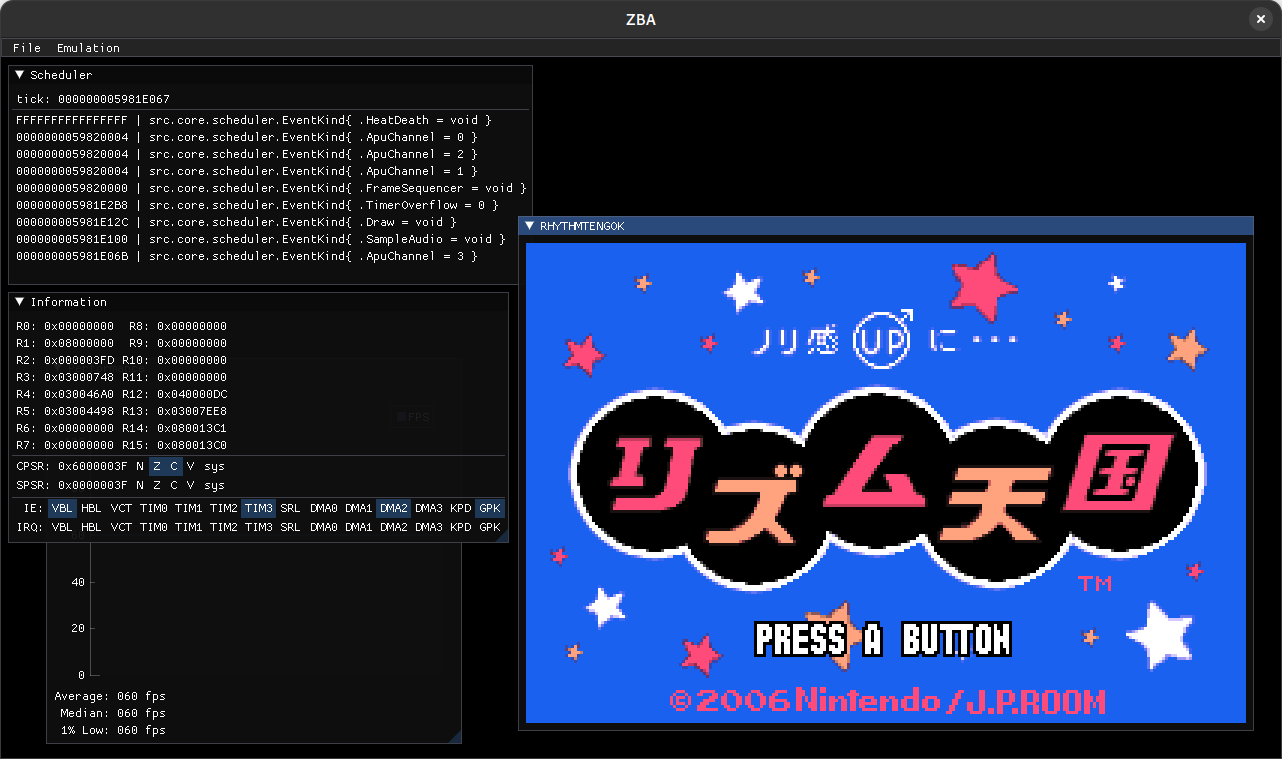
ZBA is an open-source Game Boy Advance emulator written in Zig. It provides both CLI and simple GUI frontends, aims for completeness rather than advanced accuracy optimizations, and requires an external GBA BIOS for titles that use it.
WHY IT MATTERS
Why ZBA exists
Author describes ZBA as a "first attempt" and a long-term, for-fun project to implement GBA hardware in Zig. The README explicitly frames it as not competing with mature emulators like mGBA or NanoBoyAdvance and lists outstanding features and TODOs (affine sprites, windowing, audio resampling, refactoring for performance).
BEST FOR
What ZBA does today
ZBA implements most core GBA hardware components, runs a mix of GBA test ROMs (many pass) and includes both CLI and GUI usage modes. It does not perform BIOS HLE — a BIOS image is required when a ROM needs it. The project ships build instructions using Zig and stores configuration in a TOML file placed in the OS data directory.
The people behind zba
History & status
The repository shows activity across multiple years with commits and CI changes; README and repository files indicate development and maintenance through at least 2025 and early 2026. The project began in 2023 (first visible repo content and example files from 2023) and remains actively developed (recent commits and build tweaks present). The author lists GBA hardware test results in the README where many tests PASS while several graphics/timing tests (for example line_timing, lyc_midline, window_midframe) and some software tests fail — indicating practical but incomplete compatibility. The README notes Zig as the implementation language and mentions SDL for the frontend.
What zba supports
- Game Boy Advance (Nintendo)
- CLI and simple GUI frontends (SDL)
- Linux, Windows, macOS (via Zig and SDL builds)
- Requires external GBA BIOS when a ROM needs it
- TOML configuration file stored in OS data directory
Download and availability
OFFICIAL DOWNLOADS
Get zba
Official source and releases are hosted on the project's GitHub repository; prebuilt artifacts may be published on the releases page when available. Source can also be downloaded as a ZIP/TAR from the repository.
Get zba ↗DOCUMENTATION
Official documentation
Read the official configuration, compatibility, and troubleshooting material before changing advanced options.
Read official documentation ↗zba setup guide
Setup note: This guide explains how to obtain, build, and run ZBA from source, where to place required files, and practical runtime notes based on the project's README and repository contents.
- Get the code or release: Visit the project repository on GitHub and the project's documentation/mirror. You can download a source archive (Download ZIP / TAR.GZ) or clone the repository. Check the Releases page for any tagged binaries or assets.
- Install prerequisites: Install Zig (the project lists Zig v0.15.x in the README). Install SDL (the repo references SDL and recent build notes mention linking SDL3 or SDL2). On Linux, ensure development packages for SDL2/SDL3 and standard build tools are present. On Windows and macOS, install the Zig toolchain and matching SDL development libraries.
- Build from source: From the repository root run the Zig build command the README recommends: zig build -Doptimize=ReleaseSafe. The resulting executable will appear under zig-out/bin and any shared libraries under zig-out/lib. On Windows, place executable and required DLLs in the same directory. On Unix-like systems use LD_PRELOAD if loading shared libraries is required by your setup.
- Provide a GBA BIOS image (if needed): ZBA does not include BIOS HLE. If a game requires the GBA BIOS, you must obtain a compatible BIOS image yourself and point ZBA at it (see example.toml for config keys). The README references the open-source 'Cult-Of-GBA BIOS' as an example BIOS project but does not include any BIOS in ZBA itself. Do not expect commercial BIOS or game files to be bundled.
- Configuration and controls: ZBA saves a TOML configuration file in the OS data directory. An example.toml file in the repository shows configurable options and defaults — copy or edit that file as needed. Default keyboard mapping in the README: X -> A, Z -> B, A -> L, S -> R, Return -> Start, RShift -> Select, arrow keys -> D-pad. Use zba –help for CLI flags and runtime options.
- Running tests and known compat issues: The README lists test ROM results (many core tests PASS; several timing/graphics tests FAIL such as line_timing, lyc_midline, window_midframe, and some software tests). Use the listed GBA test collections to verify behavior and be prepared for gaps in windowing, affine sprite handling, and some midframe timing-sensitive cases. Audio resampling and some UI/UX features are noted as TODO items.
- Platform notes and packaging tips: Because ZBA is written in Zig, you can produce static executables for multiple platforms with Zig's cross-compilation support, but you must ensure the correct SDL libraries are available for the target. The repository contains CI workflow and build.zig entries that may show platform-specific details and recent changes (including work to link SDL3 for Windows builds).
Software reminder: ZBA does not include games, firmware, or BIOS images. Obtain BIOS and ROMs separately and legally. The project does not perform BIOS HLE; expect to supply a BIOS image for titles that use it.
Sources and further reading
Detailed guides and tutorials
Explore step-by-step guides for zba as they are published.