 Retro Replay Retro Gaming History, Reviews & Emulation
SNES EMULATOR
chibisnes
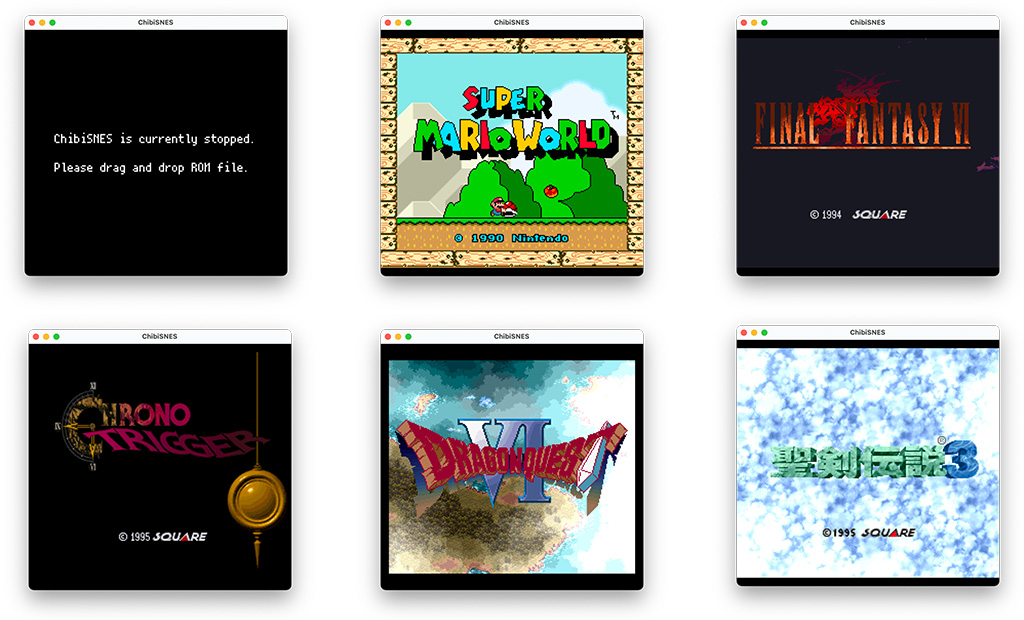
ChibiSNES is an open-source Super Nintendo (SNES) emulator implemented in Go and based on the LakeSNES codebase. It provides a command-line/desktop executable (cmd/chibisnes), basic controller keybindings, LoROM/HiROM cartridge support, SPC700 audio emulation, and partial cartridge mapper/ enhancement-chip stubs listed in the repository. The project is small
WHY IT MATTERS
Why ChibiSNES exists
ChibiSNES is a hobby project by the repository owner to implement an SNES emulator in Go, using LakeSNES as its upstream reference and applying bug fixes and Go-language reimplementation choices. The README explicitly states the project is based on LakeSNES.
BEST FOR
When to use ChibiSNES
Use ChibiSNES if you want a compact, Go-based SNES implementation for exploration, learning, or embedding in Go projects. It is suitable for developers interested in SNES internals and Go tooling rather than for users seeking a highly compatible, production-grade SNES frontend.
The people behind chibisnes
History & lineage
ChibiSNES is explicitly documented as based on LakeSNES; the repository contains the emulator implementation, a cmd/chibisnes executable, a small number of commits and assets (including a macOS build folder), and links to SNES specification resources in its README. The project is a personal/hobby repository with relatively few stars and contributions and maintains an MIT license consistent with LakeSNES. The package is published on the Go package index.
What chibisnes supports
- Super Nintendo / Super Famicom (LoROM and HiROM cartridges; SPC700 audio)
- Desktop platforms (builds via Go — Windows, macOS, Linux implied by Go tooling and build folder)
- Command-line / minimal GUI via internal/gui and cmd/chibisnes binaries (repository contains a macOS app bundle structure)
- Go language usage (module published on pkg.go.dev).
Download and availability
OFFICIAL DOWNLOADS
Get chibisnes
Official source and release builds are hosted on the repository and the project's GitHub Releases page. The canonical download locations are the repository and its releases listing (builds may be provided as assets there). Do not expect commercial games, BIOS files, or firmware to be included.
Get chibisnes ↗DOCUMENTATION
Official documentation
Read the official configuration, compatibility, and troubleshooting material before changing advanced options.
Read official documentation ↗chibisnes setup guide
Setup note: Verified, emulator-specific setup instructions to build and run ChibiSNES from source or to use release assets. These steps assume you will provide your own legally-obtained game ROM files and that no BIOS or commercial game files are included with the project.
- 1) Get the source or release: Option A — Releases: Visit the project's Releases page to download any prebuilt artifacts the maintainer published. The Releases index is the primary official release location.
- 2) Build from source (recommended for developers): Prerequisites: a working Go toolchain (Go 1.18+ recommended; check go.mod in the repo), and git. Clone the repository: git clone https://github.com/kaishuu0123/chibisnes.git. Inspect go.mod and cmd/chibisnes for the build target. Build the chibisnes command with go build ./cmd/chibisnes (or go install ./cmd/chibisnes@latest to install into your GOPATH/bin). The repo includes a build/macosx app bundle as evidence of macOS packaging; for other platforms, the Go-built binary is the portable artifact.
- 3) Run the emulator: Run the produced binary (./chibisnes or the installed chibisnes command). The README documents key bindings and expected command behavior (cmd/chibisnes is the SNES console entry). Provide a legal SNES ROM file path as the runtime argument if the executable accepts it (consult the repository's cmd/chibisnes code for exact CLI flags). The README describes supported cartridge types (LoROM/HiROM) and that .srm save data is read in a 0x2000 block.
- 4) Controller input and keybindings: The repository README lists default key bindings (keyboard mappings for Player 1) and references joystick support in the codebase. For gamepad support you may need to map your controller through the host OS or confirm that the build includes joystick input support; the README in the repository is the authoritative mapping.
- 5) Audio, save data, and compatibility notes: ChibiSNES implements SPC700 audio and will create/read .srm save data (repository notes limit .srm reading to a single 0x2000 region). The README lists enhancement chips as ToDo (SuperFX, SA1, SPC7110 and others are noted but not guaranteed), so expect incomplete compatibility for games requiring coprocessors. For higher-compatibility needs prefer more mature SNES emulators.
- 6) Packaging and macOS app bundle: The repository contains a build/macosx/ChibiSNES.app/Contents tree, which indicates the project or its author has produced a macOS app bundle at some point. If a macOS .app asset is available in Releases, download and use that; otherwise build the binary on macOS and package it as an app bundle yourself following standard macOS app packaging.
- 7) Troubleshooting and development: If you encounter crashes or incorrect behavior, check the repository Issues page and source code for recent commits and notes. Because this is a hobby project, active maintenance and broad compatibility are limited; use the code as a base for debugging or learning rather than expecting production-level compatibility.
Software reminder: The project does not include commercial ROMs, BIOS, or firmware. You must supply your own legally-obtained game ROMs and any platform-specific drivers. Follow the repository README for exact CLI flags and runtime options.
Sources and further reading
Detailed guides and tutorials
Explore step-by-step guides for chibisnes as they are published.