 Retro Replay Retro Gaming History, Reviews & Emulation
GAME BOY ADVANCE EMULATOR
DSHBA
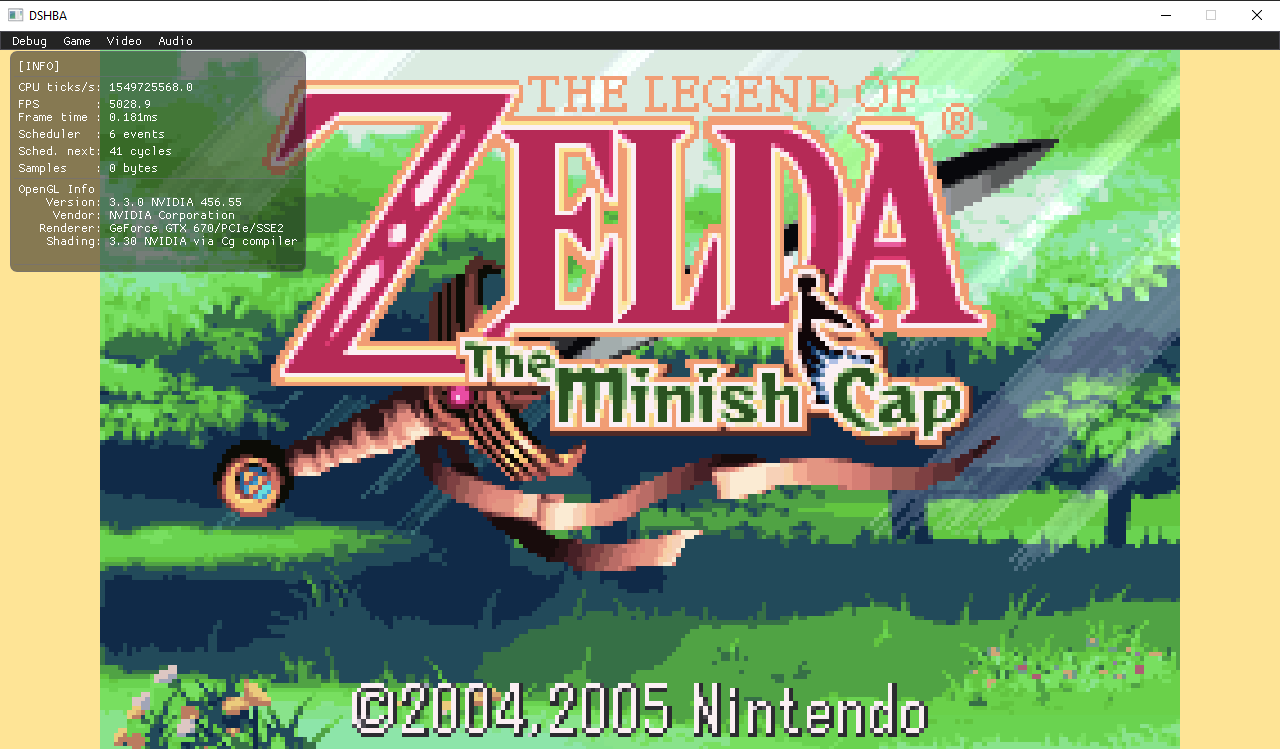
DSHBA is an open-source Game Boy Advance emulator written in C++ that emphasizes performance and a GPU-backed "hardware" renderer. It uses SDL for window/input, optional Capstone for ARM disassembly support, and requires a GPU with OpenGL 3.3+ for the hardware renderer.
WHY IT MATTERS
Why pick DSHBA?
DSHBA focuses on raw performance and a modern OpenGL-based hardware renderer that can upscale affine sprites and reduce CPU work. It implements a cached interpreter and several optimizations intended to raise frame rates while still passing most GBA compatibility tests.
BEST FOR
Best for
Users who want a high-performance, actively developed GBA emulator source they can build and experiment with (rendering/shader work, CPU/PPU optimizations), and developers wanting an example of a hardware-renderer approach for GBA graphics.
The people behind DSHBA
History & status
DSHBA is the author's rewrite of an earlier GBA emulator (GBAC-) into a faster C++ implementation with an OpenGL hardware renderer and a cached interpreter. The project's repository shows active development (commit history and releases on GitHub) and documentation in the repository README. The author documents design choices and profiling-driven optimizations; compatibility is high but not cycle-perfect for some timing-sensitive AGS tests.
What DSHBA supports
- Nintendo Game Boy Advance (GBA)
- Host platforms that support SDL2, CMake and OpenGL 3.3 (Windows, Linux, macOS) — build-target depends on toolchain
- Optional: Capstone (capstone[arm]) for disassembly features
- Requires GPU with OpenGL 3.3 for hardware renderer
Download and availability
OFFICIAL DOWNLOADS
Get DSHBA
Official releases and source are published on the project's GitHub. Prebuilt binaries may be available on the project's Releases page; otherwise build from source using CMake.
Get DSHBA ↗DOCUMENTATION
Official documentation
Read the official configuration, compatibility, and troubleshooting material before changing advanced options.
Read official documentation ↗DSHBA setup guide
Setup note: This guide covers verifying prerequisites, building DSHBA from source, and running it. It focuses on practical, repository-backed steps described in the project's README.
- 1) Verify repository and releases: Visit the official GitHub repository (DenSinH/DSHBA). Check the Releases page for prebuilt packages; if none are suitable for your OS, plan to build from source. Confirm the repository's README for requirements.
- 2) Install prerequisites: Install a modern C++ toolchain and CMake. Install SDL2 development libraries for your platform. If you want the optional disassembly support, install Capstone with ARM support (capstone[arm]). Ensure your GPU/drivers support OpenGL 3.3 or later.
- 3) Clone the repo: git clone https://github.com/DenSinH/DSHBA.git && cd DSHBA. Use the repository branch/tags matching the release you want.
- 4) Configure and build with CMake: Create a build directory (mkdir build && cd build). Run cmake .. (set toolchain/environment variables as needed). Then run cmake –build . –config Release (or use make / ninja depending on generator). The repository contains CMakeLists.txt and a cmake folder used by the build system.
- 5) Runtime requirements: DSHBA expects GBA ROM files supplied by the user; it does not include any commercial game ROMs, firmware, or Nintendo BIOS. Ensure SDL2 runtime is available; the hardware renderer requires an OpenGL 3.3 capable GPU/driver. If the build used Capstone, additional features (disassembly support) may be available in the UI.
- 6) Running the emulator: Run the produced executable from the build output. Use the in-repo dshba.ini, input.map and README sections for default controls and configuration. Load your legally obtained .gba ROMs through the emulator's UI or command-line options if available.
- 7) Troubleshooting & testing: If you encounter graphical issues, confirm GPU drivers and OpenGL version. For missing symbols at runtime, verify SDL2 development/runtime libraries match the build. The README notes which AGS tests the emulator passes and where timing-accurate tests may still fail.
Software reminder: DSHBA does not include or provide GBA ROMs, commercial BIOS/firmware, or keys. Use only legally obtained ROMs and follow local laws regarding game preservation and use.
Sources and further reading
Detailed guides and tutorials
Explore step-by-step guides for DSHBA as they are published.