 Retro Replay Retro Gaming History, Reviews & Emulation
SNES EMULATOR
Hoosnes
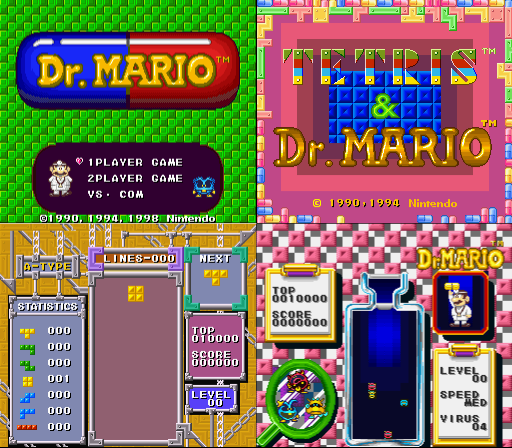
Hoosnes is an open-source TypeScript implementation of a Super Nintendo (SNES) emulator that uses WebGL for graphics and WebRTC for peer-to-peer netplay. The project is browser-focused and the repository indicates it currently runs only a small set of test ROMs (the README mentions Dr. Mario and Tetris) and is not fully cycle-accurate or feature-complete.
WHY IT MATTERS
Why this project exists
Hoosnes appears to be an experimental, educational SNES implementation written in TypeScript for the web. The author built it to explore SNES hardware concepts in JavaScript/TypeScript, add WebGL rendering, and experiment with WebRTC-based netplay rather than to provide a fully compatible production-quality emulator.
BEST FOR
Best use cases
– Learning/education: studying a TypeScript implementation of SNES components and seeing how WebGL and WebRTC can be used for emulation and netplay. – Web demos and small test ROMs: running simple/test ROMs and inspecting emulator internals in a browser. – Experimental netplay demos between browsers that support WebRTC.

The people behind Hoosnes
History & status
Hoosnes is maintained in a public GitHub repository (hkamran/Hoosnes). The repository contains source, documentation, and a small roms folder; the README explicitly states the emulator is intended for modern browsers (preference to Chrome), uses WebGL for rendering and WebRTC for netplay, and is not 100% correct emulation. The README also notes the emulator can run only some test ROMs and cites Dr. Mario and Tetris as examples. The project has limited community adoption (low star/fork counts) and appears to be an active experimental repository rather than a mature compatibility-focused emulator. Sources consulted: project README and repository listing.
What Hoosnes supports
- Super Nintendo Entertainment System (SNES) — experimental/test ROMs only
- Platform: Modern web browsers (preference: Chrome). WebGL and WebRTC required.
- Netplay via WebRTC (browser-to-browser) — requires browser permissions and working peer connectivity.
- Does not include BIOS/firmware or commercial game files.
Download and availability
OFFICIAL DOWNLOADS
Get Hoosnes
Download releases or source from the official GitHub repository. Use the Releases tab on the project page to fetch packaged builds if available, or clone the repository and build locally from source.
Get Hoosnes ↗DOCUMENTATION
Official documentation
Read the official configuration, compatibility, and troubleshooting material before changing advanced options.
Read official documentation ↗Hoosnes setup guide
Setup note: Practical setup notes — Hoosnes targets modern browsers and is best used as a web demo or development build. The steps below follow the repository layout and README guidance. ROMs are not included and must be supplied by the user; the emulator supports only a very small number of test ROMs per the project README.
- 1. Get the code or a release: Visit the official GitHub repository (hkamran/Hoosnes) and check Releases for any packaged artifacts. If no usable release is available, clone the repository to your machine: git clone https://github.com/hkamran/Hoosnes.git. The repository contains source, a roms folder, and build files (package.json, webpack config). Source and releases are the authoritative download paths.
- 2. Build (if using source): Install Node.js (current LTS) and npm. From the project root run npm install to fetch dependencies, then use the provided build task (check package.json and gulpfile.js) — common commands are npm run build or gulp build depending on the repo scripts. The repo includes TypeScript sources and a webpack configuration; building produces a web bundle suitable for serving locally or inspecting in a browser.
- 3. Serve the demo or open the demo page: The README links to a demo page hosted by the author. For a local build you can serve the built files with a simple static server (e.g., npx http-server ./dist or similar). Modern browsers require secure contexts for WebRTC on some configurations — if you plan to use netplay, host over HTTPS or use localhost where browsers allow WebRTC without HTTPS.
- 4. Prepare ROMs (user-supplied): Hoosnes does not include commercial games or BIOS files. Place legally obtained test ROM files into the roms folder or use the emulator’s ROM load UI if present. The README states the emulator can run only a few ROMs (example: Dr. Mario, Tetris) and is not fully compatible — expect many games to fail or behave incorrectly.
- 5. Netplay (browser-to-browser): Netplay uses WebRTC. To use it you and your peer must grant microphone/camera permissions only if the demo requires them (some WebRTC setups require at least ephemeral media permissions), allow the browser to connect to signaling servers if the demo needs one, and ensure network/NATs permit peer connectivity. The project README notes WebRTC is used for netplay but does not provide a production signaling server; you may need to run the demo’s signaling component or rely on any demonstration signaling provided in the repository or demo page.
- 6. Debugging & development notes: Because Hoosnes is an experimental TypeScript implementation, enable developer tools in your browser to view console logs and inspect emulator internals. The repository contains documentation and a resources folder referenced in the README for further reading. Expect incomplete PPU/CPU features and graphical/audio glitches; the README explicitly warns it is not 100% correct emulation.
Software reminder: Hoosnes does not include commercial games, firmware, BIOS files, or copyrighted ROMs. Obtain any game ROMs yourself in accordance with local law. Use modern Chromium-based browsers (Chrome/Edge) for best compatibility with WebGL and WebRTC, per the project's README.
Sources and further reading
Detailed guides and tutorials
Explore step-by-step guides for Hoosnes as they are published.