 Retro Replay Retro Gaming History, Reviews & Emulation
NES EMULATOR · 1997
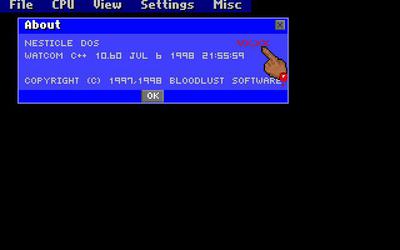
NESticle
The fast, provocative DOS emulator that helped turn NES emulation from a technical curiosity into a mass hobby.
WHY IT MATTERS
A landmark early emulator
NESticle combined speed, approachable menus, save states, recording, and graphics tools on ordinary 1990s PCs. Its personality made it impossible to ignore.

BEST FOR
Historical exploration
Use NESticle as a museum piece for emulation history and nostalgia. Modern players should choose a maintained NES emulator for regular play.
The people behind NESticle
Icer “Sardu” Addis and Bloodlust Software
NESticle was released by Icer Addis, widely known in the scene as Sardu, under the Bloodlust Software name. Bloodlust was associated with Sardu and his collaborator Dave and had already built a recognizable identity through irreverent shareware games.
The software made its author a scene celebrity as emulator developers became recognizable personalities. Later accounts describe a breach involving an exposed network share; details vary across retellings, so the episode belongs in the record with that uncertainty made clear.
Supported systems and capabilities
- Nintendo Entertainment System and Famicom software
- Fast DOS performance on period hardware
- Save states, replay recording, and configurable input
- Sprite, tile, and graphics inspection tools
- An approachable menu-driven interface
History and legacy
Released on April 3, 1997, NESticle arrived when home PCs and the early web were ready to carry emulation beyond small technical circles. It ran quickly on modest machines, spread through FTP mirrors and scene sites, and gave many players their first practical experience with NES emulation.
Its speed-first design, incomplete accuracy, and abandoned status make it unsuitable as a modern default. Its influence remains enormous: it showed that an emulator could be fast, approachable, feature-rich, and culturally distinctive.
Download and availability
ARCHIVE AVAILABLE
Preserved NESticle builds
NESticle is no longer maintained, but historical DOS releases are preserved by Zophar’s Domain. Review the available versions and documentation before downloading.
Open the NESticle archive ↗DOWNLOAD STATUS
Available for historical use
Platform: DOS
Current development: Discontinued
Recommended environment: DOSBox or an isolated virtual machine
Only download preserved software from a source you trust, scan the files, and use legally obtained homebrew or personal game dumps.
NESticle setup guide
Setup note: NESticle is obsolete software intended for historical exploration. Use a trusted archive and an isolated DOS environment.
- Use an isolated DOS environment. DOSBox or a disposable virtual machine is safer and more predictable than trying to run the original executable directly on a modern system.
- Obtain a preserved build from a reputable archive. Verify the filename and scan it before opening.
- Mount a dedicated folder. Keep the emulator and legally obtained homebrew or personally dumped test ROMs separate from personal files.
- Configure input. Open NESticle’s input settings and map the D-pad, A, B, Start, and Select controls.
- Load a test game. Begin with a simple, legally usable NES test ROM or homebrew title to verify video, input, and sound.
- Save configurations cautiously. Treat this as a historical demonstration; use a maintained emulator for a regular library.
ROM reminder: NESticle does not include commercial games. Retro Replay links to emulator software and documentation, not copyrighted ROM collections.
Sources and further reading
Detailed guides and tutorials
Explore step-by-step guides for NESticle as they are published.