 Retro Replay Retro Gaming History, Reviews & Emulation
NES EMULATOR
NESEmulator
NESEmulator — a work-in-progress open-source NES (Nintendo Entertainment System) emulator implemented in C++ with SDL rendering, an APU implementation in progress, and partial mapper support.
WHY IT MATTERS
What this project is
NESEmulator is an independent C++ implementation of the Nintendo Entertainment System intended as a learning / hobby emulator. The repository describes a mostly-complete 6502 CPU implementation, a baseline PPU, a partially implemented APU, and at least one cartridge mapper implemented (UNROM).
BEST FOR
What it does well (as of repository state)
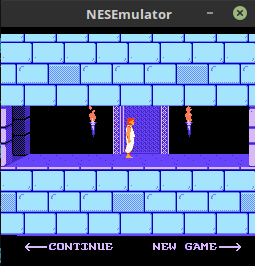
According to the project README the CPU implements the instruction set and many games run; the PPU is functional enough to render graphics for many titles; basic audio channels are implemented (two pulse channels and triangle) and SDL is used for rendering, making the project suitable for experimentation and study of NES internals.

The people behind NESEmulator
Status & history (from project documentation)
The repository README describes the project as a work-in-progress. It reports the CPU implemented with its instructions, a baseline PPU implementation that needs refactoring for more cycle-accurate scrolling, partial APU support (3 of 5 channels) with audio resampling work ongoing, and a single implemented mapper (UNROM). The author states the emulator is "fairly stable" and can run many games (examples named include Donkey Kong, Contra, Super Mario Bros) while noting minor glitches and further mapper and audio work planned. The repo uses CMake / Makefile, SDL for rendering, and SPDLog for logging. No release binaries are included in the README text; the repository is hosted publicly on GitHub and lists activity and commits.
What NESEmulator supports
- Nintendo Entertainment System (NES) — cartridge-based ROMs (.nes)
- UNROM mapper (one mapper implemented)
- SDL-based rendering (desktop platforms)
- Partial APU (two pulse channels + triangle)
Download and availability
OFFICIAL DOWNLOADS
Get NESEmulator
Official source and release artifacts are published on the project's GitHub repository. Check the repository releases page for any prebuilt packages; otherwise build from source.
Get NESEmulator ↗DOCUMENTATION
Official documentation
Read the official configuration, compatibility, and troubleshooting material before changing advanced options.
Read official documentation ↗NESEmulator setup guide
Setup note: These setup notes are specific to NESEmulator's repository state and assume a development environment with a C++ toolchain. The project expects you to build from source (CMake/Makefile present) and requires SDL and typical build tools. The emulator does not include commercial ROMs, firmware, or BIOS files — provide your own legally-obtained .nes files for testing.
- 1) Get the source: Clone the official repository from GitHub (the project's homepage is the repository). If you prefer release artifacts, check the repository's Releases section for prebuilt packages.
- 2) Install build dependencies: Prepare a standard C++ development toolchain (compiler, CMake or make). Install SDL2 for your platform. The repository also mentions SPDLog for logging; either install the library or disable logging compile-time options if present. The project uses standard build tooling (CMakeLists.txt and a Makefile) so ensure cmake and a C/C++ compiler are available.
- 3) Build: Follow a typical CMake-based build workflow (create a build directory, run cmake pointing at the repo root, then build). The repository also provides a Makefile; if you prefer use the Makefile to compile. Watch the build output for missing libraries (SDL2, spdlog) and install them if needed.
- 4) Run the emulator: Run the built binary from a terminal or GUI. The repository's source files include a driver (main.cpp) and cartridge handling (cartridge.cpp). The emulator expects a NES ROM file (commonly .nes) passed to it or loaded via the project's runtime behaviour — consult the built binary's usage output if available. The emulator does not supply ROMs; use your own legally obtained files.
- 5) Troubleshooting and development notes: If you encounter rendering or audio glitches note that the README documents the PPU scrolling as "crude" and audio resampling as a known area to improve. Mapper support is limited (UNROM implemented; MMC1/MMC3 mentioned as planned). Use logs (SPDLog) to inspect runtime behaviour if enabled. For contributions, follow normal GitHub contribution practices (fork, branch, open pull requests) and check the repo for tests and example usage.
- 6) Safety & legal: NESEmulator does not include copyrighted games, firmware, or BIOS. Only use ROMs you own or that are in the public domain. Respect copyright and local law when obtaining game images.
Software reminder: This project is intended for learning and hobby use. It requires building from source and additional libraries (SDL2, possibly spdlog). ROMs are not included.
Sources and further reading
Detailed guides and tutorials
Explore step-by-step guides for NESEmulator as they are published.