Retro Replay Retro Gaming History, Reviews & Emulation
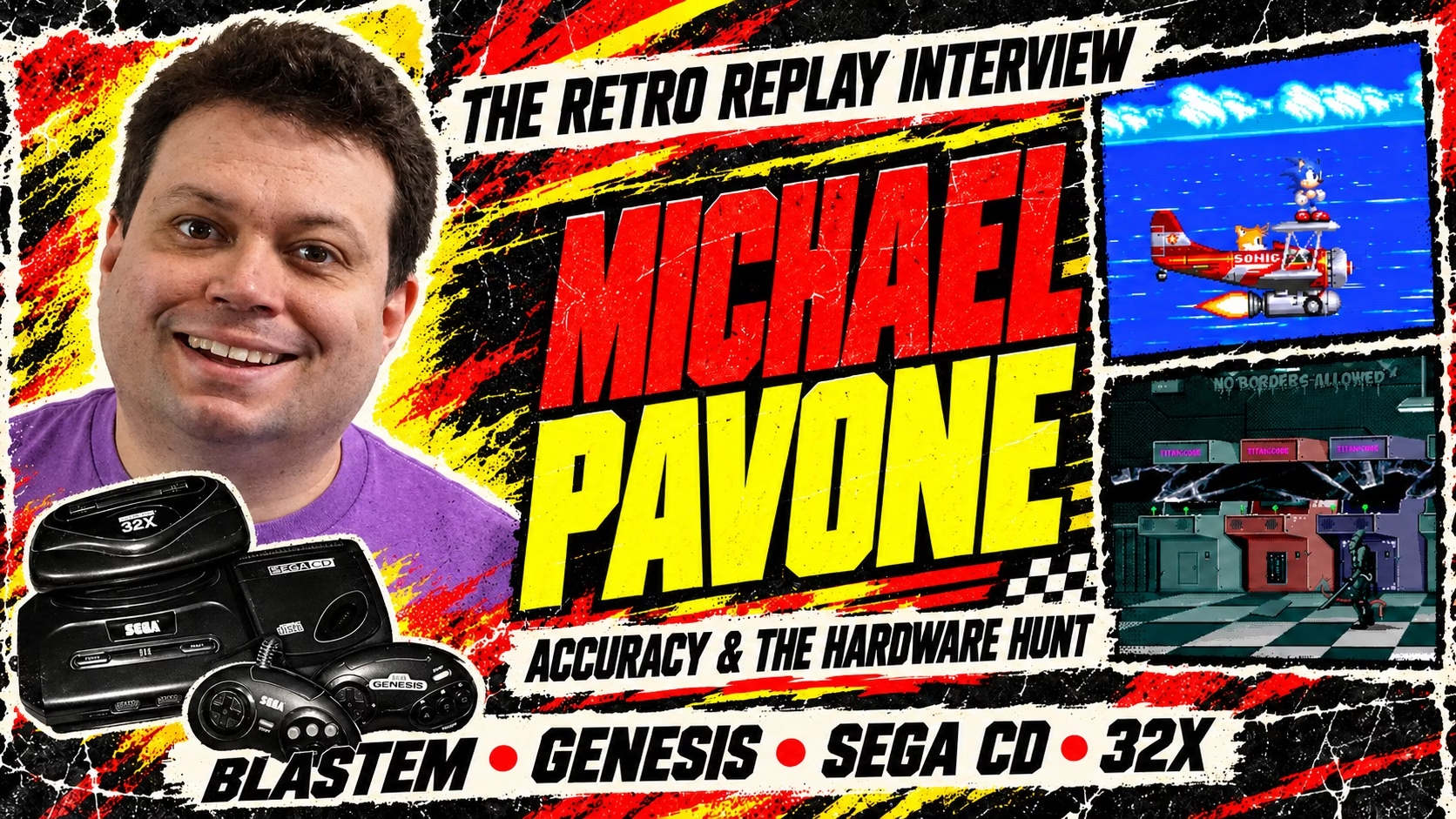
Michael Pavone paid around $2,000 for a copy of Outback Joey while trying to emulate its exercise peripheral. The first copy was a fake. After getting a refund and finding a genuine one, he still had to work backward from the game’s code because the bicycle sensor and heart-rate hardware were beyond his budget.
That is one of the more expensive detours in a conversation that also gets into disappearing sprites, frozen Sega CD videos, and a sound chip whose quirks can change how fast a game’s music plays. Pavone began as a Sonic fan who wanted to play his Genesis games on a PC. With BlastEm, he set himself a harder challenge: reproduce the hardware closely without demanding an extravagant computer to run it.
We spoke with BlastEm’s creator about the games and demos that expose emulator shortcuts, the compromises behind Sega’s hardware, and why he has chosen to keep his hobby project’s code human-written. For downloads and setup information, visit our BlastEm emulator profile.

A Genesis kid starts an emulator
Retro Replay: Before we get into BlastEm, what are you most interested in technically right now? Is emulator development still where most of your hobby-programming energy goes, or have other projects been stealing your attention?
Michael Pavone: BlastEm is still my main side project, though I recently dusted off an old programming language project of mine.
Retro Replay: What originally pushed you from using Genesis/Mega Drive emulators to deciding you wanted to write one yourself?
Retro Replay: Was the Genesis already a system you had a strong personal attachment to, or was it primarily the hardware architecture that made it an interesting emulation target?
Retro Replay: When BlastEm began, Genesis emulation had already existed for many years. What did you think the existing emulators were still getting wrong or leaving unexplored?
Retro Replay: Was high accuracy one of BlastEm’s goals from day one, or did that emphasis become stronger as you discovered just how many subtle hardware behaviors were still poorly understood?
Michael Pavone: My initial interest in Genesis emulation was as a user, probably when I was in about 8th grade. The Sega Genesis was the first console I bought with my own money and I absolutely loved the Sonic games and being able to play them on my PC felt neat. The main hub of Sega emulation at the time was Eidolon’s Inn and its message board Eidolon’s Tavern. The Tavern had a mix of end-users, homebrew developers and emudevs so it gave me an initial taste of the more technical side of things. At the time, there were no working emulators for the Sega CD and since I was fond of the system (it had a proper Sonic game after all) I decided I was going to make the first one. While I had taught myself some programming by this point, I was completely unprepared for the task so I did not get particularly far; however, it did give me an introduction to the system and to reverse engineering. Eventually Jeffrey Quinn released a version of AGES with Sega CD support which ended my dream of being first, but I stuck with the reverse engineering and eventually released what I believe to be the first bit of Sega CD homebrew.
Years later, Near (the author of BSNES) wrote an article for Ars Technica titled “Accuracy takes power: one man’s 3GHz quest to build a perfect SNES emulator”. In my hubris, I decided that I could make an emulator that was both accurate AND fast. I figured the SNES already had BSNES and I was a Genesis kid with some prior exposure to its hardware, so the choice of what system to target was clear. Nemesis had started on Exodus by this point, but I had somehow missed the announcement until I was already well underway. The emulators people were actually using were more performance oriented and didn’t support the sort of fine timing granularity that more modern efforts like BSNES provided so I felt I could fill a gap there.

Retro Replay: You mentioned that after your first Sega CD emulator attempt stalled, you kept reverse engineering the system and eventually released what you believe was the first Sega CD homebrew. What exactly was that project, what did it do, and does a copy of it still survive today?
Michael Pavone: It does! So the very first one was just a port of Charles Doty’s “Graphics and Joystick Sampler” ROM from Genesis to Sega CD. This was a very primitive port that didn’t really interact with the Sega CD at all other than booting as a disc. You can find that at the bottom of this page: https://www.retrodev.com/segacd.html (look for scdtest4.iso). Note that the documentation page it’s on is rather old and probably has some errors
After that I followed up with SLO (stands for Sega LOader) which was a simple menu that let you load other files off the disc. It had a primitive text viewer, primitive PCM sample player using the Ricoh chip and could run raw 68K binaries. You can find that here: https://www.retrodev.com/slo.html
SLO was used for my Sega CD Transfer Suite (https://www.retrodev.com/transfer.html) which was primarily useful as a cheap way to dump Genesis games back when computers still had parallel ports, but also served as an easy way to test small bits of Genesis and Sega CD code on real hardware. The Sub 68K portion of SLO also made it into Mighty Mighty Missile which was a Sega CD clone of Chu Chu Rocket
Retro Replay: Eidolon’s Tavern sounds like it played a surprisingly important role in your path from emulator user to developer. Who were some of the people there who influenced you, and what was it like having emulator authors, homebrew developers, and regular users all sharing the same space at that point in emulation history?
Michael Pavone: It’s been a very long time so my memories are a bit vague, but in its heyday it felt like basically everyone who was active in the Genesis scene was there. Certainly major emu authors like Steve Snake (KGen and Kega) and Stephane Dallongeville (Gens and SGDK though that came later) were there. It was probably the first time in my life that I directly interacted with someone developing software I actually used. I’m not sure if I really remember who influenced me specifically, but I remember the feeling that respect in the community was generally earned with real results and was excited by the idea that I could earn my place amongst their ranks.
Retro Replay: You said Near’s “Accuracy takes power” article essentially challenged you into proving that accuracy and speed did not have to be mutually exclusive. Did you ever talk with Near about BlastEm or about how that article influenced you? And after 14 years, do you think your original “I can have both” premise ultimately held up?
Michael Pavone: Yeah we did chat a fair bit. I don’t specifically remember a conversation about their article inspiring me, but I’m sure I mentioned at some point. I think Near initially reached out hoping I had a clever solution to dealing with the 68K/Z80 interaction I mentioned before as there’s apparently a similar problem with certain cartridge coprocessors on the SNES. I didn’t have anything useful for them, but we kept in contact after that. Near’s actual views on performance were a bit more nuanced than what I originally perceived from the article. It’s not that Near didn’t care about performance, but they also cared a bit about their code being clear so it could better act as documentation.
Whether the “I can have both” premise held up is somewhat a matter of perspective. It is fairly fast compared to other emulators for the system that are aiming for the same level of timing granularity. Accuracy is a many-faceted thing so it’s hard to say which amongst those is truly the most accurate at this point, but BlastEm is at least in the running and to the extent it has a gap with any of the competitors I think they can be closed without a big performance hit. At the same time, it’s still not as accurate as I would like. So in some ways it feels like a failed experiment.
What timing accuracy actually means
Retro Replay: For readers who hear terms like “cycle accurate” thrown around constantly, what does meaningful timing accuracy actually mean on a machine like the Genesis?
Michael Pavone: I personally don’t love the term “cycle accurate” since it’s a bit imprecise, but there are basically two main aspects of timing accuracy in an emulator: Do the individual operations of the individual emulated components take the correct amount of time and how fine is the granularity at which the components interact with each other. Generally speaking older emulators took liberties with both of these, though the latter suffered more. In hardware all the components operate in parallel simultaneously, but in an emulator you typically only emulate one component at once. Multi-threading technically allows you to run multiple components in parallel, but it’s actually non-trivial to do this in a way that’s actually faster unless the components have relatively limited interaction with each other. Switching between components has a cost so the more frequently you switch between components the more CPU time you burn.
Older Genesis emulators generally run each component for one video line’s worth of time before switching. This is sufficient for most raster effects (updating video parameters mid-display), but any effects that rely on things being updated mid-frame can run into trouble. This most commonly shows up with games that update vertical scroll values mid-frame. When a game uses full screen vertical scroll (i.e. the whole plane moves together vertically) the scroll value is latched early before raster effect routine can update it, but when a game uses the 2-column vertical scroll mode the values are fetched one at a time as the line is rendered. It’s possible to handle these games correctly in a line-oriented emulator, but you need to have some heuristics around when to actually render the line. These heuristics can fail when people write new boundary pushing code.
Now if you just want to play the games you remember from back in the day, all that really matters is if those games run correctly. Accuracy beyond that is more important for both developers who want to ensure their code actually works on hardware and for people running new software from those developers that maybe violates the assumptions of those older emulators.
Retro Replay: The Genesis has a Motorola 68000, Z80, VDP, YM2612, PSG and other components all interacting with each other. Is reproducing the individual chips actually easier than reproducing the timing relationships between them?
Michael Pavone: There can be challenges to both, but I feel like in practice I’ve spent more time debugging issues with the individual components. There can be some subtleties to the timing of the interactions themselves, but for the most part as long as the timing of the components is correct in isolation and you have fine enough synchronization granularity then the interactions work fine.
Retro Replay: What Genesis component surprised you most once you began investigating the real hardware deeply?
Retro Replay: Conversely, did reverse engineering the Genesis give you greater appreciation for any particularly clever engineering decisions inside the machine?
Michael Pavone: The way the Genesis VDP uses its dual port VRAM is kind of interesting. The VRAM chips are designed with a linear framebuffer in mind so there’s a serial access port which provides fast access to sequential values intended for driving the display and a random access port to allow the CPU to make updates at the same time. Both ports share a set of address lines so you can’t change the starting address for the serial access port while using the parallel port and vice versa. For the intended use, this isn’t a big limitation since you generally only need to change the address once per line or so, but the Genesis uses a tile-based display which requires access that’s much less linear. The VDP organizes all its reads into sets of 4 sequential bytes so it can maintain throughput of 1 byte per cycle while providing sufficiently random access for tile-based rendering. When you’re changing the address every 4 bytes you can’t really use both ports simultaneously, but sustaining 1-byte per cycle was very good for the time and gave the Genesis VDP the bandwidth it needed for a second background layer and more sprites compared to the SMS. This struck me as a clever and non-conventional use of the part.
Retro Replay: Was there something that emulator developers had believed about the Genesis for years that hardware testing eventually proved was simply wrong?
Michael Pavone: This is a fairly small thing, but for a long time it was thought that Z80 access to 68K work RAM worked inconsistently between various Genesis models, but as it turns out writes work on all models and reads don’t work on any models.
Test ROMs, logic analyzers, and tiny bugs
Retro Replay: How much of BlastEm development involves reading documentation versus writing test ROMs and effectively interrogating the original console yourself?
Michael Pavone: It varies quite a bit. I generally start with documentation when its available and then resort to running tests or pulling out my logic analyzer when something is sufficiently unclear. For the base Genesis, there was already a lot of community developed documentation which helped a ton, but there are always gaps. Also sometimes even when documentation exists it’s helpful to write a test ROM so you can compare the output of your code and the original hardware. This was very helpful for working out the issues in my YM2612 implementation. I wrote a small test ROM that iterated through a bunch of different parameters and played a single note with each setting and then compared the results between BlastEm and hardware to find implementation bugs.
Retro Replay: What does one of those hardware investigations actually look like? If a game behaves differently on BlastEm and a real Genesis, how do you narrow down which component is responsible?
Michael Pavone: It sort of depends on the nature of the problem. For audio issues VGM is often quite helpful. I built a VGM player using BlastEm’s audio cores (now integrated into the main emulator) primarily so I could test those components independently of the rest of the emulator. If the VGM sounds wrong then I know the issue is in the relevant audio core. If the VGM sounds correct then I know that incorrect values must be getting written to the chip. If it’s a problem with the audio chip core then I first isolate which channel is impacted and see what settings are being used which often gives some clues as to where the problem might be. If the wrong values are getting written then I generally resort to disassembling the code and trying to understand what it’s supposed to be doing.
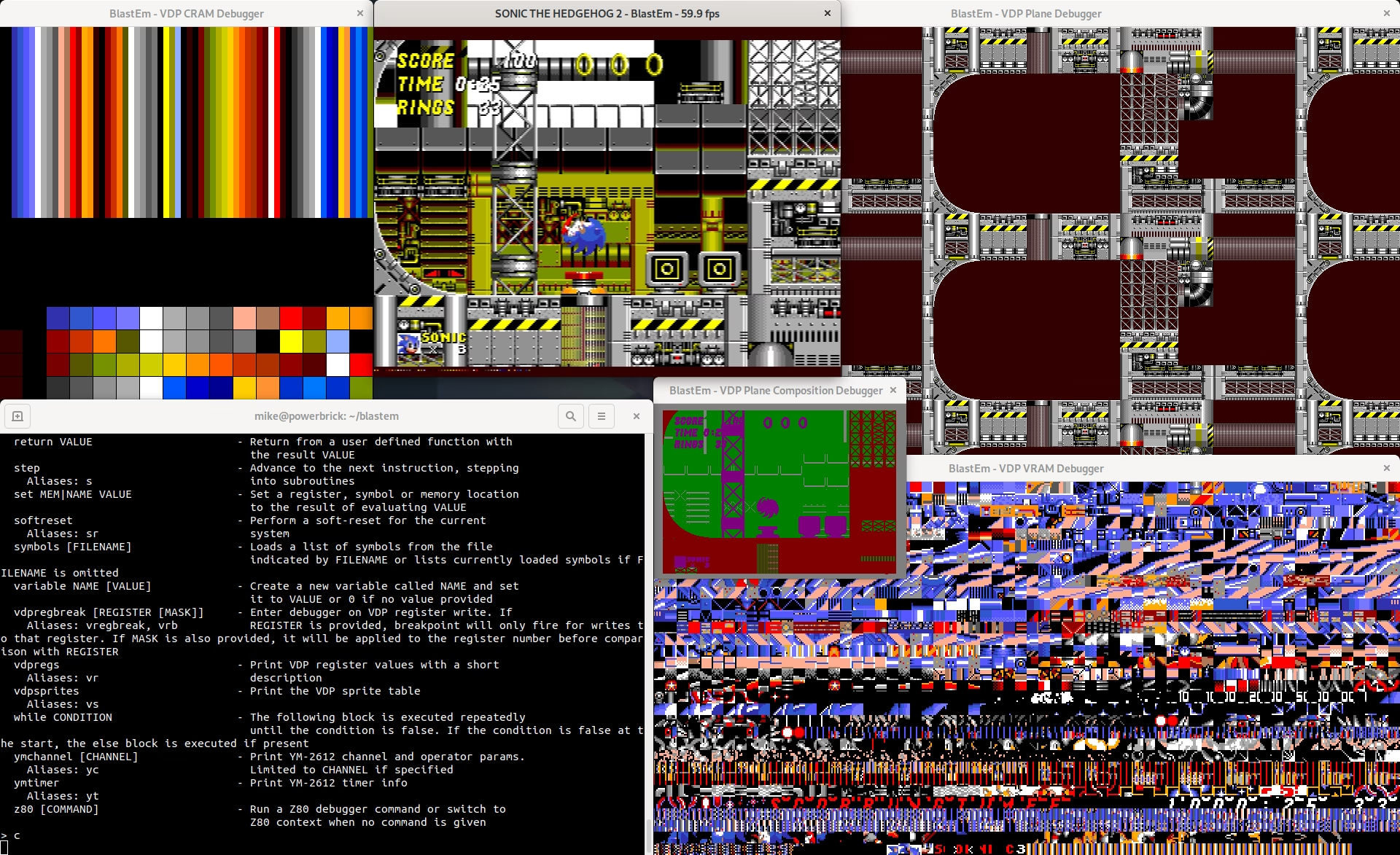
For video issues, I usually start with my plane composition debug view which shows a version of the frame color coded to indicate what plane each pixel came from and then go from there.
Retro Replay: Have you ever spent days or weeks chasing what looked like an enormous emulation problem only to discover that the real hardware was doing something ridiculously small or strange?
Michael Pavone: I feel like pretty much all bugs that take weeks to track down end up being fairly small details. I spent a very long time trying to figure out why the videos in Penn & Teller’s Smoke and Mirrors for the Sega CD would freeze and in the end it was a small edge case in when a certain CD-ROM related flag was cleared. Similar story with the Sega CD version of Cliffhanger. For that one I spent a huge amount of time reverse engineering the game’s code to try and understand why some of the data loaded was corrupted, but ultimately I only found the bug when it impacted someone’s small homebrew program.
Retro Replay: Is there one hardware behavior you discovered through testing that made you think, “Why on earth did Sega design it this way?”
Michael Pavone: With the benefit of hindsight I disagree with some of the tradeoffs they made, but generally I find it pretty straightforward to understand the design decisions when considering their desire for SMS backwards compatibility and cost optimization. As an example: The Z80 is included for backwards compatibility with the SMS, but acts as a sound CPU in Genesis mode. One of the Z80’s typical jobs is to feed PCM samples to the YM2612 (typically for drums, but sometimes voices or other sound effects). Since PCM sounds tend to be large, they don’t generally fit in the Z80’s dedicated RAM and instead need to be fetched from the cartridge. Since the Z80 has a limited address space, it can’t see the whole cartridge at once and needs a banking mechanism to select which part of the cart it wants to read from. The way Sega implemented this is slow and awkward to use, but seems to be the result of running out of pins in the bus arbiter chip. Moving to a higher pin-count part probably would have increased costs.
The demos that catch an emulator cheating
Retro Replay: Games and demos like Overdrive and Overdrive 2 have become notorious torture tests for Genesis emulators. What are those programs doing that exposes inaccuracies ordinary commercial games often never reveal?
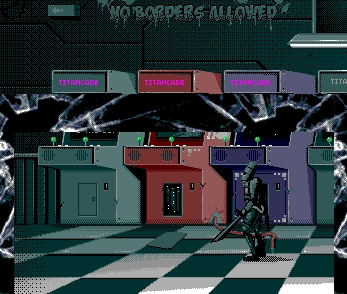
Michael Pavone: The original Overdrive is fairly timing sensitive in general, but the main part that’s a bit tricky is the “TITAN 512C FOREVER” screen. This section displays a background using all 512 colors the Genesis VDP can produce without resorting to shadow/highlight and has some text that “orbits” the sphere in the center of the background. Normally the number of colors you can upload during horizontal blanking (the gap between individual lines of the display) is pretty small because the VDP is busy with sprite rendering during this time, but if you manually blank the display this sprite rendering is paused and you can transfer more colors. Doing this reduces the number of sprites the VDP can render and this scene abuses that limitation. The scene contains some extra sprites that spell out “YOUR EMULATOR SUX”. On hardware these sprites are not displayed, but they will be on an emulator that does not properly emulate this limitation.
Overdrive 2 relies on some undocumented VDP features along with some subtleties of sprite rendering. One of these features is the 128KB VRAM mode. The VDP has support for an extra 64KB of VRAM (making 128KB total). The chips needed for this mode are not installed on a standard Genesis or Mega Drive, but were present on the short-lived Teradrive (Mega Drive/PC hybrid). Normally, enabling this mode is not useful since the extra RAM is not present, but Overdrive 2 abuses it to more efficiently transfer data for its rain effect in the scene in which the ship is landing on the planet. Numerous other scenes abuse a debug register that seems to be intended for testing the chip. Both of these things were just plain missing in all the extant emulators when it was released, but are relatively straightforward to add. The parts that depended on sprite rendering details are a bit trickier to retrofit if you’re not starting from something already closer to hardware. The “border dissolve” effect after the Titancade scene definitely depends on this a bit (in addition to some debug register use) and if I recall correctly so does the rotating cube effect later in the demo.
Retro Replay: Is there a commercial Genesis game you consider an especially good emulator test because it quietly relies on unusual hardware behavior?
Michael Pavone: There are a handful of games that are tricky in some sense, but I’m not sure any of them are really good emulator tests in general. As an example, the Moose Chase scene in Mickey Mania depends on sprite rendering limits in a similar way as the “TITAN 512C FOREVER” screen in Overdrive 1, but it’s possible to handle that without being correct enough for Overdrive. Sesame Street Counting Cafe and Fatal Rewind (known as The Killing Game Show in other regions) both depend on some interrupt edge cases, but aren’t necessarily particularly demanding beyond that.
Retro Replay: Fun one: what Genesis game has personally caused you the most aggravation as an emulator developer?
Michael Pavone: A lot of my Genesis game compatibility work is far enough in the past that I don’t really remember the most aggravating one now, but one game that did require a fair amount of work was Outback Joey. This game is designed for a custom exercise peripheral called the Heartbeat Personal Trainer that contains a bicycle cadence sensor and a heart rate monitor. At the time I started work on it, the game was rare and undumped and the peripheral was even rarer. I paid around $2K to get a copy and the first one was a fake. Fortunately, I got a refund and was able to purchase a genuine one, but the peripheral was definitely outside my budget. Because of this, I had to reverse engineer the peripheral completely from what the software expects.
As it turns out, someone else picked up a copy around the same time with the intention of dumping it. The copy that’s currently floating around came from them. One of us could have saved a fair bit of cash with some better communication. Oops!
Retro Replay: And flipping that around, what Genesis game do you actually enjoy playing the most when you’re not staring at it as a test case?
Michael Pavone: It’s not my favorite Genesis game, but I had a surprising amount of fun playing Gain Ground. The game is not visually impressive at all, but figuring out how to best use all the different characters to clear a stage is a fun challenge.
Accuracy, speed, and the limits of a dynarec
Retro Replay: Dynamic recompilation is a major part of how BlastEm achieves strong performance while maintaining detailed timing. What was the hardest part of designing a dynarec that was fast without throwing away the timing information you needed for accurate emulation?
Michael Pavone: BlastEm’s dynarecs aren’t really all that fast and the average performance improvement is fairly modest. Been a while since I made an effort to try and calculate the average speedup, but I think I calculated about 5% the last time I tried. Some games do get a bigger speedup than this (Sonic 1 seems to get a 15% speedup for instance), but these often aren’t the ones that really need it the most. Some games, like Outrunners, end up running slightly slower than with the interpreter due to the cost of retranslating self-modifying code.
A lot of the reason they’re not particularly fast is that I wrote them a long time ago and it was my first real attempt at the technique, but keeping things accurate also makes multi-instruction optimizations more complicated. With the benefit of more time and experience under my belt I do have some thoughts on how to address that, but overhauling my dynarecs hasn’t been a huge priority until the recent addition of 32X support.
Retro Replay: Is there a point where chasing another tiny amount of accuracy becomes disproportionately expensive in host CPU performance?
Michael Pavone: Accuracy and performance are definitely in tension. My goal with BlastEm was to let you have both with clever engineering, but I was only partially successful. To my knowledge BlastEm is the fastest Genesis emulator that has a fine degree of synchronization, but it is still noticeably slower than the older line-based emulators. It’s also not perfect and while some of this is just bugs or aspects of the hardware I don’t fully understand, there are some things that feel like they might be difficult to fix without a substantial performance hit. An example is Z80 access to the 68K’s bus (e.g. to read a PCM sample from the cartridge). This causes a delay on the Z80 because it has to wait for the 68K to acknowledge its bus request and it causes a delay on the 68K because the Z80 is stealing some time on its bus. Part of what makes BlastEm reasonably fast is that I don’t actually run the components in lockstep, I just do something that achieves the same result most of the time. Essentially I let the CPU run for a while until it touches one of the other components and then I “catch up” that component to the particular cycle the CPU is at when it does the touching. This works great for components that are primarily reactive to the CPU and only do things independently in fairly predictable ways (think horizontal and vertical interrupts), but it’s less great for an independent CPU that can steal some cycles whenever it wants. By the time the Z80 is running the instruction that does the 68K bus access, the 68K core is usually way ahead of that particular point in time. Emulating this precisely either requires running the CPUs in lockstep all the time or having some kind of rollback mechanism. Both feel like they might be too expensive.
Of course, what’s too expensive sort of depends on how fast of a computer you have.
Retro Replay: How do you personally decide when an approximation is good enough, especially when you know the real hardware behavior could theoretically be modeled more precisely?
Michael Pavone: Apart from things that just don’t work well with my synchronization model, I generally try to get the observable behavior completely correct when I actually know what that is. A more common scenario is that I’ll have a partial understanding of the low-level details of some hardware feature either from documentation or observation, but some details aren’t entirely clear. Whether I resort to writing a test in these cases often comes down to some combination of how easy it is to test or measure, how impactful the detail is likely to be and how likely I think an educated guess will be correct. Once these are in place, they’re generally good enough until they’re not. Someone writes a test ROM or demoscene prod that depends on the detail and then I go and fix it.
Retro Replay: Have you ever implemented a more accurate behavior only to discover that it broke a game because the previous inaccurate behavior had accidentally been compensating for another bug?
Michael Pavone: This is a fairly common occurrence in emudev and is especially common with timing sensitive code. As an example, Clue has a minor bug that causes some garbage to show on the difficulty selection screen if the timing is a bit off. As I worked through timing issues this bug disappeared and reappeared a few times.
The sound chip and the console revisions
Retro Replay: Genesis audio emulation has its own long history of debate, particularly around the YM2612. Why has getting the sound of an original Genesis exactly right been such a complicated problem?
Michael Pavone: There are a few reasons for this. The basic principle of operation of the YM2612 is actually pretty simple, but the way the parameters impact the output is not at all intuitive. This both makes it difficult to understand what the problem is when something sound wrongs and also means that developers using the chip ended up relying on edge cases without realizing it.
Retro Replay: Do differences between revisions of actual Genesis hardware make the concept of one perfectly “correct” emulated Genesis somewhat misleading?
Michael Pavone: To an extent it does. Perfectly emulating a Model 1 VA3 Genesis is perfectly correct in a sense, but if you’re writing new code that’s not enough to be sure it will run on all the official models. There are even a handful of commercial games with different behavior across models. For instance, the music in Hellfire plays at a very different speed on models with a discrete YM2612 instead of an integrated YM3438 because they poll the chip’s status incorrectly. Gargoyles famously will not work on a Genesis 3 VA2 because it relies on the 68K TAS instruction being broken. For this reason, I’ve done some work trying to identify all the software-observable differences between models and have started to emulate them in BlastEm. This feature is not complete, but the initial version of it is in the 1.0 release.
Retro Replay: Your answer about Genesis hardware revisions surprised me. Once you start emulating differences between specific motherboard and sound-chip revisions, does the idea of “the Genesis” almost stop making sense as one single emulation target? How far would you ideally like BlastEm to go in letting users reproduce specific hardware revisions?
Michael Pavone: Ideally all observable behavior of all known revisions would be implemented. Not all motherboard revisions have known observable differences so I doubt I’ll ever include every single revision in the model selection settings, but I’d like to cover all the details of those. At the moment, I’m mostly focused on things that software running on the console can directly observe, but longer term I’d like to cover the things that are just noticeable to the end-user like differences in analog audio circuitry.
The differences between the models are relatively small. My test ROM for checking model quirks easily fits all its results on a single screen. So I think it still mostly makes sense to think of it as a single target.
Retro Replay: Has there been an audio detail that most players probably would never consciously notice but that bothered you enough to spend significant time fixing it anyway?
Michael Pavone: I’ll be honest and say that my users are much better at noticing these sorts of issues.
Sega CD, 32X, and the tower of power
Retro Replay: Sega CD seems particularly nasty from an emulation standpoint because you are effectively adding another CPU, CD hardware, additional memory arrangements, PCM audio and synchronization problems to an already complicated system. What part of Sega CD emulation gave you the most trouble?
Michael Pavone: The CD-ROM drive has given me the most trouble by far. It’s complicated, poorly documented and a lot of the timing is dependent on the movement of mechanical parts. Debugging issues is further made more difficult because a lot of the interaction with the hardware goes through Sega’s BIOS which has its own bugs and is somewhat difficult to understand.
Retro Replay: Were there Sega CD behaviors that could only really be understood by creating specialized hardware tests rather than relying on surviving documentation?
Michael Pavone: Definitely. There’s very little community documentation for the system and the official docs are not especially detailed.
Retro Replay: The 32X adds yet another pair of processors and another layer of video hardware. At some point while implementing it, did you ever stop and wonder what Sega’s engineers were doing to themselves?
Michael Pavone: In a lot of ways, the 32X hardware is actually pretty simple compared to both the base Genesis and the Sega CD. Not necessarily simple to write good software for, but
Retro Replay: From an emulator developer’s perspective, is the Genesis + Sega CD + 32X combination gloriously interesting, absolutely horrible, or somehow both?
Michael Pavone: There’s not a lot of software for the full “tower of power” and what does exist doesn’t do anything particularly complicated. So from that perspective, adding support for the combination was pretty easy once the Sega CD and 32X were both working individually. It is rather heavy to emulate though and it’s currently slower in BlastEm than I would like.
Retro Replay: Emulators can now reveal details about hardware that even developers working in the 1990s may never have consciously known. Do you see emulator development partly as a form of hardware archaeology?
Retro Replay: Does an accurate emulator become a historical document in its own right, essentially encoding what we currently understand about how a machine behaved?
Michael Pavone: I guess the reverse engineering itself is a sort of hardware archaeology, though I feel like maybe real archaeologists might have some thoughts about that. I do feel that accurate emulators are an important piece of documentation that complement other forms of documentation though. Normal documentation written in prose is much more accessible, but an emulator has the advantage that you can run stuff in it to check its correctness in a fairly direct way. Test ROMs are also an important piece of the documentation puzzle.
Retro Replay: How important are homebrew developers and demo-scene programmers to improving emulation accuracy? They seem uniquely willing to deliberately push hardware into situations commercial developers never intended.
Michael Pavone: I think the demoscene has been great for pushing emulation accuracy. Without some software that depends on it, accurately emulating a hardware detail sort of feels like that old thought experiment about a tree falling in the forest with no one around to hear it. Demoscene devs pushing the envelope can both discover new hardware behaviors and shine a light on places where emulator devs took some shortcuts.
Homebrew is also important, but I think for a slightly different reason. The average emulator user just wants to play games. As long as those games work correctly, they don’t have a lot of reason to care about accuracy. Homebrew devs are writing new code and generally care if their code actually works on new hardware, but it’s much more convenient to test in an emulator because it’s generally faster and emulators can have additional debugging tools that real hardware lacks. However, if the emulator is inaccurate this shortcut is hazardous and can lead to hard-to-debug issues that only show up in hardware.
Retro Replay: If you could sit down with one original Sega hardware engineer for an afternoon and ask them anything you wanted about the Genesis architecture, what mystery would you want explained first?
Michael Pavone: I’d love a thorough explanation of low-level sprite rendering details. A lot of this is done from caches internal to the VDP so it’s harder to observe than some other parts of rendering. Kabuto (a member of the Titan crew that made Overdrive 2) put together a document that covers a lot of the details, but I still feel like I don’t fully understand it.
Lessons learned, human-written code, and unfinished business
Retro Replay: BlastEm has now been in development for well over a decade. If you could hand your younger self everything you know about the Genesis today, what single discovery would save him the most wasted effort?
Michael Pavone: In some ways, I feel like the biggest time savings involve lessons I learned about emulator development rather than hardware details per se. Starting with the dynarecs was probably a mistake that cost me a lot of debugging time. Spending more time on BlastEm’s debugging tools earlier would have also sped up figuring out why games weren’t behaving correctly.
If we’re limiting to just hardware details then I would guess something YM2612 related would probably be the most helpful, but it’s been a long time since I was really deep in the weeds there so it’s hard for me to be too specific.
Retro Replay: You mentioned that starting with the dynarecs was probably a mistake and that better debugging tools earlier would have saved a great deal of time. If someone told you today that they wanted to write their first serious emulator, what order would you recommend they build things in before worrying about performance?
Michael Pavone: To clarify, I don’t think it was wrong to be worried about performance from the start. While a profiler can help you find performance problems in hotspots, it can be difficult to fix “death by a thousand cuts” type performance problems after the fact. Keeping performance in mind can help you avoid that. The dynarecs specifically though had a very high implementation cost relative to the performance benefit and made debugging more difficult. I sort of knew from the start that the speedup would probably not be large, but I was interested in learning how to write one and it was sort of a novel thing to do in an emulator focused on timing accuracy. I just didn’t realize how much trouble it would cause me until later.
As for what advice I would give others, it sort of depends on what their goals are and what prior experience they have. The most generally applicable advice I would give is that early on, it’s very useful to find ways to test parts of the emulator independently. Later on I definitely would encourage them to spend time on debugging tools. Getting an initial implementation of all the hardware is relatively easy, but figuring out why a particular game isn’t working correctly is a huge time sink and having builtin debugging tools helps a lot.
Retro Replay: You’ve recently been outspoken about keeping BlastEm’s code human-written rather than relying on generative-AI coding tools. Is that primarily about trust and correctness, or is the actual process of understanding and solving these problems a large part of why you enjoy emulator development in the first place?
Michael Pavone: So there’s a simple answer to this and a complicated one. The simple answer is that BlastEm is primarily a hobby for me and that gives me the luxury of only doing things the way I most enjoy rather than what’s the most effective. I don’t enjoy using LLMs to generate code so I just avoided doing so in BlastEm. Going from just not doing something to making it a formal policy involved some other factors.
While BlastEm is a hobby, software development is also my job. I mention this for two reasons. The first is that I have used these tools some at work (primarily because it’s expected of me) and have some appreciation of what they’re capable of and their limitations. I often feel like I’m the slowest adopter at my company, but I do admit they can be helpful. Used judiciously I think you can fairly easily use them to improve the quality of your code. Automated LLM reviews have caught bugs in my code at work that might have been missed by human review. There has been a huge surge in known security vulnerabilities in software because these tools have been very productive at finding them. On some level, I feel like I’m doing a disservice to my users by not leveraging these tools in at least this limited fashion.
The other reason my job is relevant is that I’m also worried whether there’s still a future in it. At this moment, I still see value in actual software development expertise. Since I released BlastEm 1.0, there have been releases of at least 2 vibecoded Geneesis/Sega CD/32X emulators. Neither of these is particularly accurate or even particularly fast (even a debug build of BlastEm is faster), but they do run games. One of them has commit history suggesting it was put together in a little over 2 weeks whereas I’ve been working on BlastEm for 14 years. Now in some ways this is a task you would expect LLMs to be good at. Every open source Genesis emulator ever written is in the training data as are all the forum threads, text files and blog posts documenting the behavior of the system. The problem is in some sense very well specified so the prompter doesn’t really need to provide any details. So in that sense, the results are kind of underwhelming. At the same time, the first public release of ChatGPT 3.5 could barely write emulator code at all and that was just 4 years ago. I’ve got over 20 years to go until I hit traditional retirement age. Is software development really going to remain a viable career if these things keep advancing? I don’t know, but it’s mostly out of my control. I can adapt my skills as long as there’s something to adapt to, but this feels pretty different from previous technology transitions in the industry.
So on some level, this policy is about exerting a very small amount of control in my life during a time when things feel very out of control.
Retro Replay: Your comments about AI-generated emulators were fascinating because you have a very unusual comparison point: you have spent 14 years learning the machine at a low level, while someone can now prompt a working emulator into existence in weeks. What do you think those AI-built emulators are actually missing that only becomes apparent when you understand the hardware rather than merely produce something that runs games?
Michael Pavone: I don’t want to speak to authoritatively here because I haven’t looked too deeply at the code of these and don’t know much about the precise process or prompts that were used. That said, I suspect that someone who had better idea of what they’re doing could get a lot better results with a purely AI-generated emulator than these. If you point the AI at the existing test ROMs, give it something to compare the results with and point it at the right documentation I think you would probably get something pretty accurate. Give it some architectural hints and it could probably make something fairly fast too.
As it so happens, between when I wrote the answer this is a followup to and now, someone submitted a bunch of Github issues to the newer of those two AI-generated emulators including references to a number of test ROMs that it was failing previously and indeed it now is in much better shape than when I checked originally. Overdrive 1 and 2 still have issues, but it’s definitely passing more tests and OD1 is definitely less broken than it was before (though not any faster).
There’s still a gap in results between what someone with expertise can achieve (with or without AI) and what a non-expert can produce with AI. That gap is why I still have a well-paying job developing software, but it keeps getting smaller. Not sure what I’m going to do when it’s gone.
Retro Replay: If unlimited time and money suddenly appeared and you could investigate one remaining piece of Sega hardware behavior until you understood it perfectly, what would you choose?
Michael Pavone: It’s so tough to pick just one, but I think I have to go with the CDD microcontroller in the Sega CD. This is a small CPU with an embedded ROM that accepts commands from the Sub 68K, handles the low-level CD-ROM drive control and reports the status back. We have the source code from a CD-ROM emulator used in one of the official devkits, but we haven’t dumped the ROMs of any of the retail microcontrollers. Right now everyone does high level emulation of these microcontrollers, but it would be great to switch to low-level emulation. This will probably require decapping them and analyzing the die.
Retro Replay: The CDD microcontroller sounds like one of the last major black boxes in Sega CD emulation. If somebody successfully decapped and dumped one of those retail chips tomorrow, how much could that potentially change Sega CD accuracy? Are there specific games, timing problems, or drive behaviors you suspect high-level emulation currently gets wrong because that ROM is still missing?
Michael Pavone: BlastEm’s Sega CD compatibility is pretty mediocre right now and I suspect most of these issues are CD-ROM drive related. It’s actually fairly frustrating as I emulate a lot of low-level details that a lot of emulators gloss-over, but with worse results. I doubt switching to LLE of just this component will solve all my remaining issues, but it would be nice to eliminate it as a source of uncertainty.
Retro Replay: Finally, when the interview is published, are there any BlastEm resources, repositories, hardware-test projects, documentation, your other programming projects, or anything else you would like me to direct readers toward?
Michael Pavone: I think the main BlastEm website (https://www.retrodev.com/blastem/) is probably sufficient. The official source repository is at https://www.retrodev.com/repos/blastem/ but that is linked from the main site and unlike a github project it doesn’t really give a lot of context.
Follow BlastEm
Find releases and project information on the official BlastEm website, or browse the official source repository. Our BlastEm profile collects the download and setup links.
Our thanks to Michael Pavone for taking the time to share the testing, debugging, and detective work behind BlastEm.