 Retro Replay Retro Gaming History, Reviews & Emulation
In the early 1960s, buying a faster computer could leave a company unable to run the software it depended on. Years of useful programs might still have work to do, but they had been written for the machine being replaced. Long before anyone tried to run a Nintendo game on a computer—before home consoles, ROM websites or the personal computer revolution—engineers were wrestling with that problem. Even the word emulator had yet to acquire the meaning familiar to players today.
Over the next three decades, the answer gradually moved out of corporate computer rooms and into homes. By the late 1980s, programmers were selling products that let an Amiga behave like a Commodore 64 or a Macintosh. If a computer could imitate another computer, a game console seemed like a plausible next step. That question would receive a remarkable answer in 1990, but the work began with business software too expensive to abandon.
A faster computer, a costly problem
Early-1960s computers came in different families designed for different jobs, far removed from the standardized machines that would later sit on desks and kitchen tables. A program often depended closely on its computer’s architecture: the instructions and behavior that particular machine provided. More powerful hardware was little help if it could not understand the programs its owner needed to run.
IBM had several successful computer families, but they were incompatible with one another. Its customers had spent enormous amounts of time and money building payroll systems, accounting programs, inventory systems, scientific calculations and custom business applications around them. Replacing the computer was one thing. Replacing everything the organization had taught that computer to do was something else entirely.
One machine caught in this transition was the IBM 7070, a transistorized decimal computer introduced at the end of the 1950s. The 7070 and later 7074 were substantial corporate installations, surrounded by tape drives, printers, card equipment and other hardware. A customer could not casually discard one and start fresh. An entire working environment had grown around it.

IBM planned to replace those unrelated computer lines with a family sharing a common architecture across a huge range of prices and performance levels. That ambitious project became the IBM System/360.
Software written for one System/360 model could move to another in the family without forcing customers to start over with every upgrade. The architecture—the behavior a program relied on—could remain the same even when the physical machine changed. That gave new software a path forward. IBM still had to find a way to bring its customers’ existing programs along.
Larry Moss and a New Meaning for the Word “Emulator”
IBM explored translation, which attempted to convert a program from one architecture to another, and software simulation, which let the new machine interpret the older system’s instructions. Both presented challenges. Getting an old program to run at all was only part of the job; it also had to run well enough to remain useful.
Larry M. Moss was an IBM engineer involved in solving the backward-compatibility problem facing the System/360 project. Moss helped develop an approach that combined hardware, microprogramming and software so a new IBM computer could execute programs created for older systems. Historical accounts of the System/360 project closely associate Moss with the use of the term emulation for this form of compatibility.
Larry Moss worked with another possibility opened up by the System/360’s microprogrammed control: the low-level control behavior that directed the machine’s work. The new computers already contained much of the machinery needed to carry out tasks associated with older IBM architectures, though they did not inherently understand every instruction those programs expected. Engineers could change that control behavior and add supporting hardware and software to reproduce characteristics of an earlier computer, without dedicating a separate processor to each older architecture.
Rather than rewrite every old program for the new computer, IBM could make the new computer understand the old programs. Speed was central to the effort. A machine that reproduced the right behavior but ran hopelessly slowly would not be much use to a business waiting for its work to finish.
Stuart Tucker and the System/360 Breakthrough
Stuart G. Tucker was an IBM engineer closely associated with System/360 microprogramming and its backward-compatibility work. Together with Larry Moss and other IBM engineers, Tucker helped turn the idea of recreating older instruction sets on newer hardware into a practical migration strategy for customers whose businesses depended on legacy software.
With the appropriate configuration, a System/360 could behave as an older IBM computer. Programs written with no knowledge of the new family could keep running because the replacement supplied enough of the environment they expected.

IBM formally launched the System/360 on April 7, 1964, announcing six processor models across a huge performance range and dozens of peripherals.
IBM had a practical reason to make the move easier. A painful software transition gave competitors a chance to lure customers away; compatibility helped IBM sell them a new computer instead. Keeping old programs alive was a business decision long before it became a preservation goal.
Hardware wears out. It becomes expensive to maintain, goes out of production and eventually gets replaced. A program can survive that cycle if another machine reproduces the behavior it depends on. The original computer may be gone, but the software can still have somewhere to run.
For an IBM customer in the 1960s, that could mean keeping an accounting or data-processing program in use after replacing an aging mainframe. For players thirty years later, it would mean games from NES cartridges, arcade boards and discontinued consoles could run on other hardware.
The methods would change considerably. Some emulators would interpret a program’s instructions one at a time; others would translate blocks of code as it ran. Some would reproduce low-level hardware behavior as closely as possible, while others would recreate higher-level functions without copying every detail of the circuitry. Eventually, FPGA systems would bring parts of the job back to configurable hardware. Each approach took a different route to the same trick: make a replacement behave enough like the original machine that its software can keep running.
The 1970s: Emulation Grows Up Away From the Games
Through much of the 1970s, that work stayed mainly in professional computing. As mainframes and minicomputers evolved, manufacturers used compatibility techniques to keep customers’ existing software useful. Virtualization developed closely related ideas, allowing one physical computer to provide several controlled computing environments. Games were not yet driving this work.
Meanwhile, computers were getting smaller and cheaper. Microprocessors put useful computing power into increasingly affordable hardware, and by the second half of the decade, personal computers had become a reality. The Computer History Museum’s history of personal computers highlights the Apple II, TRS-80 and Commodore machines among the systems that helped bring computing to a mass market.
A programmer no longer necessarily needed a corporate mainframe or a university computer center. Hobbyists worked with hardware manuals, machine language, expansion cards and memory maps, learning how to get more out of their own computers. Alongside games, utilities and operating systems came another question: what else could this machine be persuaded to do?
1980: Compatibility Reaches the Personal Computer
The Apple II gave that question somewhere to go: its internal expansion slots. Third-party boards could add capabilities to the computer, and on April 2, 1980, Microsoft introduced the Microsoft’s Z-80 SoftCard. Plugging the board into an Apple II let its owner run applications written for the CP/M environment.
An actual Zilog Z80 processor on the SoftCard did much of the crucial work. This was hardware-assisted compatibility, rather than the software-only approach familiar from later console emulators. But the appeal was already familiar: buy an add-on, and the computer you owned could run software from another computing environment.

Apple built compatibility into the Apple III itself with an Apple II emulation mode, intended to draw on its predecessor’s enormous software library. Apple co-founder Steve Wozniak later described how Apple deliberately restricted the mode, partly to keep a clear market separation between the Apple II and the more business-oriented Apple III. The newer machine could imitate the older one, though only within the limits Apple had chosen.
These products worked very differently from modern emulators such as Dolphin, MAME or PCSX2. Still, compatibility was now something ordinary computer buyers could use: a board to install or a mode to select, bringing another machine’s software within reach.
The 1980s Turn Compatibility Into a Product
Getting another computer’s software to run was only half the problem. Getting it to run fast enough to use could be harder. Throughout the 1980s, computer manufacturers and third-party companies tried expansion cards carrying the target machine’s processor or other hardware, software emulation, and combinations of the two. A software approach gave the host processor a long job list: reproduce another processor’s instructions, then keep up with its video, sound, memory behavior and input. That could swallow an enormous share of the computer’s resources.
The increasingly capable 16-bit personal computers gave programmers more room to work. Processors such as the Motorola 68000 offered substantially more performance than the 8-bit machines that had dominated the early part of the decade. The Commodore Amiga 1000, introduced in 1985, also brought multimedia capabilities that stood out from much of the personal-computer market. A new computer might now reproduce an older one largely in software and still have enough speed left to be useful.
Randy Linden and The 64 Emulator
For Amiga programmers, the Commodore 64 was an inviting target. The Amiga’s Motorola 68000, custom graphics and sound hardware, and comparatively advanced operating environment made it significantly more capable than the machine that had dominated Commodore’s earlier home-computer business. But the C64 had something a faster processor could not replace: a huge library of games, applications and utilities built up over years of popularity. Buying a newer computer did not make that software any less appealing.
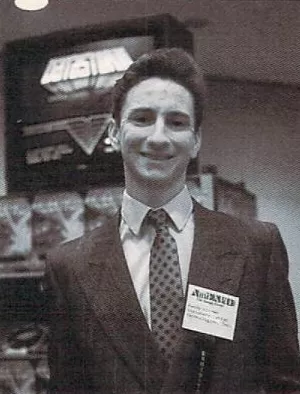
Randy Linden is a Canadian programmer whose career repeatedly crossed paths with emulation. Early in his career he created The 64 Emulator for the Amiga, allowing Commodore 64 software to run on Commodore’s newer 16-bit computer. Linden later discussed the project, its technical challenges and its custom disk-drive interface in a detailed interview about his early career. He would eventually become even more important to the history of commercial game emulation through bleem! and bleemcast!.
ReadySoft offered a way to bring that library along. Published by the company, The 64 Emulator was being advertised in Amiga World by December 1987. ReadySoft promoted access to thousands of Commodore 64 programs, with support for the older machine’s color and sound. An optional interface let owners connect their Commodore disk drives and printers directly to the Amiga.
A 1988 review in Ahoy! covered both the software-only package and versions bundled with a serial-bus adapter for connecting 1541 or 1571 disk drives. Compatibility was imperfect, and contemporary reviews made clear that users had to accept compromises. Even so, this was an emulator ordinary computer owners could buy to keep using another machine’s software, games included.
The Amiga Becomes an Emulation Playground
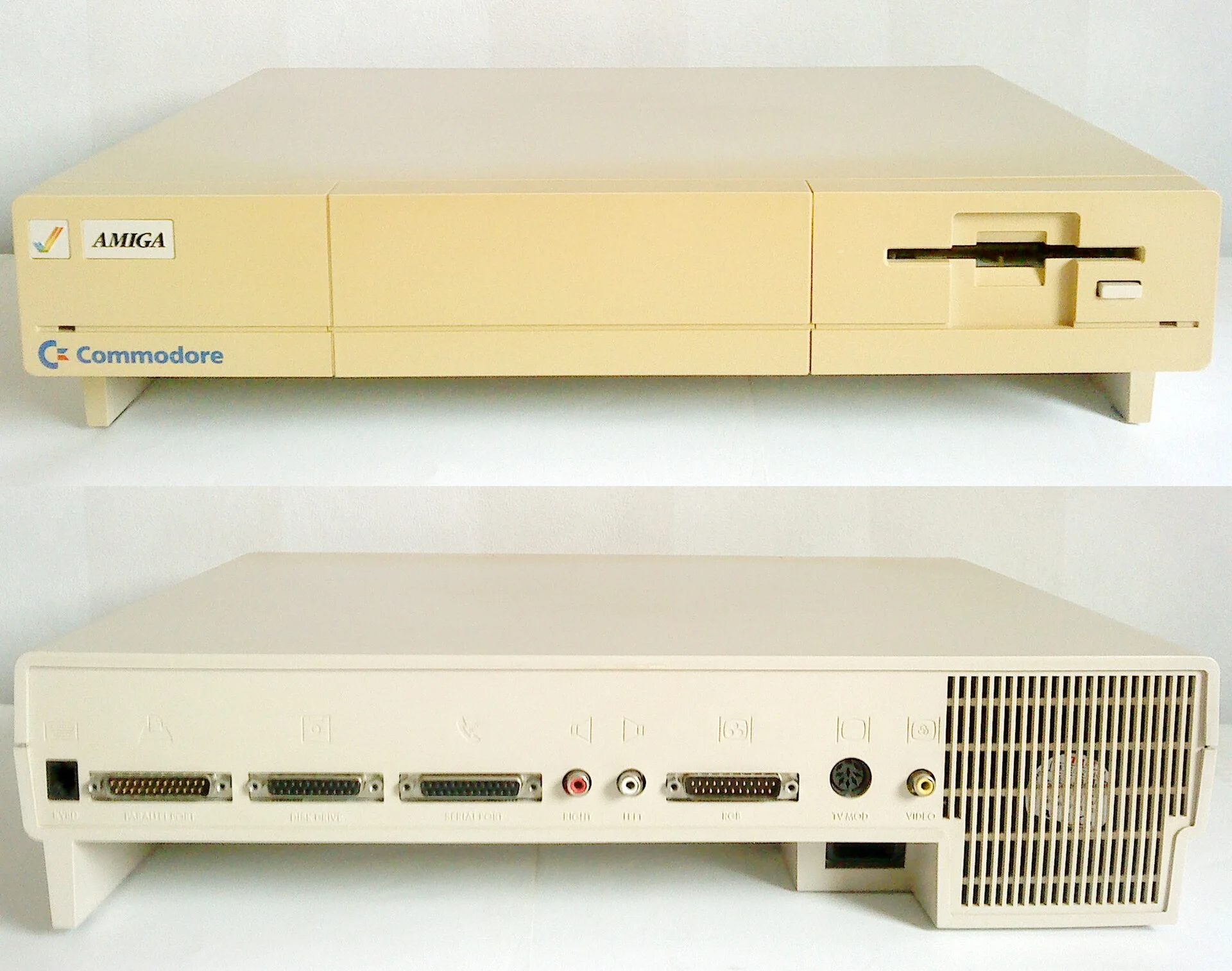
The Amiga soon hosted several such experiments. Its processing power made increasingly ambitious software emulation plausible, and it attracted technically curious owners willing to try unusual software, peripherals and hardware. Developers began looking beyond the Amiga’s own library and treating it as a place to recreate other computing environments.
Finding and building those experiments took more legwork than it would in the later emulation scene. Software travelled through magazines, commercial releases, bulletin-board systems, user groups and copied disks. There was no worldwide web of emulator downloads, no standardized ecosystem of ROM formats, and no compatibility databases maintained by thousands of users. Working together across the world was a slower business than it would become with modern public code repositories. Hardware documentation could be hard to obtain; reverse engineering demanded patience, without the decades of accumulated technical knowledge that would help later developers.
Simon Douglas and A-Max Push Across the Proprietary Line
ReadySoft’s next major step took the Amiga beyond Commodore’s own family. The company turned to Apple’s Macintosh, one of the most tightly controlled personal-computer platforms of the era.
Simon Douglas was the programmer principally responsible for the software behind ReadySoft’s A-Max, an ambitious Macintosh emulator for the Commodore Amiga. A-Max emerged at the end of the 1980s as one of the clearest demonstrations that consumer computers could reproduce a competing proprietary platform well enough to run serious commercial software.
A-Max paired software running on the Amiga with an external hardware interface. That interface accepted genuine Macintosh ROM chips and provided a connection for a Macintosh floppy drive. With the Amiga doing the processing, A-Max recreated enough of the Macintosh to run compatible Mac software. Its first commercial version is documented in 1989, and contemporary reviewers quickly recognized how unusual the arrangement was.
An extensive Amiga World review from October 1989 found performance comparable in important respects to a Macintosh Plus and described the software compatibility as impressive. ReadySoft kept expanding A-Max over the following years, eventually adding hard-drive support, compatibility with newer Macintosh system software and further hardware options.
The genuine Apple ROMs made an important distinction visible: A-Max could recreate Macintosh hardware behavior, but users still had to supply Apple’s proprietary code. Recreating how a machine worked was not the same as distributing its manufacturer’s copyrighted software. Game emulator developers would encounter that distinction again through BIOS files, firmware and game ROMs, which later became central to major legal disputes.
The Missing Piece Was the Game Console
By the end of the 1980s, commercial emulators had found customers, and hobbyists had computers powerful enough to attempt increasingly ambitious simulations of complete systems. But a dedicated game console brought its own demands.
There were also plenty of games people had reasons to keep playing. The Atari era had shown how large a home console’s software library could become. Nintendo’s Famicom and Nintendo Entertainment System had become worldwide phenomena, and Sega was building an increasingly sophisticated console business. The Commodore 64, ZX Spectrum, Apple II, Atari 8-bit family and Amiga had libraries of their own.
But reproducing a console meant getting much more than its processor right. Games leaned hard on graphics behavior, sprite systems and scrolling hardware to move things around the screen. Sound generation and controllers needed to behave correctly too, along with cartridge mapping—the way a console accessed the data in a cartridge—and precise timing. Ordinary applications did not expose these details so dramatically. A console could look simple from the outside while its games exploited all sorts of behavior underneath.
Even if the emulator worked, it still needed something to run. Business programs and home-computer software might already be on disks or other media the host computer could read. Console games mostly lived on ROM chips inside cartridges. Programmers and users needed ways to extract that data and turn it into files before playing console games on another computer could become convenient.
By 1989, the groundwork was in place, though the vocabulary of a worldwide emulation scene had yet to take hold. Terms such as ROM dump, ROM image, mapper, compatibility list, save state and frame skip would become familiar later.
Next stop: a Nintendo game
The audience for emulation was changing. IBM had wanted to spare customers the cost of rewriting commercial software. Personal-computer owners wanted applications from older or competing platforms. Game enthusiasts would soon want to preserve, study and play console and arcade games on their computers.
Games would also bring emulation into arguments that IBM’s engineers could hardly have foreseen while moving business programs between mainframe generations. Fan communities would use reverse engineering to work around obsolete hardware. Preservation and piracy would become entangled with copyright law, commercial rereleases and increasingly passionate disputes over who controlled access to old games.
In Japan, programmer Haruhisa Udagawa was about to attempt the leap to a dedicated game console: Nintendo’s Famicom. His work would take the story into 1990.
Part of: The Complete History of Video Game Emulation
People introduced in this chapter: Larry M. Moss • Stuart G. Tucker • Randy Linden • Simon Douglas
Browse biographies: People in the History of Video Game Emulation
Sources and Further Reading
- IBM — The IBM System/360
- Computer History Museum — IBM 7070 Data Processing System
- Microsoft — The History of Microsoft: 1980
- Apple II History — The Apple Story, Part 2
- Computer History Museum — 1985 and the Amiga 1000
- Vintage Is The New Old — Interview with Randy Linden
- Amiga World, December 1987 — The 64 Emulator advertisement
- Ahoy!, February 1988 — The 64 Emulator review
- Amiga Hardware Database — ReadySoft A-Max
- Amiga World, October 1989 — A-Max review