 Retro Replay Retro Gaming History, Reviews & Emulation
PLAYSTATION EMULATOR
sharpemu
SharpEmu is an open-source, experimental PlayStation 5 emulator implemented in C# that runs on Windows x64, Linux x64 and macOS x64. It can load real PS5 eboot.bin images and execute native PS5 CPU instructions, but remains an early research project with limited compatibility and performance.
WHY IT MATTERS
Why SharpEmu exists
SharpEmu is a research and education-focused project created to learn PS5 system architecture and to provide open-source infrastructure for future emulation work. The maintainers emphasize accuracy and tooling/infrastructure over immediate game compatibility.
BEST FOR
What SharpEmu does today
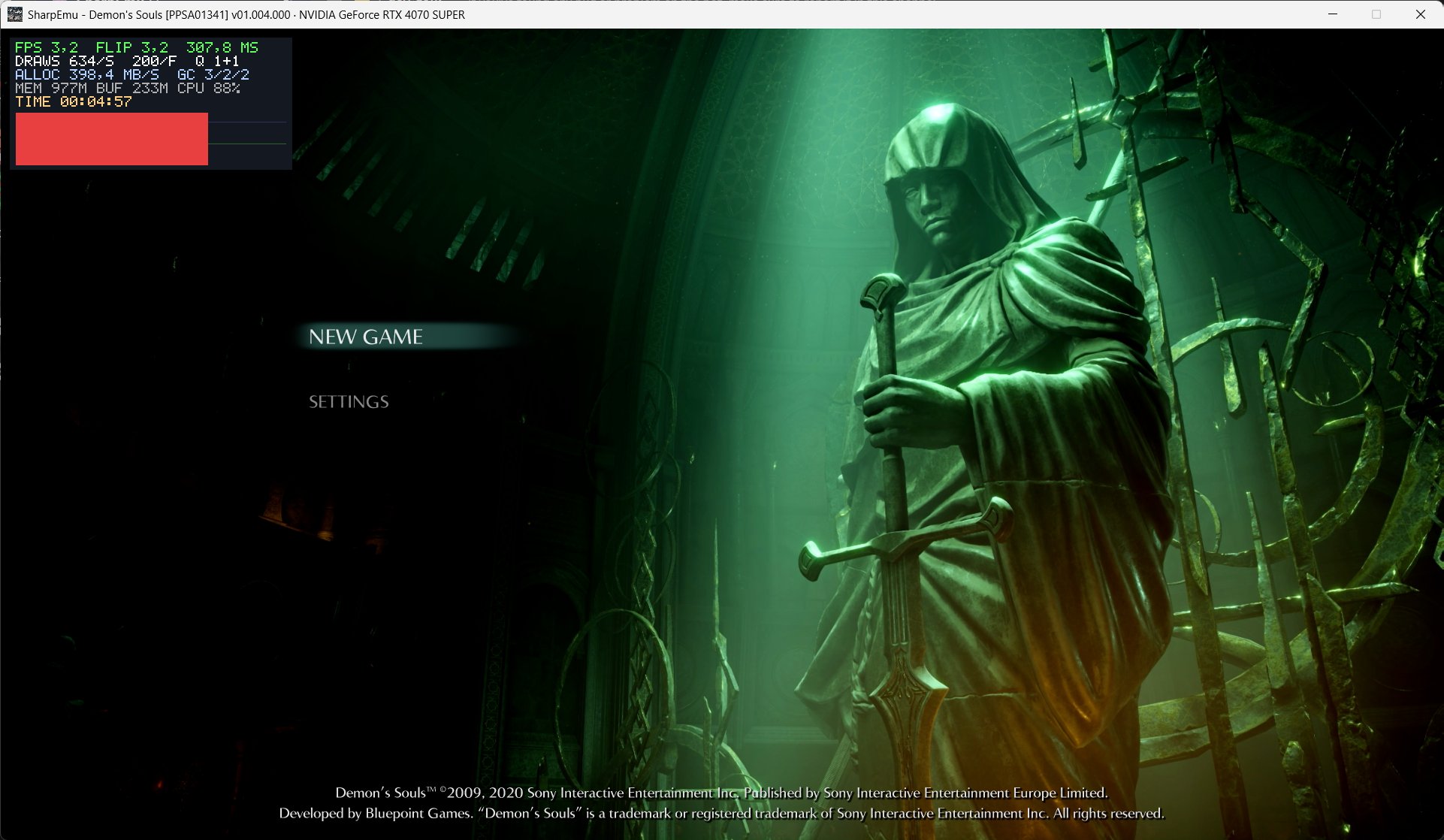
SharpEmu can load real PS5 eboot.bin files, execute native CPU instructions, and partially handle GPU and platform features using Vulkan (or MoltenVK on macOS). It is capable of booting and producing video output for some titles but is not yet generally playable for most commercial 3D games.
The people behind sharpemu
History and status
SharpEmu launched as a public, open development project with active commits, releases, and community discussion in 2026. The project is under active development on GitHub with frequent commits and rolling builds; the team publishes development releases and maintains a website with downloads, FAQ, and a compatibility tracker. The repository and site repeatedly note the project's experimental nature and policy against piracy; testing and compatibility reports are drawn from dumped game files owned by contributors. The project focuses exclusively on PlayStation 5 (it will not add PS4 support) and lists other PS5 projects as references.
What sharpemu supports
- PlayStation 5 (eboot.bin execution)
- Windows x64 (native build)
- Linux x64 (native build)
- macOS x64 (native build, Apple Silicon via Rosetta 2)
- Vulkan graphics (MoltenVK included for macOS release)
Download and availability
OFFICIAL DOWNLOADS
Get sharpemu
Official release archives and rolling development builds are published from the project's GitHub releases page and from the project's downloads page. Each release archive contains the desktop app; extract and run the included SharpEmu binary for your OS.
Get sharpemu ↗DOCUMENTATION
Official documentation
Read the official configuration, compatibility, and troubleshooting material before changing advanced options.
Read official documentation ↗sharpemu setup guide
Setup note: This is a practical setup guide for using SharpEmu from official releases or building from source. It focuses on verified requirements and steps documented by the project.
- 1) Get the official release or source: Preferred: download the prebuilt archive for your OS from the project's GitHub releases page or the project's Downloads page. If you want to build, clone https://github.com/sharpemu/sharpemu and follow the build steps in the repository README.
- 2) Confirm system requirements: SharpEmu requires a Vulkan-capable GPU and current graphics drivers. Releases support Windows x64, Linux x64 and macOS x64; macOS Apple Silicon can run the x64 build under Rosetta 2. The repository indicates the project is written in C# and uses the .NET SDK: building requires the .NET SDK version specified in global.json.
- 3) Running a release build: Extract the downloaded archive. On Windows run SharpEmu.exe; on Linux/macOS mark the binary executable (chmod +x ./SharpEmu) and run it. You can launch the GUI (desktop app) and point it at a legally obtained game's eboot.bin, or run from the command line: Windows PowerShell: .\SharpEmu.exe "C:\path\to\game\eboot.bin" –log-to-file. Linux/macOS: ./SharpEmu "/path/to/game/eboot.bin" –log-to-file.
- 4) Building from source (verified steps): Install the .NET SDK version listed in global.json in the repo. Clone the repository, open SharpEmu.slnx in VS Code or use the dotnet CLI. Build or publish with: dotnet build or dotnet publish. Build artifacts will appear in the artifacts directory as described in the repository README.
- 5) Required runtime and drivers: Make sure your system has a Vulkan runtime and up-to-date GPU drivers. The macOS release bundles MoltenVK to provide Vulkan support on macOS. The GitHub README and FAQ explicitly mention Vulkan as a requirement.
- 6) Practical tips and troubleshooting: Run with –log-to-file to collect logs for debugging and reporting. Use the GUI to configure environment variables and per-game settings; undocumented variables are listed in the project's docs repository files. If you encounter crashes or rendering problems, check the compatibility tracker and open issues on GitHub; the project is under active development and many games will not boot or may crash.
Software reminder: SharpEmu does not include any PS5 firmware, game files, or copyrighted assets. You must use legally obtained game dumps (eboot.bin) and follow the project's legal and reverse-engineering policies.
Sources and further reading
Detailed guides and tutorials
Explore step-by-step guides for sharpemu as they are published.