 Retro Replay Retro Gaming History, Reviews & Emulation

Atari emulation is one of Android’s most rewarding retro rabbit holes. The 2600 library is immediate and wonderfully strange, the 5200 and 7800 preserve a particular arcade-at-home moment, the Lynx still feels technically ambitious, and the Jaguar remains fascinating precisely because it is uneven. A phone or tablet is more than powerful enough for most of this history; the real question is choosing a setup that fits the machine and its unusual controls.
For most people in 2026, the practical answer is RetroArch. It puts strong emulation options for the 2600, 5200, 7800, Lynx, and Jaguar behind one interface, with controller mapping, save states, shaders, and per-game settings. The tradeoff is that its first-run setup takes patience. If you only want Atari 2600 games, a dedicated 2600-focused setup built around Stella is worth understanding, but RetroArch remains the simplest route to an all-Atari Android library.
The short recommendation
- Best one-app Atari collection: RetroArch, using the Stella, A5200, ProSystem, Handy, and Virtual Jaguar cores as appropriate.
- Best place to begin for Atari 2600: RetroArch with the Stella core. Stella’s long history and attention to 2600 hardware behavior make it the sensible accuracy-first choice.
- Best for Atari Lynx: RetroArch with Handy for a straightforward, lightweight setup; consider Gearlynx where it is offered in your libretro build if accuracy and advanced options matter more than simplicity.
- Best realistic Jaguar route on Android: RetroArch with Virtual Jaguar. Treat Jaguar compatibility as game-by-game, not as a promise that every cartridge or CD title will behave perfectly.
None of these older Atari systems should require a flagship phone for ordinary play. Smoothness is rarely the deciding factor. Correct controller mapping, screen treatment, and whether a particular game relies on paddles, a keypad, or Lynx face buttons matter much more.
1. RetroArch: the practical all-in-one choice
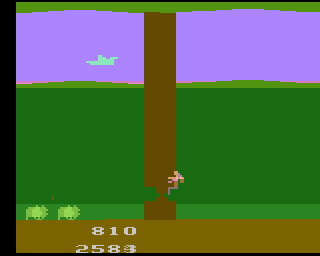
RetroArch is a frontend: it loads emulation “cores,” each of which models a particular machine. That architecture is initially more involved than an app with a single console logo, but it is ideal for Atari because the family spans several distinct systems. You can keep your legally dumped games in clearly named folders, load the appropriate core, and use one controller profile and one save-state workflow across much of the collection.
The useful Atari lineup from the supplied core options is straightforward: Stella for 2600/VCS, A5200 for 5200, ProSystem for 7800, Handy for Lynx, and Virtual Jaguar for Jaguar. The original article’s broad recommendation still holds: one configured RetroArch installation is more useful than maintaining a scattering of narrowly focused apps.
Its advantages are practical rather than glamorous. Save states let you pause an unforgiving arcade game anywhere. Remapping can make an awkward original layout sensible on a modern pad. Rewind is helpful for learning old games, while shaders and overlays can make a sharp phone display look less harsh without changing the underlying game. RetroArch also makes it easy to create system-specific settings: for example, one aspect-ratio preset for the 2600 and another for the Lynx.
The downside is menu density. A newcomer can get lost in video drivers, playlists, global overrides, core overrides, and input ports. Resist the urge to change everything at once. Get one game running, confirm that your controller works, then make only the changes you can explain. If a setting improves one game but breaks another, save it as a game-specific override rather than changing your global configuration.
A sensible first-hour setup
- Install RetroArch from a source you trust, such as its Google Play listing or official site.
- Create a simple folder structure on your device, such as
Games/Atari2600,Games/AtariLynx, andGames/AtariJaguar. Keep your own dumps separate by system. - Use the core downloader or the core-management route available in your installation to add only the cores you need.
- Start with a known-good dump from your own collection. Load it directly before worrying about library artwork or playlists.
- Connect a controller, map the essential buttons, and test both the game and RetroArch’s menu hotkey.
- Save a core override once the basic picture, input, and aspect ratio are right. Add individual-game overrides only for exceptions.
Keep save files and save states backed up if they matter to you. They are personal play records, and an Android device can be replaced, reset, or run short of storage with little warning.
2. Atari 2600/VCS: use Stella emulation and respect the controllers

The Atari 2600 is the easiest Atari system to emulate in terms of processing demands, but it is not always the easiest to configure correctly. The console’s cartridge library used several controller types: standard joysticks, paddles, keypad controllers, and later specialty hardware. A game can boot flawlessly yet feel wrong if you have selected the wrong device or mapped it poorly.
The Stella core is the default recommendation inside RetroArch. Stella is a long-running 2600 emulator project with deep support for 2600 hardware, cartridge formats, and controller behavior. Its reputation comes from treating the machine’s quirks seriously rather than merely drawing familiar pixels. Read our Stella emulator profile for a closer look at why it remains such an important 2600 reference.
For ordinary joystick games such as Adventure, Asteroids, or Pitfall!, a compact Bluetooth controller is vastly better than touch controls. The original one-button joystick layout maps naturally to almost any modern pad. For games designed around paddles, however, a touchscreen can be surprisingly usable because dragging across the screen resembles turning a dial. It may not reproduce the original feel exactly, but it is often preferable to forcing paddle movement onto an analog stick.
Do not automatically stretch 2600 games to fill a modern wide screen. The console was designed around old television displays, and many games look best at a preserved 4:3-style presentation with modest integer scaling where it fits. A CRT-style shader can soften hard edges and add scanline character, but use it lightly. Heavy curvature, blur, and mask effects can make small sprites harder to read on a phone.
Stella versus a 2600-specific Android app
You may encounter Android apps described as Stella-based or Stella forks. A focused app can be appealing if all you want is a short 2600 playlist and a minimal interface. The important distinction is that Stella itself is the established emulator project, while Android packages may be separate ports or forks with their own interfaces and maintenance decisions. For an Android library that also includes Lynx, 7800, or Jaguar, RetroArch’s Stella core avoids that fragmentation.
Choose a dedicated option only when you have verified its provenance yourself and genuinely prefer its workflow. Otherwise, using Stella through RetroArch is the cleaner recommendation.
Atari 5200 and 7800: similar era, very different input expectations
The Atari 5200 and 7800 are often grouped together because both followed the 2600, but they ask different things of an emulator setup. The 5200’s controller included a numeric keypad and an analog stick that behaved unlike a modern self-centering stick. The 7800, by contrast, is generally a more comfortable fit for a conventional digital pad.
3. Atari 5200 with A5200

RetroArch’s A5200 core is the natural starting point for the 5200. Expect the games themselves to run without the heavy performance concerns associated with later 3D hardware. The challenge is controls. Before declaring a 5200 game unplayable, inspect the core’s input options and map the keypad functions that the game actually uses. A few titles expect keypad input for starting, selecting modes, or other functions that a modern controller does not expose by default.
For analog movement, experiment conservatively with sensitivity and dead-zone settings. A large dead zone can make a game feel unresponsive; too little can introduce unwanted drift. Make changes one at a time, test for several minutes, and save a game override if a specific title needs unusual tuning.
Atari 7800 with ProSystem
The ProSystem core is the straightforward 7800 option in RetroArch. The 7800 library is a good fit for Android because its arcade-oriented games are quick to load, easy to resume from a save state, and usually comfortable with a D-pad and face buttons. Joust, Ballblazer, and the system’s version of Asteroids are the kind of pick-up-and-play sessions that work well on a phone with a clipped-on controller or a small tablet.
Use a 4:3-oriented display setting here as well. The temptation to force an edge-to-edge picture is understandable, but preserving the intended shape is more valuable than filling every pixel of an ultrawide handset.
Atari Lynx: Handy is the easy route, Gearlynx is worth knowing
The Lynx is particularly well suited to Android in one respect: it was already designed for a small color screen. Its games can look excellent on a modern OLED phone or tablet, though you may still prefer a controller for action-heavy titles such as Blue Lightning. The original hardware also allowed the screen orientation to be used in different ways, so check each game’s intended layout before deciding that its controls are awkward.
Handy is a mature libretro core for Lynx cartridge images and provides the familiar RetroArch conveniences: save states, rewind, core options, and remapping. It is the uncomplicated choice when you want to play. Our Handy profile explains its role within the libretro ecosystem.
Gearlynx is also worth noting for enthusiasts who prioritize a modern, accuracy-focused Lynx implementation and advanced features. Its standalone binaries are described for desktop platforms, while a libretro core broadens its frontend options. On Android, availability therefore depends on the libretro frontend and core selection you are using; do not assume a separate standalone Android app exists. For most players, Handy is enough. For careful testing, homebrew interest, or deeper technical exploration, Gearlynx is a meaningful alternative.
For display settings, avoid oversized overlays that cover the Lynx’s already compact game area. A slim border is fine; virtual buttons should be transparent and placed outside the active image where possible. A landscape controller grip is the best all-round arrangement, while a tablet can make touch controls more tolerable for slower games.
Atari Jaguar: Virtual Jaguar is the real option, with real caveats
The Jaguar is where an Atari guide needs restraint. It is not sensible to promise a flawless Android experience across its library. RetroArch’s Virtual Jaguar core is the practical emulation path described here, supporting Jaguar cartridges and Jaguar CD within a libretro frontend and offering options, save states, and controller configuration. See the Virtual Jaguar profile for its scope.
That does not mean every game is equally mature or equally comfortable on a phone. Jaguar software can be demanding in ways older Atari machines are not, and compatibility can vary. Begin with a title you own and test it carefully: reach actual gameplay, watch for audio or visual problems, verify that saving works, and try several controller layouts before committing time to it.
The Jaguar’s original controller had a distinctive keypad, so a modern pad cannot duplicate every game’s inputs without thought. Map frequently used functions first; use RetroArch’s overlays or secondary bindings only when the game genuinely needs them. For Jaguar CD software, use only disc images you have created from discs you own and ensure your setup has any required system data from your own hardware or media. Never rely on downloaded BIOS files or bypass copy protection.
In short: Virtual Jaguar is an interesting and useful preservation tool on Android, especially for exploring compatible games such as Tempest 2000. It is not a replacement for testing each title on original hardware or a mature desktop setup when absolute reliability is the goal.
Controllers, screens, and the small choices that improve Atari on Android
A physical controller is the single best upgrade for Atari emulation. Even a modest Bluetooth pad gives you tactile direction changes, consistent fire-button timing, and a way to keep your thumbs off the screen. Look for a controller with a reliable D-pad, at least two face buttons, and a comfortable way to reach RetroArch’s menu hotkey. A phone clip is convenient for short sessions; a tablet stand and separate controller are better for Lynx and Jaguar.
Touch controls remain useful for testing, menu navigation, and 2600 paddle games. They are less satisfying for fast joystick action. If a touch overlay blocks important information, reduce its opacity or disable it once a controller is connected.
On displays, preserve the original aspect ratio first. Then decide whether you want clean pixels or a television-inspired presentation. Clean scaling suits Lynx graphics particularly well. Mild scanlines can flatter 2600 and 7800 games, but no shader can turn a low-resolution game into high-definition artwork. The goal is readability and the right character, not artificial sharpness or excessive effects.
Dumping games legally and organizing a personal library
Emulators are software; game dumps are separate files. The responsible route is to use games you own and create personal backups with hardware and tools designed for that purpose. Cartridge dumpers can read compatible cartridges, while optical-drive dumping workflows can preserve discs you own. Keep the original media, label your files clearly, and retain any notes about special controller requirements.
Do not download copyrighted ROMs, disc images, or BIOS files from random sites. Owning a cartridge or disc does not make every download source legitimate, and those sites also create obvious security and file-integrity risks. Likewise, do not bypass copy protection. If a system requires firmware or system files, obtain them by lawful means from hardware or media you own, and follow the emulator’s documentation for placement.
For a clean library, use one folder per system, name files consistently, and avoid repeatedly moving them after you have created playlists and saves. Back up the game files you created, plus RetroArch’s saves and configuration, to storage you control.
FAQ
Which Atari emulator should a beginner use on Android?
Start with RetroArch and the Stella core if you own 2600 games. It offers a clear route into the wider Atari family without learning a different app for every console.
Will any Android phone run Atari games?
Most current Android devices should have no trouble with the 2600, 5200, 7800, and Lynx in normal use. Jaguar is the one to approach title by title, because compatibility and configuration matter more there.
Do I need a Bluetooth controller?
No, but it is strongly recommended for joystick-driven games. Touch input is workable for casual play and can suit paddles, while a controller makes most action games far more enjoyable.
Can I use save states?
Yes. RetroArch provides save states for its cores. Use them as a convenience, but keep ordinary in-game saves when a game supports them and back up important progress.
Is Atari Jaguar emulation on Android fully reliable?
No. Virtual Jaguar is the realistic Android option in this guide, but Jaguar compatibility should be tested per game, especially for CD titles and titles with unusual controller needs.
Conclusion
If you want one decisive recommendation, install RetroArch, begin with Stella for Atari 2600, and add the A5200, ProSystem, Handy, and Virtual Jaguar cores only as your own collection requires them. Configure a physical controller, keep aspect ratios honest, and use per-game overrides for Atari’s unusual inputs rather than trying to force one universal layout.
That approach delivers the best balance of convenience and respect for the hardware. The 2600, 5200, 7800, Lynx, and Jaguar were not interchangeable platforms, and the best Android setup acknowledges those differences. With carefully made personal dumps and a little input tuning, Android becomes an excellent companion for rediscovering Atari’s games rather than merely a place to make them boot.
More Android Emulator Guides
Choose the system you want to play. These guides compare Android options and link to the matching emulator profiles.



15 comments
Pingback: Best Android Emulators in 2026: The Complete System-by-System Guide - Retro Replay
Pingback: Best PSP Emulators for Android in 2025 | Retro Replay
Pingback: Best PS3 Emulators for Android in 2025 | Retro Replay
Pingback: Best Sega Genesis Emulators for Android in 2025 | Retro Replay
Pingback: Best MSX Emulators for Android in 2025 | Retro Replay
Pingback: Best GBA Emulators for Android in 2025 | Retro Replay
Pingback: Best TurboGrafx-16 Emulators for Android in 2025 | Retro Replay
Pingback: Best ZX Spectrum Emulators for Android in 2025 | Retro Replay
Pingback: Best Dreamcast Emulators for Android in 2025 | Retro Replay
Pingback: Best Neo Geo Emulators for Android in 2026 - Retro Replay
Pingback: Best PS2 Emulators for Android in 2025 | Retro Replay
Pingback: Best Wii Emulators for Android in 2025 | Retro Replay
Pingback: Best GameCube Emulators for Android in 2025 | Retro Replay
Pingback: Best NES Emulators for Android in 2025 | Retro Replay
Pingback: Best Amiga Emulators for Android in 2026 | Retro Replay