 Retro Replay Retro Gaming History, Reviews & Emulation
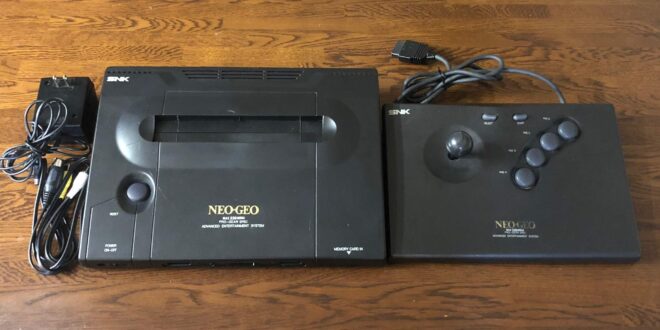
Neo Geo on Android is one of the easiest ways to carry a serious arcade library in your pocket—provided you choose the right approach. SNK’s AES home console and MVS arcade hardware shared a famously rich catalogue of fighters, run-and-guns, puzzlers, and shooters, from King of Fighters and Samurai Shodown to Metal Slug and Magical Drop. The hardware was premium in its day; emulation makes the experience far more practical, but it still rewards a little careful setup.
The good news is that Neo Geo is not a demanding platform for modern Android hardware. The important decisions are less about raw speed than emulator style, game-file format, controls, and whether you want a focused Neo Geo library or a wider arcade collection. This guide explains the sensible options, what each is best at, and how to get a responsive, authentic-feeling result without turning your phone into a weekend troubleshooting project.
Our short recommendation
Start with RetroArch and the FBNeo core if you want the strongest all-round Android setup. It combines a mature arcade-focused emulation core with excellent input, display, save-state, and configuration options. It is the best fit for players willing to spend a little time learning a frontend.
Choose Neo.emu if you prefer a dedicated Neo Geo app and a more direct, self-contained interface. Its focus makes it appealing when your goal is simply to load your own games, map a controller, and play.
Use a MAME-based route when Neo Geo is part of a broader arcade collection. MAME’s preservation-first approach and enormous hardware scope are valuable, but its ROM-set expectations can be less forgiving than a Neo Geo-focused setup.
What makes Neo Geo emulation different?
Neo Geo games exist in two closely related forms. AES refers to the home-cartridge system, while MVS is the arcade platform. Their libraries overlap extensively, but arcade-oriented emulators may present MVS-style settings such as coin inputs, arcade difficulty, and region or cabinet configuration. That is not a problem; it is simply worth knowing why a game might initially ask for credits rather than show a home-console menu.
Unlike many cartridge consoles, Neo Geo emulation commonly depends on a system BIOS alongside the game data. The BIOS governs parts of system startup and can affect whether the emulator behaves like an AES console or MVS cabinet. Some frontends and cores also expect the BIOS archive to have a precise filename and location. When a game will not boot, this is usually the first thing to check—not device performance.
There is also an arcade convention that catches newcomers out: game archives are often intended to remain compressed. Do not automatically unzip a legally created arcade dump just because other console emulators use loose files. Read the core or app documentation and keep each title in the layout it expects.
Best Android options for Neo Geo
1. RetroArch with FBNeo: best overall for most players
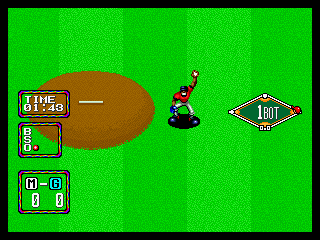
RetroArch is a frontend rather than a single emulator. You install an appropriate emulation “core” inside it, and for Neo Geo the FBNeo core is the natural first choice. FBNeo is an arcade-focused project with broad support for Neo Geo and other classic arcade hardware, a performance-oriented design, and an extensive game database. Its scope is ideal if your interests extend beyond SNK to CPS-era Capcom, Toaplan, Cave, Taito, and other arcade families.
For everyday play, the practical advantages are substantial: per-game and per-core control mappings, save states, shaders, latency-related options, and a consistent interface if you also emulate other systems. RetroArch can feel intimidating because it exposes more settings than a simple standalone app. Treat that flexibility as optional. Set up one core, one legal test game, and one controller before exploring the deeper menus.
FBNeo is usually the more convenient choice when you want the game to behave like an arcade title but still want polished frontend features. It is also worth understanding that arcade cores can be particular about dump compatibility. A game archive that worked in another emulator is not automatically the correct set for FBNeo. Re-dumping or verifying your own material against the core’s documented requirements is safer than repeatedly changing random settings.
Read more about the emulator’s arcade focus in our FB Neo profile.
Best for: players building a curated arcade library, enthusiasts who want shaders and per-game tuning, and anyone who values one interface for many older platforms.
Tradeoff: initial configuration takes longer than with a dedicated app.
2. Neo.emu: best for a focused, straightforward setup
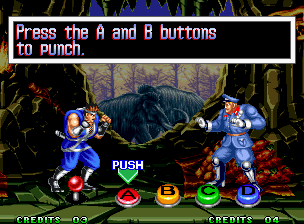
Neo.emu is a standalone Android emulator dedicated to the Neo Geo family. The original recommendation remains sound for players who do not need a universal frontend: a purpose-built app can be easier to approach because the menus and options are centered on one system rather than every console and arcade board ever made.
Its useful quality-of-life features include save states, configurable on-screen controls, cheat support, and external-controller mapping. A dedicated emulator is especially attractive on a phone where you want to open a game quickly rather than navigate a multi-system library. It also avoids the mental overhead of choosing and maintaining cores.
The limitation is equally clear. If you later decide that you want a single library for Neo Geo, CPS games, and other arcade hardware, RetroArch with FBNeo or a MAME-based setup will give you more room to grow. Neo.emu is a specialist tool, not an arcade museum.
Best for: a Neo Geo-only collection and players who value a focused interface over broad arcade support.
Tradeoff: fewer ecosystem-wide options than a frontend-and-core setup.
3. MAME and MAME4droid: best when preservation and arcade breadth matter

MAME is one of the foundational arcade emulation projects. Its purpose is documentation and accurate reproduction of arcade hardware, not merely providing a quick route to commercial games. That preservation mission is why it covers an extraordinary variety of boards, cabinets, revisions, and peripheral behavior. Neo Geo is only one part of that much larger picture.
On Android, a MAME-oriented app such as MAME4droid can make sense if you genuinely want a mixed arcade library. Expect configurable controls, gamepad support, and arcade-specific concepts such as coin and service inputs. It is a sensible choice for players who enjoy browsing many hardware families rather than concentrating on AES/MVS.
The price of this breadth is file management. MAME versions and ROM-set conventions matter. Clones, parent sets, device files, and BIOS dependencies can all be relevant. Do not treat an error screen as proof that your phone is incapable of emulating Neo Geo; it more often points to a set mismatch or missing required file. Our MAME overview provides useful context on its preservation-driven design.
Best for: a broad arcade collection and players comfortable with arcade ROM-set housekeeping.
Tradeoff: it is usually more technical than FBNeo for a Neo Geo-first library.
Geolith in a Libretro frontend: an interesting Neo Geo-specific alternative
Geolith is a Neo Geo AES/MVS-focused emulator available as a Libretro core. Its defining appeal is that it approaches Neo Geo as a dedicated console-and-cartridge experience while remaining usable through a frontend such as RetroArch. It supports cartridge images and expects users to provide their own system BIOS.
This makes Geolith worth considering for experienced users who want to experiment with a Neo Geo-centric core or work with the .neo cartridge format. It is not the default recommendation for a first setup: FBNeo has the broader arcade orientation and is the more obvious general-purpose choice. But a focused alternative can be valuable when you understand your file format and want to compare behavior.
See our Geolith profile for its intended AES/MVS workflow.
Performance expectations: good news for phones and handhelds
Neo Geo’s original hardware is far less demanding to emulate than later 3D consoles. In normal circumstances, a reasonably capable current Android phone or Android-based handheld should have no difficulty with 2D Neo Geo games. If you encounter slowdown, crackling audio, or erratic frames, start with configuration rather than assuming you need a faster device.
- Use the default renderer and resolution before enabling filters or heavy shaders.
- Confirm that the game dump and BIOS match the emulator or core’s requirements.
- Disable frame-advance, rewind, and other extras while diagnosing a problem.
- Close demanding background apps, especially on older hardware.
- Test a second known-good personal dump before changing multiple settings at once.
Most visual enhancements are optional. Pixel-art games can look excellent at their native proportions, and overly aggressive smoothing can erase the crisp edges and deliberate dithering artists used on original displays.
Controls: the biggest upgrade you can make
Neo Geo fighters and action games were designed around physical arcade controls. Touch controls are serviceable for menu navigation, turn-based games, or casual sessions, but they are a compromise for precise inputs. A Bluetooth or USB gamepad makes a bigger difference than almost any video setting, particularly in King of Fighters, Garou, Samurai Shodown, and the faster Metal Slug entries.
Map the four Neo Geo face buttons in a layout that is easy to remember, then test it in an actual match or action stage. Avoid assigning important actions to cramped shoulder buttons merely because the labels seem to line up. Comfort and consistency matter more. If you use an arcade stick, verify that its D-pad or stick is recognized as a proper directional input before blaming the emulator for missed diagonals.
For touchscreen play, enlarge and reposition the virtual buttons rather than accepting the default overlay. Keep the directional control clear of the screen edge, and leave room between the main action buttons. A small layout adjustment can prevent accidental jumps, supers, and continues.
Display, aspect ratio, and arcade presentation
Neo Geo games were made for 4:3-era displays. Start with the original aspect ratio; stretching the image to fill a modern widescreen phone makes characters noticeably wider and can undermine the artwork. Black side borders are normal and usually preferable to distortion.
Integer scaling can produce clean, stable pixels when the screen resolution permits it, though it may leave larger borders. Bilinear filtering can soften shimmering on a small display but also blurs sprites. CRT-style shaders can add scanlines, masks, and a gentler analog character, yet they are personal taste rather than authenticity by default. Use them lightly on a phone, where a strong mask can make the image dim.
For MVS-style arcade play, learn the coin and start bindings. A common beginner mistake is pressing Start and seeing nothing because the virtual cabinet has not received a credit. If your emulator offers an AES/MVS or region setting, choose the mode that suits the experience you want and keep it consistent while testing.
A clean, legal setup workflow
Emulators do not include rights to commercial games, firmware, or BIOS files. The responsible route is to use game images and system files created from media you own, where doing so is permitted in your jurisdiction. Do not download copyrighted ROMs, BIOS files, or prebuilt collections from unauthorized sites, and do not bypass copy protection.
- Pick one emulator path: RetroArch with FBNeo for flexibility, Neo.emu for a focused setup, or MAME for wider arcade coverage.
- Create a tidy folder structure on your device, separating your own game dumps from BIOS or system files where the app expects that separation.
- Follow that emulator or core’s documented naming and placement rules for the Neo Geo BIOS. A BIOS that is present but incorrectly named or placed may not be detected.
- Transfer one legally created game dump first. Test it before importing a large collection.
- Map controller inputs, set the aspect ratio, and confirm save-state behavior.
- Only then add optional shaders, cheats, artwork, or per-game settings.
Back up your save files and configurations after you have a working setup. That small precaution is especially welcome after changing phones, storage cards, or frontend settings.
Common problems and sensible fixes
“The game does not load.”
Check the required BIOS, its filename, and its folder. Then check whether the game dump format matches the chosen core. With arcade emulation, a mismatch between a ROM set and emulator database is a far more likely cause than a performance problem.
“I only see an arcade test screen or cannot start the game.”
You may be running MVS mode. Insert a virtual credit using the assigned Coin control, then press Start. If your emulator supports AES mode and you prefer a console-style experience, switch modes according to its documentation.
“My controller is connected but inputs are wrong.”
Map controls from inside the emulator, not just Android’s system menus. Test diagonals and all four face buttons. In RetroArch, save mappings at the core or game level once they feel correct so another system does not overwrite your preferred layout.
“The picture looks fuzzy or stretched.”
Return to the original 4:3 aspect ratio, disable smoothing, and try integer scaling. Add filters only after you have seen the unfiltered image; it provides a useful baseline.
FAQ
Do I need a powerful Android device for Neo Geo?
Usually no. Neo Geo is a comparatively light 2D emulation workload. Correct files, sensible settings, and a good controller are more important than chasing high-end hardware.
Is FBNeo better than MAME for Neo Geo?
Neither is universally better. FBNeo is an excellent practical choice for an arcade-focused play setup, especially through RetroArch. MAME is the stronger fit when its wider preservation scope and extensive arcade coverage are your priorities.
Do Neo Geo games need a BIOS?
Many setups do. The exact requirement, filename, and location depend on the emulator or core. Use a BIOS dumped from hardware you own and follow the documentation for your chosen setup.
Can I play with touch controls?
Yes, but a physical controller is strongly recommended for fighters and action games. It improves directional precision, reduces screen obstruction, and makes longer sessions much more comfortable.
Conclusion
For most Android players in 2026, RetroArch with the FBNeo core is the decisive recommendation: it delivers a capable Neo Geo experience, scales naturally into a wider arcade library, and gives committed players the tools to tune controls and presentation properly. Pick Neo.emu when a dedicated, simpler Neo Geo app suits your habits better. Pick a MAME-based setup when you are building an arcade archive rather than a Neo Geo shelf.
Whichever route you choose, keep the setup disciplined: use your own legally created dumps and BIOS, confirm files with one game before expanding the library, preserve the original 4:3 presentation, and use a physical controller when the game deserves it. Neo Geo’s best games still thrive on quick response, bold sprites, and satisfying arcade controls—and Android can deliver exactly that without requiring original collector-grade hardware.
If SNK’s portable side interests you as well, see our guide to the best Neo Geo Pocket emulators for Android.
More Android Emulator Guides
Choose the system you want to play. These guides compare Android options and link to the matching emulator profiles.



16 comments
Pingback: Best GBA Emulators for Android in 2025 | Retro Replay
Pingback: Best Commodore 64 Emulators for Android in 2025 | Retro Replay
Pingback: Best Atari Emulators for Android in 2025 | Retro Replay
Pingback: Best GameCube Emulators for Android in 2025 | Retro Replay
Pingback: Best NDS Emulators for Android in 2025 | Retro Replay
Pingback: Best Game Boy Emulators for Android in 2025 | Retro Replay
Pingback: Best Android Emulators in 2026: The Complete System-by-System Guide - Retro Replay
Pingback: Best Sega Genesis Emulators for Android in 2025 | Retro Replay
Pingback: Best PS2 Emulators for Android in 2025 | Retro Replay
Pingback: Best Wii Emulators for Android in 2025 | Retro Replay
Pingback: Best PS3 Emulators for Android in 2025 | Retro Replay
Pingback: Best TurboGrafx-16 Emulators for Android in 2025 | Retro Replay
Pingback: Best Dreamcast Emulators for Android in 2025 | Retro Replay
Pingback: Best Amiga Emulators for Android in 2025 | Retro Replay
Pingback: Best Neo Geo Pocket Emulators for Android in 2026 | Retro Replay
Pingback: Best SNES Emulators for Android in 2026 | Retro Replay