 Retro Replay Retro Gaming History, Reviews & Emulation
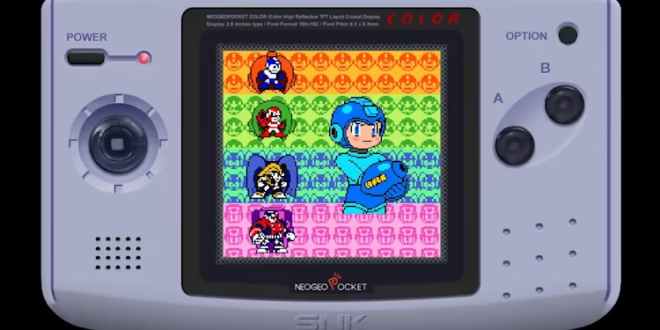
The Neo Geo Pocket and Neo Geo Pocket Color never had the reach of Nintendo’s handhelds, but SNK’s compact machines earned an unusually devoted audience. Their best games feel built for short sessions without being slight: smart fighting games, excellent arcade conversions, and action titles that make remarkable use of a small screen and a clicky directional control.
They are also among the easiest retro systems to enjoy on an Android phone or tablet. You do not need flagship hardware, elaborate system files, or a tolerance for constant setting tweaks. The real choice is whether you want a straightforward dedicated app or a flexible multi-system setup. For most people in 2026, NGP.emu is the simplest focused option, while RetroArch with the Beetle NeoPop core is the better fit for players who already use RetroArch and value its broader toolset.
Why the Neo Geo Pocket Color is still worth playing
SNK approached its handheld library differently from the Game Boy’s. Rather than trying to reproduce every arcade game unchanged, many releases were redesigned around quick matches, readable sprites, and controls that suited a portable system. The result is a catalogue with a distinctive personality, especially for fighting-game fans.
SNK vs. Capcom: Match of the Millennium remains the essential starting point. It is a crossover fighter with a surprising amount of character, team options, and mini-games, not merely a novelty version of a larger console release. King of Fighters R-2 similarly turns a large roster into a brisk, enjoyable handheld fighter. Samurai Shodown! 2 is another fine showcase for the machine’s emphasis on deliberate, readable duels.
Outside the fighting library, Metal Slug: 1st Mission proves that the platform could deliver a satisfying action game without pretending to be an arcade-perfect port. These games are excellent candidates for a phone because their stages and matches are naturally suited to a commute, a break, or an evening on the sofa. If you are exploring lesser-known handhelds in the same era, the system makes a useful companion to the WonderSwan emulation options on Android.
What Android emulation is like for this system
Neo Geo Pocket emulation has modest demands compared with later consoles. A modern Android device should have no trouble running the games at their intended speed. That leaves comfort and configuration—not raw performance—as the important considerations.
- NGP and NGPC support: A suitable emulator should cover both the original monochrome Neo Geo Pocket library and the colour model’s games.
- Save states: These let you suspend play anywhere. They are especially useful in a handheld game that was originally designed around battery-backed cartridge saves and short play sessions.
- Controller mapping: A Bluetooth or USB controller is a major upgrade for fighters and action games, although touch controls are workable for slower titles.
- Adjustable on-screen controls: Look for the ability to move, resize, or hide virtual buttons rather than accepting a fixed overlay.
- Presentation options: Scaling and filters can improve how the tiny original image sits on a large phone or television, but they should be applied with restraint.
Do not expect higher internal resolutions to transform the games in the way they can on 3D consoles. Neo Geo Pocket graphics are pixel art rendered at a fixed, low resolution. Clean integer-style scaling, sensible aspect ratio settings, and avoiding excessive smoothing are usually more valuable than visual effects.
1. Best overall for simplicity: NGP.emu

NGP.emu, by Robert Broglia, is the practical recommendation for someone who wants to play Neo Geo Pocket games rather than learn a frontend. It is a standalone emulator dedicated to the system and built on the NeoPop core. The supplied app listing describes support for Neo Geo Pocket and Neo Geo Pocket Color games, save states, cheat codes, configurable controls, and Bluetooth or USB controller input.
That narrow focus is its advantage. You choose your game folder, configure a few preferences, and spend your time playing. There is no core downloader, no multi-system menu to organize, and no need to understand RetroArch terminology before loading a game. For a player whose main goal is a few rounds of Match of the Millennium, that directness matters.
NGP.emu is a paid app, which is its obvious tradeoff. In return, it offers a purpose-built experience rather than making you assemble one. Its Google Play listing is available here.
Who should choose NGP.emu?
- Newcomers who want the shortest path from their own game files to playing.
- Players concentrating on Neo Geo Pocket rather than building a large all-in-one library.
- Anyone who values quick access to touch-layout and controller settings.
- Fighting-game players who want to map a physical controller without navigating a broad frontend.
The limitation is not emulation quality; it is scope. It does one job. If your Android device is also your Game Boy Advance, Mega Drive, arcade, and Neo Geo Pocket machine, managing individual apps can become less convenient than using a unified frontend. For another dedicated handheld-focused route, see our GBA emulator guide for Android.
Best for an all-in-one library: RetroArch and Beetle NeoPop
RetroArch is a frontend that runs emulation “cores” for many systems. For Neo Geo Pocket, the relevant choice in this guide is the Beetle NeoPop core, based on NeoPop. The original recommendation remains sound: it is a strong route for players who want Neo Geo Pocket support as part of a larger RetroArch setup rather than as a separate app.
RetroArch brings useful extras around the core: detailed controller mapping, rewind, shaders, achievements, and a consistent interface across systems. Its flexibility is valuable if you enjoy tailoring a setup. You can use one controller profile across multiple platforms, save game-specific overrides, and create a library that does not scatter your collection among separate applications.
The cost is complexity. RetroArch asks you to select and manage the appropriate core, point it at your content folder, and become familiar with menus that can initially feel dense. None of this is difficult once learned, but it is more work than a dedicated emulator. It is also easy for new users to change a setting accidentally and not know which layer—the core, the game, or the global configuration—needs to be reset.
You can find RetroArch on Google Play and its official site. Once it is installed, obtain the Beetle NeoPop core through RetroArch’s own core-management interface, then load a game file from a folder you control.
A sensible RetroArch setup for Neo Geo Pocket
- Create one clearly named folder for your personally dumped Neo Geo Pocket game files. Keeping each system separate makes scanning and troubleshooting easier.
- In RetroArch, install the Beetle NeoPop core through the application’s core downloader or management menu.
- Load one game manually before worrying about playlists or artwork. Confirm that the game starts, the buttons respond, and saving works.
- Connect and map a controller if you have one. Test the direction pad carefully in a fighting game, where a bad diagonal mapping is immediately noticeable.
- Only then adjust display settings. Start with the original aspect ratio and a clean scaling mode. Add shaders only if you prefer their look.
- Save a core or game-specific override after you are happy. This prevents experimental settings for one system from affecting the rest of RetroArch.
RetroArch’s rewind feature is enjoyable for practice and for undoing a missed jump, but it is not a substitute for normal saving. Keep regular in-game saves when a title supports them, and use save states as an additional convenience. It is wise to maintain more than one state slot for a game you care about.
NGP.emu versus RetroArch: the practical choice
| Priority | Better choice | Why |
|---|---|---|
| Get playing with minimum setup | NGP.emu | A dedicated interface and system-specific focus reduce the number of decisions. |
| One app for many retro systems | RetroArch | Its core-based design keeps several systems under one frontend. |
| Advanced presentation and frontend tools | RetroArch | Shaders, rewind, achievements, and extensive overrides suit tinkerers. |
| Simple portable fighting sessions | NGP.emu | Fast access and straightforward controller configuration are more important than a large feature menu. |
| Learning emulation settings gradually | NGP.emu first | It establishes the basics before you take on RetroArch’s layers of options. |
Neither option needs high-end phone hardware for this system. Choose based on your preferred experience, not on processor specifications. A budget or older Android device can make a fine Neo Geo Pocket machine; a comfortable screen, dependable battery, and usable controls will affect your experience far more.
Controls: touch screen, controller, and fighting games
The original hardware’s small stick-like directional control had a defined, tactile feel. A glass touchscreen cannot fully replicate it. Virtual controls remain perfectly reasonable for menu-driven games and casual play, but fighting games expose their weaknesses: your thumb can drift, diagonals can be inconsistent, and your hand covers part of the image.
A compact Bluetooth controller is the best upgrade if you plan to play King of Fighters R-2, Samurai Shodown! 2, or SNK vs. Capcom regularly. Map the main action buttons where your fingers naturally rest and test both diagonals and simultaneous inputs before starting a serious run. A controller with a directional pad you already like is usually a better choice than one chosen for extra buttons you will not use.
For touch-only play, make the directional control larger than you think you need and place it near the lower-left edge, leaving the centre of the display clear. Put the action buttons far enough apart to avoid accidental presses. Try a few matches, then adjust; a layout that looks tidy in a menu is not always comfortable during play.
Display advice for phones, tablets, and televisions
These games were made for a very small screen, so a phone’s portrait orientation can feel surprisingly natural. A landscape layout gives virtual controls more room and works well with a controller, but it may leave unused space around the image. Neither is wrong—use the orientation that lets you see the screen and reach the controls comfortably.
On a large tablet or television, resist the urge to blur the pixels into smooth shapes. Start with sharp scaling and the correct aspect ratio. If the image feels harsh, experiment with a light filter or shader one at a time. The goal is to preserve sprite detail and animation, not to make late-1990s pixel art resemble modern high-resolution artwork.
If you use a television, a wired controller connection can feel more immediate than wireless in timing-sensitive games, though controller preference and your display’s own game mode can matter just as much. The Neo Geo Pocket library is forgiving overall, but crisp input makes its fighters much more rewarding.
Use your own game files responsibly
Emulators are software; games are separate copyrighted works. The responsible approach is to use game files created from cartridges you own, using appropriate dumping hardware and software, while following the rules that apply where you live. Keep your original cartridges and your personal backups organized together.
Do not rely on copyrighted ROM download sites, shared collections, or files passed around online. They do not establish ownership, and downloading someone else’s copy is not the same thing as preserving your own cartridge. This system does not need you to hunt for a downloaded BIOS package in order to follow the basic recommendations here; avoid sites that bundle dubious “complete setups,” game files, or unrelated installers.
For collectors, dumping is also a preservation habit: label files clearly, retain an untouched original copy, and back up save data separately. A clean folder structure makes it much easier to move between NGP.emu and RetroArch later without losing track of what you own.
Quick FAQ
Do Neo Geo Pocket games run well on Android?
They should be a low-demand form of emulation on modern Android hardware. If a game feels wrong, check your controller mapping, display configuration, and the game file before assuming your phone lacks power.
Which emulator should a beginner start with?
Start with NGP.emu if Neo Geo Pocket is your only goal. Use RetroArch if you are comfortable with a more involved setup or already keep a multi-system library there.
Do I need a controller?
No. Both approaches support on-screen controls, and many games are playable that way. A physical controller is strongly preferable for fighting games and longer sessions.
Should I use save states or normal saves?
Use both. Normal in-game saves are a sensible primary record of progress when available, while save states are ideal for quick stops, testing, and practice.
Final verdict
Neo Geo Pocket emulation on Android is refreshingly uncomplicated. NGP.emu is the decisive choice for players who want a polished dedicated app with useful essentials such as save states, configurable touch controls, and controller support. RetroArch with Beetle NeoPop is the better long-term choice for enthusiasts who want Neo Geo Pocket alongside other platforms and appreciate deeper configuration.
Either route gives this overlooked handheld the screen time it deserves. Begin with a properly dumped copy of SNK vs. Capcom: Match of the Millennium, use a controller if fighters become a regular habit, and keep the display settings clean. The Neo Geo Pocket library is small enough to explore without feeling overwhelming—and rich enough that it still rewards the effort.
More Android Emulator Guides
Choose the system you want to play. These guides compare Android options and link to the matching emulator profiles.

16 comments
Pingback: Best GBA Emulators for Android in 2025 | Retro Replay
Pingback: Best Amiga Emulators for Android in 2025 | Retro Replay
Pingback: Best TurboGrafx-16 Emulators for Android in 2025 | Retro Replay
Pingback: Best Neo Geo Emulators for Android in 2026 - Retro Replay
Pingback: Best GameCube Emulators for Android in 2025 | Retro Replay
Pingback: Best NDS Emulators for Android in 2025 | Retro Replay
Pingback: Best Game Boy Emulators for Android in 2025 | Retro Replay
Pingback: Best Android Emulators in 2026: The Complete System-by-System Guide - Retro Replay
Pingback: Best SNES Emulators for Android in 2025 | Retro Replay
Pingback: Best Commodore 64 Emulators for Android in 2025 | Retro Replay
Pingback: Best Sega Genesis Emulators for Android in 2025 | Retro Replay
Pingback: Best WonderSwan Emulators for Android in 2025 | Retro Replay
Pingback: Best Dreamcast Emulators for Android in 2025 | Retro Replay
Pingback: Best Atari Emulators for Android in 2026 | Retro Replay
Pingback: Best PS2 Emulators for Android in 2026 | Retro Replay
Pingback: Best PS1 Emulators for Android in 2026 | Retro Replay