 Retro Replay Retro Gaming History, Reviews & Emulation
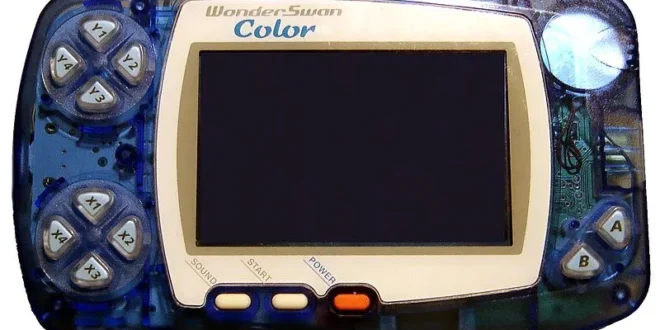
The WonderSwan is one of handheld gaming’s most interesting near-misses. Designed under Gunpei Yokoi’s influence and launched by Bandai in Japan in 1999, its compact shape, efficient battery use, and unusual rotating screen gave it an identity all its own. The later WonderSwan Color expanded its visual range, while the SwanCrystal refined the family further.
For Android players, it is also a refreshingly uncomplicated system to revisit. WonderSwan emulation is not demanding by modern mobile standards, but a good experience still depends on picking an emulator that suits how you play, setting the display up for the game’s intended orientation, and using game files created from software you legally own. This guide focuses on the two Android routes identified here: RetroArch with its Beetle Cygne core, and the dedicated WonderDroid X app.
Why the WonderSwan is worth revisiting
The WonderSwan did not receive a worldwide retail launch, so its library can feel unfamiliar even to seasoned handheld collectors. That is part of the appeal. It is home to Japanese-focused RPGs, visual novels, puzzle games, shooters, licensed releases, and distinctive versions of bigger series.
The system’s most notable quirk is its physical rotation. A WonderSwan can be held horizontally or vertically, with controls available for either position. Some games use the conventional landscape layout, while others were designed around a tall, portrait-style screen. A worthwhile Android setup respects that rather than forcing every game into one orientation.
There are famous curiosities in the catalogue, including WonderSwan versions of Final Fantasy games, several Digimon titles, Judgment Silversword, and Tetris. The important thing is not to approach the machine as a substitute for a Game Boy. It has its own design language: a monochrome original model, a color successor, and software made for a Japanese market with different priorities.
If you are comparing neighboring portable libraries, our guide to Neo Geo Pocket emulators for Android is a useful companion. SNK’s handheld competed in much the same late-1990s space, but its software and control philosophy are very different.
What Android performance should be like
This is one of the least stressful systems to emulate. WonderSwan and WonderSwan Color games are modest technically compared with later handhelds, so the priority is usability, not buying the fastest phone possible. A reasonably current Android device should have no trouble with ordinary play in either RetroArch or a dedicated emulator.
That does not mean every issue is automatically an emulation-performance issue. Audio crackling, input delay, odd scaling, or a game opening in the wrong orientation are usually settings problems. Start with default video and audio options, make sure your controller is mapped properly, and only then experiment with filters, shader effects, rewind, or other extras.
Do not judge the system solely by screenshots blown up to a large tablet or television. These games were built around a small, low-resolution display. Integer scaling or a simple sharp filter generally looks cleaner than aggressive smoothing. On an OLED phone, restrained settings also preserve the deliberate pixel contrast of the original monochrome games.
The two practical choices
RetroArch with the Beetle Cygne core: best for a flexible long-term setup
RetroArch is a multi-system frontend rather than a single-purpose WonderSwan app. Its WonderSwan option in this guide is the Beetle Cygne core, based on the Cygne emulator. It supports both WonderSwan and WonderSwan Color software, making it the stronger choice for someone who wants one library and one controller configuration across several classic systems.
The advantage is depth. RetroArch can provide save states, control remapping, display scaling, shaders, rewind, and achievement features. It also lets a player keep a consistent workflow for multiple consoles. If your Android device already handles Game Boy, GBA, or other retro platforms through RetroArch, adding WonderSwan is straightforward once the core and content folders are organized.
The tradeoff is that RetroArch asks more of a first-time user. Its menus are powerful but initially dense, and its terminology—cores, playlists, overrides, shaders, and so on—can feel like a lot for a system with a small control set. It is best for players willing to spend a few minutes learning the interface, or for established RetroArch users who value a unified setup.
The original recommendation points Android users to RetroArch on Google Play. After installing it, use RetroArch’s own interface to locate and install the Beetle Cygne core if it is offered by the app’s core downloader. Keep your personally dumped games in a folder you can identify easily, then load a game through the core or scan the folder to build a playlist.
1. WonderDroid X: best when you want a dedicated, simpler app
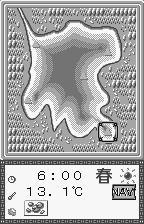
WonderDroid X is the dedicated alternative named in the original guide. A focused emulator has an obvious appeal: you launch one app for one family of hardware, choose a game, and get to the useful settings without navigating a multi-system frontend.
The supplied recommendation describes WonderDroid X as lightweight and easy to use, with save states, configurable touch controls, external gamepad support, and portrait or landscape play. Those last two features matter more here than they might on another handheld. Being able to match the game’s intended orientation, then save that arrangement, makes a major difference to comfort.
Choose WonderDroid X if WonderSwan is a specific interest and you do not need RetroArch’s broad toolkit. It is also the more approachable starting point for someone who wants to test a few games without learning a frontend. The original guide links to its Google Play listing; review the app’s current listing and permissions before installing any Android app.
For a closer look at the dedicated option, see this WonderDroid X emulator overview.
RetroArch or WonderDroid X?
| Priority | Better fit | Why |
|---|---|---|
| One app for many classic systems | RetroArch | Its core-based design can bring several systems into one interface. |
| Fastest route to playing WonderSwan | WonderDroid X | A dedicated app is generally easier to understand at first. |
| Display experimentation and advanced features | RetroArch | It offers broader options for shaders, overrides, rewind, and controls. |
| Simple orientation and touch-control setup | WonderDroid X | Its single-system focus is a practical advantage. |
| Using a Bluetooth controller | Either | Both are described as supporting external gamepads; the quality of setup depends on your mapping. |
There is no need to treat this as a permanent choice. Many experienced players keep RetroArch as their multi-platform home but use a standalone app for a system they play only occasionally. What matters is whether the emulator makes you want to return to the library.
Setup advice that makes a real difference
Organize your own game dumps
Create a clear folder such as Games/WonderSwan and keep your legally created WonderSwan and WonderSwan Color dumps there. Use sensible file names that identify the game and, where useful, the region or revision. Do not scatter files across Downloads, messaging attachments, and temporary folders; it makes library scanning and troubleshooting needlessly difficult.
Emulators themselves are not a license to obtain games you do not own. The responsible route is to dump cartridges from your own collection using appropriate hardware and retain those files for personal use in accordance with the law where you live. Do not use copyrighted ROM sites, and do not seek or share files that bypass copy protection. This guide does not require BIOS downloads: follow the emulator’s documentation if it requests any system file, and source only files you are entitled to use.
Set rotation per game, not once for everything
Before adjusting video filters, find out whether the game was made for landscape or portrait play. In a vertical title, rotating the display can make the image more natural and can create space for touch buttons. In a conventional horizontal title, forcing portrait mode wastes screen area and usually makes controls cramped.
RetroArch users should take advantage of per-game or per-core overrides once they have found a comfortable rotation, aspect ratio, and button layout. That prevents one game’s settings from making the next game awkward. In a dedicated emulator, look for a comparable saved setting or profile if one is provided.
Touch controls versus a physical controller
For deliberate RPGs, card games, and slower puzzle titles, touch controls can be perfectly adequate. Make the virtual buttons slightly larger than you think you need, reduce their opacity enough to see the action behind them, and move them away from frequently used screen areas.
A Bluetooth or USB controller is the better answer for action games, shooters, and long sessions. Map the directional controls first, then the primary face buttons, then any emulator shortcuts you genuinely use. Avoid assigning save-state or fast-forward functions to buttons you might hit during normal play. A misplaced shortcut can turn an exciting run into an accidental reload.
WonderSwan’s physical control layout was unusual, so give yourself time to adapt rather than immediately assuming a game controls badly. If a title feels wrong, check whether its intended orientation changes the role or location of the directional inputs.
Display settings: keep the image honest
Start with the correct aspect ratio and a sharp scaling mode. From there, a subtle LCD-style shader or light grid effect can be enjoyable, particularly on a large tablet, but it is optional. Heavy blur often makes text and small sprites harder to read, while over-sharpening can add distracting halos.
For original monochrome WonderSwan games, experiment with a restrained color palette only after trying a neutral grayscale presentation. The original machine had a distinctive reflective LCD look, but extreme “green screen” presets can become tiring. WonderSwan Color games benefit more from clean scaling than from artificial enhancement.
Useful expectations and limitations
Save states are convenient, especially for portable play, but they should complement normal in-game saves rather than replace them whenever a game supports saving. Make a conventional save before changing emulators, moving files, or updating an app. Keep a backup of your save files separately from your game collection.
Rewind is similarly helpful, but it changes the character of games designed around limited retries. Use it if it helps you learn a difficult shooter or preserve time on a commute; simply recognize that it is a modern convenience, not original hardware behavior.
Language can be the larger barrier than performance. The WonderSwan library was primarily made for Japan, and many games contain substantial Japanese text. Do not assume a game has an official English release or that an emulator can translate it. Community translation patches may exist for some games, but use them only with a legally dumped copy you own and follow the patch’s instructions carefully.
For another view of compact Japanese handheld design, the best GBA emulators for Android guide is worth reading. Game Boy Advance emulation has a far larger international library, but WonderSwan’s rotating format and Japanese-exclusive catalogue give it a distinct reason to coexist on the same device.
Quick FAQ
Do I need a powerful Android phone for WonderSwan games?
No. This is a lightweight system to emulate. Comfort, storage organization, screen setup, and controller mapping are more significant than raw performance.
Which emulator should a beginner choose?
Start with WonderDroid X if you want a dedicated, less complicated WonderSwan experience. Start with RetroArch and Beetle Cygne if you already use RetroArch or want its wider feature set and multi-system library tools.
Can I play both monochrome and color WonderSwan games?
The Beetle Cygne core is described here as supporting WonderSwan and WonderSwan Color titles. WonderDroid X is presented as a WonderSwan-focused Android emulator; check its current documentation or listing for the specific formats you intend to use.
Why is my game sideways?
It may be correct. Some WonderSwan games were designed to be played with the handheld rotated vertically. Check the game’s intended layout, then set the emulator’s orientation and controls to match.
Final verdict
WonderSwan emulation on Android is best approached as an invitation to explore a library that never had a broad international retail life. For most players, the decision is simple: use RetroArch with Beetle Cygne if you want a configurable all-in-one retro setup, or choose WonderDroid X if you prefer a focused app with less menu diving.
Either way, keep your own dumps organized, use the proper screen orientation, and take a few minutes to tailor the controls. With those basics in place, Bandai’s peculiar, inventive handheld feels remarkably at home on an Android phone or tablet in 2026.
More Android Emulator Guides
Choose the system you want to play. These guides compare Android options and link to the matching emulator profiles.



11 comments
Pingback: Best Neo Geo Pocket Emulators for Android in 2025 | Retro Replay
Pingback: Best ZX Spectrum Emulators for Android in 2025 | Retro Replay
Pingback: Best MSX Emulators for Android in 2025 | Retro Replay
Pingback: Best PSP Emulators for Android in 2025 | Retro Replay
Pingback: Best Sega Saturn Emulators for Android in 2026 - Retro Replay
Pingback: Best GameCube Emulators for Android in 2025 | Retro Replay
Pingback: Best Amiga Emulators for Android in 2025 | Retro Replay
Pingback: Best Atari Emulators for Android in 2025 | Retro Replay
Pingback: Best SNES Emulators for Android in 2025 | Retro Replay
Pingback: Best GBA Emulators for Android in 2026 | Retro Replay
Pingback: Best Commodore 64 Emulators for Android in 2026 | Retro Replay